Fold Craft Launcher
by FCL-Team · GPL-3.0 · open source
A Minecraft Java Edition launcher for Android that combines HMCL’s version and mod management with the Amethyst engine.
Needs:Android 8.0+ · Minecraft: Java Edition, sold by Mojang
2113 Apps is independent, not affiliated with or endorsed by FCL-Team. Official sources: source code on GitHub.
- Version
- 1.3.4.6
- Size
- 322.1 MB
- Requires
- Android 8.0+
- Updated
- 2026-11-12
Screenshots
Introduction
Fold Craft Launcher (FCL) runs Minecraft: Java Edition on Android. It pairs two existing projects:
- the core of HMCL, a popular PC launcher, for installing versions, mod loaders and modpacks;
- the Amethyst backend, a fork of PojavLauncher, for actually starting Java and drawing the game on a phone. FCL also borrows code from Boat, another Android launcher.
It is updated about once a week, so the details of its interface change often.
What it supports
According to the README and recent release notes:
- All Minecraft versions, including the latest snapshots.
- Mod loaders: Forge, NeoForge, LiteLoader, OptiFine, Fabric, Quilt and Cleanroom, plus Legacy Fabric since version 1.3.3.5.
- Built-in Java 8, 17, 21 and 25, and you can import another Java runtime.
- Resource management for mods, modpacks, resource packs, shaders and saves. The download page searches CurseForge and Modrinth together, and modpacks can be imported from MultiMC and exported in Modrinth (.mrpack) and CurseForge formats.
- Shaders, with Zink or the built-in MobileGlues renderer; VirGL now needs a renderer plugin.
- A virtual mouse and custom key mapping. Control layouts from Zalith Launcher 2 can be imported and are converted automatically.
- Turnip is the built-in default GPU driver. Plugins can add other renderer or driver versions, including VirGL and, since 1.3.4.1, Mali options such as panvk.
- Multiplayer on a shared world through Terracotta, off by default (see the questions below).
- New in 1.3.3.8 and 1.3.3.9, both released on 10 October 2026, and still in this version: while a game is running, FCL now keeps a foreground service with a notification that takes you back to it, which, in the release notes’ words, makes Minecraft “less likely to be killed in the background for memory pressure”. The release also adds support for Android 12’s game mode settings, file management in the built-in file browser (new folders, renaming, copying, moving and deleting), separate horizontal and vertical gyroscope sensitivity, and moves the forced-resolution setting into the in-game menu. 1.3.3.9 adds a Simultaneous View Control switch to the in-game menu’s gesture settings, off by default: with it off, whichever of the touchpad or a key-based pointer starts moving the camera first keeps control until it is released, instead of both moving the view at once. It also fixes opening folders and links from Minecraft 26.3, and mod screens that are used by holding a mouse button down, such as the value settings of the Create mod named in the release notes, releasing that button the moment they opened.
- New in 1.3.4.0, from 15 October 2026: a star button pins favourite versions to the top of the version list, control layouts can be copied, and the mod list refreshes by itself after a download or update. It also fixes the game freezing when a modded instance starts on Minecraft 26.3 and later, external keyboards being unable to type text in-game in SDL mode, and old 64×32 skins showing wrongly after switching pages.
- New in 1.3.4.1, from 20 October 2026: a Fullscreen display switch in the in-game menu, and the built-in file manager now always shows hidden folders such as
.minecraft. It also brings back Forge’s early loading screen on Minecraft versions before 26.3, which 1.3.4.0 had turned off for every version. - New in 1.3.4.2, from 25 October 2026: fixes for a crash when entering the game on Android 13 and a Cleanroom start-up crash, and the agreement screen described under “What goes online”.
- New in 1.3.4.3, from 30 October 2026: built-in MobileGlues and SimpleFPEWrapper support, cross-group copying, moving and editing for control layouts, and a restored voxel-style second layer in the 3D skin preview. Its fixes include a JNA crash in the latest Minecraft 26.4 snapshot, repeated failures after BMCLAPI downloads without an explicit checksum, missing Cleanroom sounds and a jumping version list. OSMesa, Freedreno and VirGL are no longer bundled as built-in renderers; FCL now expects them from a renderer plugin.
- New in 1.3.4.4, from 2 November 2026: SimpleFPEWrapper is no longer presented as a standalone renderer; it is a compatibility layer placed over a real renderer, skipped for renderers and mods that already provide fixed-function support. MobileGlues moves to 2.0.1, and a game-screen magnifier can show the area hidden by the keyboard. Fixes cover MultiMC modpacks with duplicated launch arguments, per-modpack settings that could not be turned off, a keyboard toggle getting out of sync, and one control dialog that did not fit on a small screen.
- New in 1.3.4.5, from 7 November 2026: a slow single-stream download can resume the remaining range over up to eight parallel connections when the server supports byte ranges; FCL still verifies the completed file. Before restoring files that are missing from an imported modpack, it now lists them and lets you continue, skip once or stop automatic completion for that instance. The skin model’s settings move from a double-click to a two-finger tap. Fixes cover double screen movement or a black screen when the keyboard opens, backgrounds stretching after a screen-size change, the keyboard toggle needing two taps and version-list animations replaying after a selection.
What you need
- Android 8.0 or later.
- Minecraft: Java Edition. The game isn’t bundled: the launcher downloads it the first time you install a version. See the questions below for accounts and download sources.
- Storage. This is the universal build, with native code for four CPU types in one file, so it is large. The project also publishes smaller builds for each CPU type on its GitHub. We host the universal one because it installs on any supported phone.
What goes online
- Game, mod and loader downloads, from the servers listed in the questions below, and Microsoft’s servers if you sign in with Microsoft.
- A JNA Android library fallback for a Minecraft version whose native library is not already bundled: the current release tries Maven Central through Aliyun, Huawei Cloud and then Maven Central itself, in that fixed order regardless of your game-download source setting. For 5.19.1, used by the latest 26.4 snapshot at this release, the native files are already in the APK, so the fallback is for a future or otherwise missing version.
- An update check at start-up, which reads a version file from FCL’s GitHub repository (from Gitee when the interface is in Chinese). We found no setting to turn it off.
- An announcement on the home screen, loaded from the project’s repository each time.
- With an offline account and a custom skin, FCL downloads authlib-injector and runs a small login server on the phone itself so the game can show the skin.
- DNS for the game: FCL’s privacy policy says it sets public DNS servers for the game, “AliDNS and DNSPod when the system language is Simplified Chinese (China), and Cloudflare otherwise”, so the names the game looks up go to those services.
- Log upload, only when you choose it: the log goes to mclo.gs (logshare.cn with a Chinese interface), and anyone with the link can read it.
Since 1.3.4.2, the first screen asks you to accept a user agreement and a privacy policy, which says “FCL does not request any permission or connect to the internet until you agree”; people updating from an older version are asked once too. You can withdraw consent under Settings › About › Privacy Policy, and the app then closes. The agreement states that it doesn’t limit your rights under the GPL-3.0.
We found no analytics or crash-reporting library; crash reports are shown on the phone. For users with a Chinese interface in a mainland China time zone, the launcher sometimes shows a promotion for a cloud storage service before a game starts; the code skips it for everyone else.
Where it comes from
FCL is developed by FCL-Team and licensed under GPL-3.0. Its README is written first in Chinese, with English and Russian translations, and the app itself is translated on Weblate, Brazilian Portuguese included, though not completely. The file here is the official universal GitHub release of version 1.3.4.5, from 7 November 2026, signed by FCL-Team. It is 322.1 MB and includes ARM and x86 libraries in 32- and 64-bit forms. FCL isn’t on Google Play. The APK contains LWJGLX, a layer that lets older Minecraft versions written for LWJGL 2 run on LWJGL 3, but we found no licence identified for it. FCL’s 1.3.4.4 README called its licence “unknown”; the 1.3.4.5 README removed that component list without adding licence terms. We host the app knowing this.
One thing to know about the signing: the project keeps an encrypted keystore, which its build script uses for release builds, in its public GitHub repository, protected by a password that the build reads from a private setting. Its security depends entirely on that password staying secret. Our check confirms that a file was signed with the key we first recorded for FCL; it can’t tell who held that key.
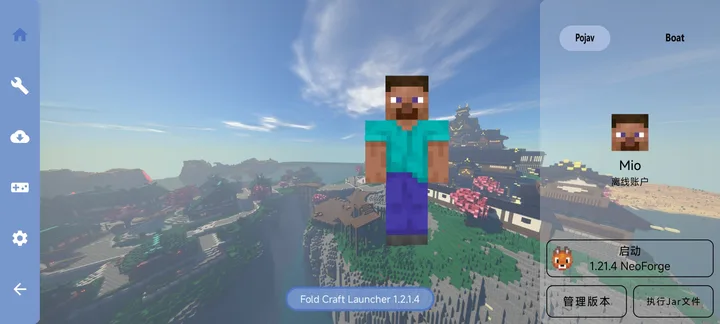
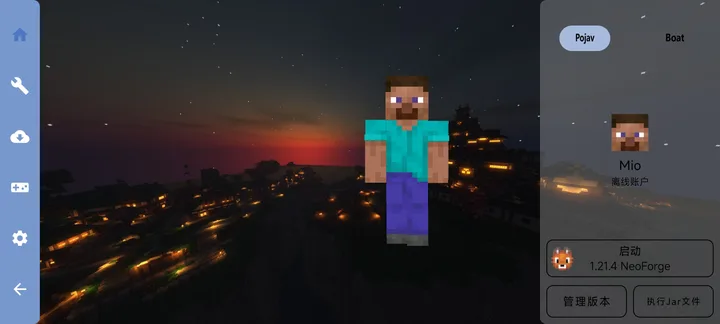
The screenshots are the only pictures of the launcher’s interface we found from the project. They show version 1.2.1.4, in Chinese, with a Minecraft world as the background, so today’s interface looks different.
What’s inside the APK
Trackers
No code matching the tracker signatures we check, including Exodus Privacy’s list and our published supplements.ByteHook (bhook) matches the Pangle signature but is not a tracker; see why.
Native code
Runs on 64-bit and older 32-bit ARM phones.
Android versions
Built for Android 14 (target API 34).
Permissions
4 of them need your approval first.
CPU types in this build: arm64-v8a (64-bit ARM, almost every phone since 2017); armeabi-v7a (32-bit ARM, older and budget phones); x86 (32-bit Intel, emulators); x86_64 (64-bit Intel, emulators and Chromebooks).
Asks you first (4)
Android shows a prompt before the app can use these.
- Show notifications (Android 13+) · POST_NOTIFICATIONS
- Read shared storage (Android 12 and older) · READ_EXTERNAL_STORAGE
- Record audio with the microphone · RECORD_AUDIO
- Write shared storage (Android 10 and older) · WRITE_EXTERNAL_STORAGE
You switch these on in Settings (2)
Special app access. Nothing is granted until you turn it on yourself.
- All files access · MANAGE_EXTERNAL_STORAGE
- Install unknown apps · REQUEST_INSTALL_PACKAGES
Granted at install (15)
Low-risk permissions Android grants automatically, plus any we have not classified.
- ACCESS_NETWORK_STATE
- ACCESS_WIFI_STATE
- CHANGE_NETWORK_STATE
- CHANGE_WIFI_MULTICAST_STATE
- CHANGE_WIFI_STATE
- FOREGROUND_SERVICE
- FOREGROUND_SERVICE_CONNECTED_DEVICE
- FOREGROUND_SERVICE_DATA_SYNC
- FOREGROUND_SERVICE_SPECIAL_USE
- HIGH_SAMPLING_RATE_SENSORS
- INTERNET
- REQUEST_DELETE_PACKAGES
- REQUEST_IGNORE_BATTERY_OPTIMIZATIONS
- VIBRATE
- WAKE_LOCK
Defined by other apps (1)
Permissions that belong to another app or to this app itself.
- com.tungsten.fcl.DYNAMIC_RECEIVER_NOT_EXPORTED_PERMISSION
More Information
- Package name
- com.tungsten.fcl
- Version
- 1.3.4.6 (build 1346)
- File size
- 322.1 MB (322,110,322 bytes)
- Requires
- Android 8.0 or later
- Category
- Minecraft Launchers
- License
- GPL-3.0
- Developer
- FCL-Team
- Source code
- github.com/FCL-Team/FoldCraftLauncher
- Released
- Nov 12, 2026
- Signer SHA-256
- be114d96613f7375a510d836680b456c9d528d15b24c382b1137480f15894e5e
- File SHA-256
- 55b50a44925566d315bfa268745a363058b0a26fbf60ebc83e40ff0dd8e84ea5
- Checked
- , against the 1.3.4.6 release on GitHub · how we check · verify it yourself
Common questions
Is this APK the official Fold Craft Launcher release?
Yes. It is the file from the project’s 1.3.4.6 release on GitHub, byte for byte, and it matches the SHA-256 checksum GitHub publishes for it. It is signed with the certificate we recorded when we first checked Fold Craft Launcher (SHA-256 be114d96613f7375a510d836680b456c9d528d15b24c382b1137480f15894e5e); a release signed with a different key would not be published here.
What Android version does Fold Craft Launcher need?
Android 8.0 or later (API level 26). Version 1.3.4.6 is built for Android 14 (target API 34). Runs on 64-bit and older 32-bit ARM phones.
Can Fold Craft Launcher access the internet?
Yes. The APK requests Android’s internet permission. In total it declares 22 permissions, and 4 of them need your approval first.
Does Fold Craft Launcher contain trackers?
No known trackers: our scan of version 1.3.4.6 found no code matching the tracker signatures it checks. Those include Exodus Privacy’s list and the published local supplements described on How We Check; the scan doesn’t show what data the app itself sends.
Is Fold Craft Launcher open source?
Its code is. The source code of Fold Craft Launcher is released under the GPL-3.0 licence and published at https://github.com/FCL-Team/FoldCraftLauncher. One bundled component, the LWJGLX compatibility layer, has no licence identified; the current README no longer lists the component or supplies licence terms for it.
Do I need a Microsoft account?
The launcher doesn’t require one. Its account screen offers three kinds of account: a Microsoft account, an offline account with just a player name, and an account on a third-party login server (authlib-injector). As far as accounts go, it only checks before starting the game that one is selected. Minecraft: Java Edition is Mojang’s paid game, and signing in with Microsoft is how you play the copy you bought; FCL doesn’t check that you own it.
Where does it download Minecraft from?
Outside mainland China, by default from Mojang’s servers first, with the BMCLAPI mirror as a fallback; for users it detects as being in mainland China the order is reversed. The download settings can also be set to Mojang only or to the mirror first. A few lists come from elsewhere whatever you choose: OptiFine versions from BMCLAPI and Forge versions from an HMCL metadata server. Mods come from Modrinth and CurseForge.
Is multiplayer built in?
Yes, for playing on a shared local world over the internet, and it is off until you switch it on. It uses Terracotta, built on EasyTier, which asks for Android’s VPN permission. Its notice says that “after a successful connection, users in the room will connect directly to each other, and no third-party server will relay your traffic”; public EasyTier nodes and STUN servers are used to find each other.
Recent releases
| Version | Released | Size |
|---|---|---|
| v1.3.4.6 · this download | Nov 12, 2026 | 322.1 MB |
| v1.3.4.5 | Nov 7, 2026 | 322.1 MB |
| v1.3.4.4 | Nov 2, 2026 | 322.1 MB |
| v1.3.4.3 | Oct 30, 2026 | 321.9 MB |
| v1.3.4.2 | Oct 25, 2026 | 330.4 MB |
Recent releases on the project’s GitHub. We host and check only the newest one. Full changelog.
Alternatives and related apps
-
 Amethyst Launcher The engine FCL is built on, in a simpler launcher that also supports Android 5.0 and up.Download
-
 Zalith Launcher 2 A Material Design 3 launcher whose control layouts FCL can import.Download