

Nekogram
by Nekogram · GPL-2.0 · open source
Telegram with a few more switches: hide parts of the interface you don’t use, translate messages and whole chats with the engine you choose, and see details such as chat IDs. Uses your account.
Needs:No root · Android 6.0+ · a Telegram account
2113 Apps is independent, not affiliated with or endorsed by Nekogram. Official sources: nekogram.app · source code on GitHub.
- Version
- 13.1.1
- Size
- 73.9 MB
- Requires
- Android 6.0+
- Updated
- 2026-10-30
Screenshots
Introduction
Nekogram describes itself in one line: “Nekogram is a third-party Telegram client with not many but useful modifications.” It is built from the source code of Telegram for Android, version 13.1.1 for this release, with its own settings added, and it logs in to your normal Telegram account. As Telegram’s rules for other apps require, it uses its own API ID and its own name and cat logo, without the word “Telegram”. Nekogram isn’t made by Telegram.
What it adds
From its website and the settings in this version:
- Interface: hide the bottom navigation bar, the All Chats tab or stories, use the system’s emoji, set folder icons, change sticker size, and a tablet layout.
- Translation of single messages, whole chats and articles, with a choice of engines: Google, the default, Yandex, Microsoft, DeepL, Telegram’s own and several Chinese services. Its Auto translate option, on by default, offers Telegram’s chat translation without Telegram Premium.
- Voice message transcription through Cloudflare’s Workers AI, if you enter your own Cloudflare account details.
- Details: chat and user IDs in profiles, a user’s approximate registration date, data-centre status, and a message’s raw data as JSON.
- Exporting your login session as a file or QR code, which lets you sign in elsewhere with it; keep such an export private.
What goes online
Besides Telegram’s own servers, from the code of this version:
- Firebase Analytics and Sentry, on by default. Nekogram creates a random ID and records the screens you open and the Nekogram settings you change; Sentry collects crash reports and sends them to a server under Nekogram’s domain. The note in the settings names only Sentry. Version 13.1.1 removes the extra non-crash Sentry report that 13.0.3 made when the database was used from the wrong thread. The Send bug report switch there doesn’t stop Sentry in this version’s code; Delete data stops both, from the next start, for good.
- Nekogram’s Telegram bot, about once a day while you are logged in, for updates, the list of verified chats and notices. The request includes the app version, your system language, your SIM’s mobile country code and your push-notification token.
- Third-party lookup bots. When you open a user or chat by its numeric ID and the phone doesn’t already know it, Nekogram asks two inline bots run by others, @usinfobot and @tgdb_search_bot, sending them that ID.
- Registration dates of other users. When you open a chat with someone who isn’t in your contacts and Telegram shows when they registered, Nekogram sends that user’s ID, registration month and phone country to its bot. There is no setting for this.
- The translation engine you choose, with the text you translate.
About this file
- This is Nekogram 13.1.1, from 30 October 2026, built on Telegram 13.1.1. Its release notes promise faster downloads, bug fixes and other improvements; the fixed-tag source also includes fixes for sharing multiple files and handling protected content, plus updated QR scanning and login code. It is the universal APK from Nekogram’s GitHub releases, built by Nekogram’s GitHub Actions workflow from the public source at that release, according to GitHub’s build record for this exact file. That record marks the machine as self-hosted: the workflow asks for a “blacksmith” runner, presumably from the third-party CI service Blacksmith, rather than GitHub’s own servers; the build adds private values such as the API key, so others can’t rebuild it byte for byte.
- It is signed by Riko Sakurauchi (certificate 5C:E9:32:B9…33:13); we found no fingerprint published by Nekogram to compare it with. Nekogram is also on Google Play and its own Telegram channel, but not on F-Droid: a request to add it was closed as not planned.
- The 73.9 MB file runs on ARM and x86, 32- and 64-bit, and needs Android 6.0 or later. It declares 71 permissions, as Telegram does, among them contacts, location, camera and microphone, your phone number, and installing the updates it downloads.
- Our tracker scan matches Google Firebase Analytics and Sentry, both described above.
- Nekogram is licensed under the GPL-2.0, like Telegram for Android.
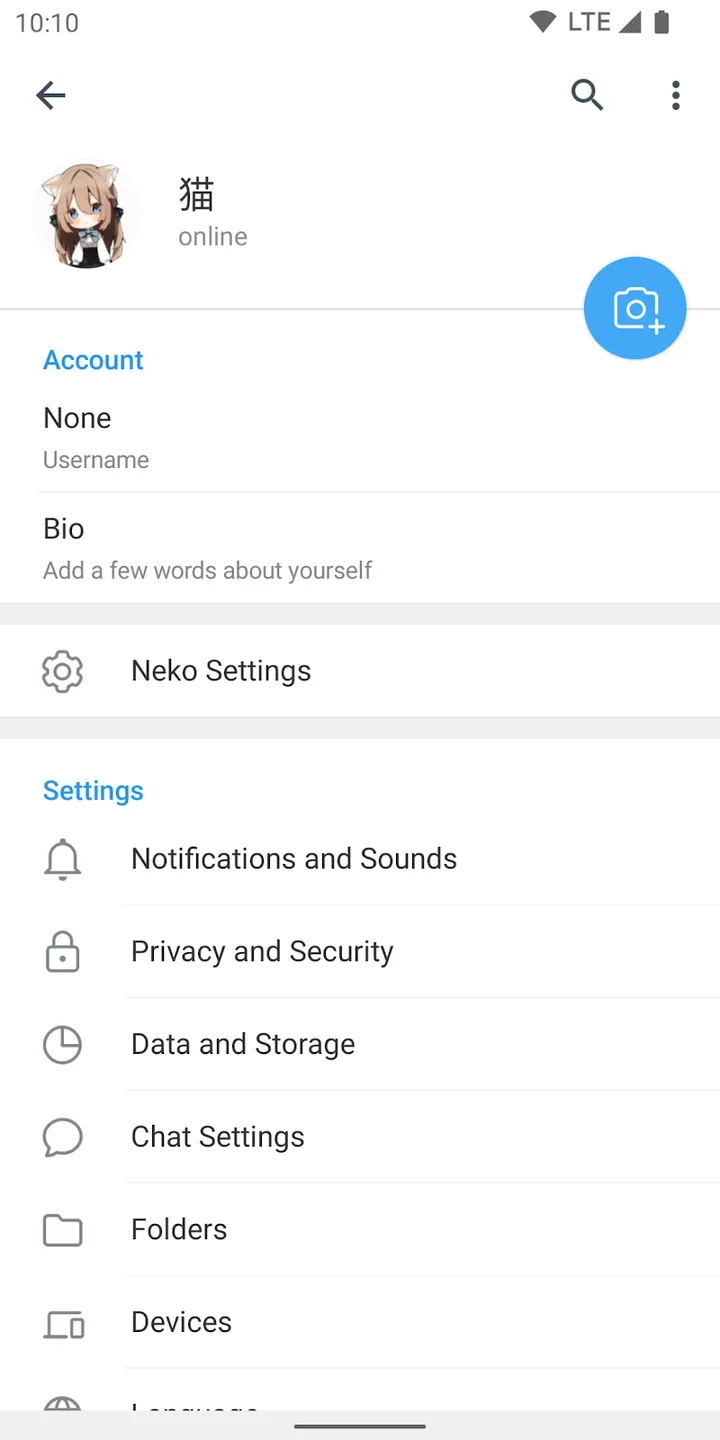
- The screenshot is Nekogram’s, from its Google Play listing, and shows an older version from 2022.
What’s inside the APK
Trackers
Code from these SDKs is in the package. That shows it is bundled, not how it is used.
Native code
Runs on 64-bit and older 32-bit ARM phones.
Android versions
Built for Android 16 (target API 36).
Permissions
17 of them need your approval first.
CPU types in this build: arm64-v8a (64-bit ARM, almost every phone since 2017); armeabi-v7a (32-bit ARM, older and budget phones); x86 (32-bit Intel, emulators); x86_64 (64-bit Intel, emulators and Chromebooks).
Asks you first (17)
Android shows a prompt before the app can use these.
- Location while running in the background · ACCESS_BACKGROUND_LOCATION
- Approximate location · ACCESS_COARSE_LOCATION
- Precise location · ACCESS_FINE_LOCATION
- Connect to paired Bluetooth devices · BLUETOOTH_CONNECT
- Use the camera · CAMERA
- See the accounts on the device · GET_ACCOUNTS
- Show notifications (Android 13+) · POST_NOTIFICATIONS
- Read your contacts · READ_CONTACTS
- Read shared storage (Android 12 and older) · READ_EXTERNAL_STORAGE
- Read music and audio files · READ_MEDIA_AUDIO
- Read photos · READ_MEDIA_IMAGES
- Read videos · READ_MEDIA_VIDEO
- Read your phone number · READ_PHONE_NUMBERS
- Read phone status and identity · READ_PHONE_STATE
- Record audio with the microphone · RECORD_AUDIO
- Change your contacts · WRITE_CONTACTS
- Write shared storage (Android 10 and older) · WRITE_EXTERNAL_STORAGE
You switch these on in Settings (2)
Special app access. Nothing is granted until you turn it on yourself.
- Install unknown apps · REQUEST_INSTALL_PACKAGES
- Display over other apps · SYSTEM_ALERT_WINDOW
Granted at install (30)
Low-risk permissions Android grants automatically, plus any we have not classified.
- ACCESS_ADSERVICES_AD_ID
- ACCESS_ADSERVICES_ATTRIBUTION
- ACCESS_MEDIA_LOCATION
- ACCESS_NETWORK_STATE
- ACCESS_WIFI_STATE
- AUTHENTICATE_ACCOUNTS
- BLUETOOTH
- FOREGROUND_SERVICE
- FOREGROUND_SERVICE_CAMERA
- FOREGROUND_SERVICE_DATA_SYNC
- FOREGROUND_SERVICE_LOCATION
- FOREGROUND_SERVICE_MEDIA_PLAYBACK
- FOREGROUND_SERVICE_MEDIA_PROJECTION
- FOREGROUND_SERVICE_MICROPHONE
- INSTALL_SHORTCUT
- INTERNET
- MANAGE_ACCOUNTS
- MANAGE_OWN_CALLS
- MODIFY_AUDIO_SETTINGS
- READ_APP_BADGE
- READ_CLIPBOARD
- READ_PROFILE
- READ_SYNC_SETTINGS
- RECEIVE_BOOT_COMPLETED
- USE_BIOMETRIC
- USE_FINGERPRINT
- USE_FULL_SCREEN_INTENT
- VIBRATE
- WAKE_LOCK
- WRITE_SYNC_SETTINGS
Defined by other apps (22)
Permissions that belong to another app or to this app itself.
- com.anddoes.launcher.permission.UPDATE_COUNT
- com.android.launcher.permission.INSTALL_SHORTCUT
- com.android.launcher.permission.UNINSTALL_SHORTCUT
- com.android.vending.BILLING
- com.google.android.c2dm.permission.RECEIVE
- com.google.android.finsky.permission.BIND_GET_INSTALL_REFERRER_SERVICE
- com.google.android.gms.permission.AD_ID
- com.htc.launcher.permission.READ_SETTINGS
- com.htc.launcher.permission.UPDATE_SHORTCUT
- com.huawei.android.launcher.permission.CHANGE_BADGE
- com.huawei.android.launcher.permission.READ_SETTINGS
- com.huawei.android.launcher.permission.WRITE_SETTINGS
- com.majeur.launcher.permission.UPDATE_BADGE
- com.oppo.launcher.permission.READ_SETTINGS
- com.oppo.launcher.permission.WRITE_SETTINGS
- com.sec.android.provider.badge.permission.READ
- com.sec.android.provider.badge.permission.WRITE
- com.sonyericsson.home.permission.BROADCAST_BADGE
- com.sonymobile.home.permission.PROVIDER_INSERT_BADGE
- me.everything.badger.permission.BADGE_COUNT_READ
- me.everything.badger.permission.BADGE_COUNT_WRITE
- tw.nekomimi.nekogram.DYNAMIC_RECEIVER_NOT_EXPORTED_PERMISSION
More Information
- Package name
- tw.nekomimi.nekogram
- Version
- 13.1.1 (build 72370)
- File size
- 73.9 MB (73,948,009 bytes)
- Requires
- Android 6.0 or later
- Category
- Productivity
- License
- GPL-2.0
- Developer
- Nekogram
- Source code
- github.com/Nekogram/Nekogram
- Released
- Oct 30, 2026
- Signer SHA-256
- 5ce932b970199fbda2aae7bf21e1ad9e70b0809a7b1ac94c0699f5d5ada83313
- File SHA-256
- 53f23308e84e4331072416b198cc92eced1cb510694d73027bcc81b6c863767e
- Checked
- , against the v13.1.1 release on GitHub · how we check · verify it yourself
Common questions
Is this APK the official Nekogram release?
Yes. It is the file from the project’s v13.1.1 release on GitHub, byte for byte, and it matches the SHA-256 checksum GitHub publishes for it. It is signed with the certificate we recorded when we first checked Nekogram (SHA-256 5ce932b970199fbda2aae7bf21e1ad9e70b0809a7b1ac94c0699f5d5ada83313); a release signed with a different key would not be published here.
What Android version does Nekogram need?
Android 6.0 or later (API level 23). Version 13.1.1 is built for Android 16 (target API 36). Runs on 64-bit and older 32-bit ARM phones.
Can Nekogram access the internet?
Yes. The APK requests Android’s internet permission. In total it declares 71 permissions, and 17 of them need your approval first.
Does Nekogram contain trackers?
Yes. Version 13.1.1 contains code from Google Firebase Analytics and Sentry, which match Exodus Privacy tracker signatures. That shows the code is bundled, not how the app uses it.
Is Nekogram open source?
Its code is. The source code of Nekogram is released under the GPL-2.0 licence and published at https://github.com/Nekogram/Nekogram. It includes Google components that aren’t open source: Firebase Analytics and Messaging, Google Play services for maps, location and push, ML Kit and Google Play Billing.
What does it send to its developer?
In this build, usage statistics to Google’s Firebase Analytics and crash reports to Sentry, both on by default under a random ID, plus a daily update check through Nekogram’s Telegram bot. To stop the statistics and crash reports, go to Neko Settings → Experimental → Delete data, which, in its words, will “Permanently block outgoing data from this instance and delete collected data.” It can’t be undone.
How does it update?
Through Telegram. About once a day, while you are logged in, Nekogram asks its own Telegram bot whether there is a new version; the APK then arrives as a file in Telegram and Android’s installer asks you to confirm it. The developer can mark an update as one you can’t skip.
Is it the same as Nekogram on Google Play?
Same app and package name, built from the same code, but the Play build has no switch to turn off the statistics: the developer has said “If you installed from Play Store, you cannot turn if off.” Whether the two are signed with the same key we couldn’t check, so don’t count on one updating the other.
Can I use it in Brazilian Portuguese?
Yes. Nekogram’s own settings are translated into Brazilian Portuguese, and the rest of the interface uses Telegram’s translation.
Recent releases
| Version | Released | Size |
|---|---|---|
| v13.1.1 · this download | Oct 30, 2026 | 73.9 MB |
| v13.0.3 | Oct 24, 2026 | 73.5 MB |
| v13.0.2 | Oct 14, 2026 | 73.2 MB |
| v12.10.6 | Oct 1, 2026 | 112.6 MB |
| v12.10.5 | Sep 30, 2026 | 112.6 MB |
Recent releases on the project’s GitHub. We host and check only the newest one. Full changelog.
Alternatives and related apps
-
 Telegram Telegram’s own app from telegram.org, without Nekogram’s changes or its analytics.Download
-
 Telegram X Telegram’s other official app, with a different, faster interface.Download