
ColorBlendr
by DrDisagree · GPL-3.0-only · open source
Take over the Material You palette that Android 12 and later builds from your wallpaper: pick your own seed color, tune saturation and lightness, and override single shades.
Needs:Root, Shizuku or wireless ADB · Android 12+
2113 Apps is independent, not affiliated with or endorsed by DrDisagree. Official sources: source code on GitHub.
- Version
- v3.0.1
- Size
- 6.5 MB
- Requires
- Android 12+
- Updated
- 2026-08-02
Screenshots
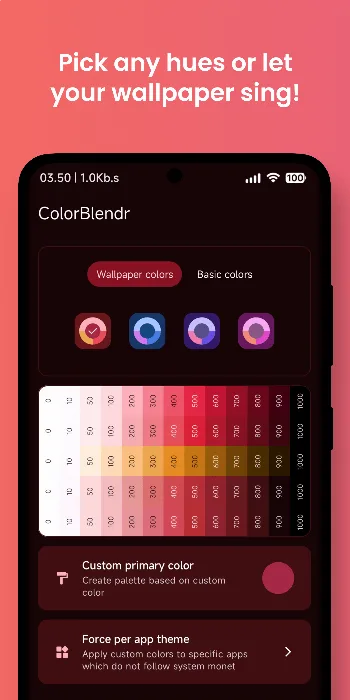
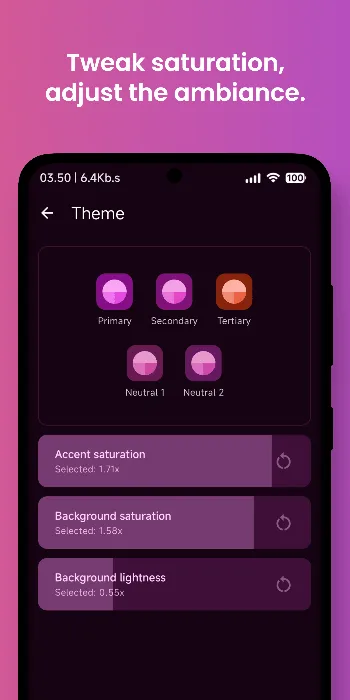
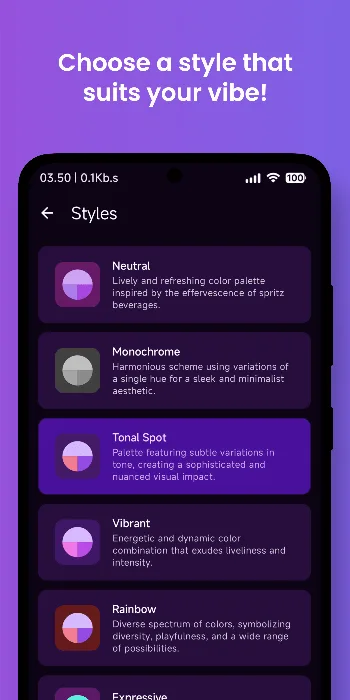
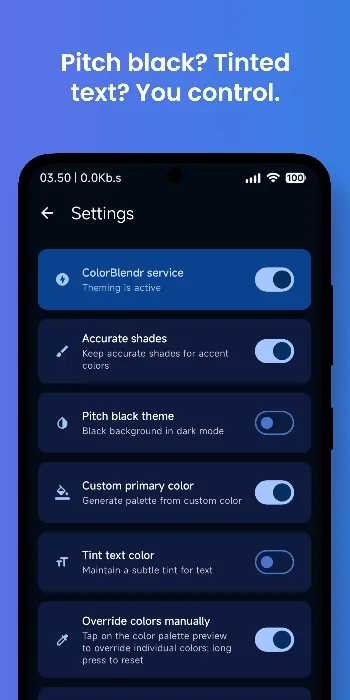
Introduction
Since Android 12, the system builds a set of colors from your wallpaper and applies them to the system and to apps that support it; Google calls this Material You. ColorBlendr, by Mahmudul Hasan, lets you choose those colors yourself instead.
What it does
From the project’s README:
- Pick any seed color, or one of a set of basic colors, with a live preview before you apply it.
- Fine-tuning: sliders for accent saturation, background saturation and background lightness, ready-made Monet style presets, a pitch-black dark mode, tinted text, and your own secondary and tertiary colors.
- Full control: override any single shade across the whole palette, with separate settings for light and dark mode.
- Backup and restore of your whole setup to a file.
- Community creations: a gallery of color themes made by other users, which you can browse, upvote and share to (more below).
Root, Shizuku or wireless ADB
ColorBlendr works in any of the three modes, but the developer recommends root “if you want to have the full experience”. With root, the README says, it changes the colors at run time through Android’s overlay system “without creating any permanent files”; without root it uses adb commands, and some features are greyed out. Applying a community creation needs root, while browsing and upvoting work in every mode. See how to start Shizuku if you go that way.
Community creations and the network
The theming itself happens on the phone. According to the privacy policy bundled with version 3.0.1, ColorBlendr goes online for two things only: the profile pictures of its contributors and translators, and the optional community gallery. The gallery needs no account, but it isn’t free of identifiers:
- Browsing downloads the public list of creations from the jsDelivr CDN, which serves them from a public GitHub repository; the policy says no account or identifier is needed for this.
- Upvoting sends a salted SHA-256 hash of the device ID to a Cloudflare Worker run by the developer, and the server stores a salted hash of your IP address next to it, so that each person gets one vote. The 3.0 release notes add that apply counts are tracked with the same kind of device hash.
- Sharing a creation uploads the palette with the name, description and optional author name you type, all of which become public. Submissions pass Cloudflare’s Turnstile bot check and are published as a pull request on GitHub, where a person reviews them. For rate limiting, the server keeps the same two hashes; reporting a creation works the same way.
The developer says neither hash can be reversed to identify you. That is the server’s side, which we can’t check.
About this file
- This is the developer’s own build, from IzzyOnDroid, signed with the developer’s key (SHA-256 fingerprint starting 4A:F4:FF:A1), the same key that signs Iconify. F-Droid ships the same developer-signed file.
- Our scan found no tracker libraries. ColorBlendr isn’t on Google Play.
- The 6.5 MB file runs on Android 12 and later, on ARM and x86, 32- and 64-bit, and declares 16 permissions, 4 of which need your approval.
- ColorBlendr is licensed under GPL-3.0.
What’s inside the APK
Trackers
No code matching the Exodus Privacy tracker signatures.
Native code
Runs on 64-bit and older 32-bit ARM phones.
Android versions
Built for Android 16 (target API 36).
Permissions
4 of them need your approval first.
Shizuku API. Uses the Shizuku API, so it can do ADB-level work without root once Shizuku is running. (rikka.shizuku.ShizukuProvider)
CPU types in this build: arm64-v8a (64-bit ARM, almost every phone since 2017); armeabi-v7a (32-bit ARM, older and budget phones); x86 (32-bit Intel, emulators); x86_64 (64-bit Intel, emulators and Chromebooks).
Asks you first (4)
Android shows a prompt before the app can use these.
- Show notifications (Android 13+) · POST_NOTIFICATIONS
- Read shared storage (Android 12 and older) · READ_EXTERNAL_STORAGE
- Read photos · READ_MEDIA_IMAGES
- Write shared storage (Android 10 and older) · WRITE_EXTERNAL_STORAGE
You switch these on in Settings (1)
Special app access. Nothing is granted until you turn it on yourself.
- All files access · MANAGE_EXTERNAL_STORAGE
Granted at install (9)
Low-risk permissions Android grants automatically, plus any we have not classified.
- ACCESS_NETWORK_STATE
- ACCESS_WIFI_STATE
- FOREGROUND_SERVICE
- FOREGROUND_SERVICE_SPECIAL_USE
- INTERNET
- QUERY_ALL_PACKAGES
- RECEIVE_BOOT_COMPLETED
- REQUEST_IGNORE_BATTERY_OPTIMIZATIONS
- WAKE_LOCK
Defined by other apps (2)
Permissions that belong to another app or to this app itself.
- com.drdisagree.colorblendr.DYNAMIC_RECEIVER_NOT_EXPORTED_PERMISSION
- moe.shizuku.manager.permission.API_V23
More Information
- Package name
- com.drdisagree.colorblendr
- Version
- v3.0.1 (build 42)
- File size
- 6.5 MB (6,501,453 bytes)
- Requires
- Android 12 or later
- Category
- Customization
- License
- GPL-3.0-only
- Developer
- DrDisagree
- Source code
- github.com/Mahmud0808/ColorBlendr
- Released
- Aug 2, 2026
- Signer SHA-256
- 4af4ffa12ce90815a1775c4604ea16c19f5bed2a6e09ae7c3c92815982af052e
- File SHA-256
- a30ea8f14ea9d6349381fc2b6d537b19c137e4762dc58713da18a8af91700045
- Checked
- , against the IzzyOnDroid index · how we check · verify it yourself
Common questions
Is this APK the official ColorBlendr release?
Yes. It is the developer’s own release of ColorBlendr v3.0.1, byte for byte as IzzyOnDroid distributes it. Its SHA-256 matches IzzyOnDroid’s signed index, and it is signed with the certificate IzzyOnDroid records for the app (SHA-256 4af4ffa12ce90815a1775c4604ea16c19f5bed2a6e09ae7c3c92815982af052e).
What Android version does ColorBlendr need?
Android 12 or later (API level 31). Version v3.0.1 is built for Android 16 (target API 36). Runs on 64-bit and older 32-bit ARM phones.
Can ColorBlendr access the internet?
Yes. The APK requests Android’s internet permission. In total it declares 16 permissions, and 4 of them need your approval first.
Does ColorBlendr contain trackers?
No known trackers: our scan of version v3.0.1 found no code matching the Exodus Privacy tracker signatures. The scan covers known tracker libraries; it doesn’t show what data the app itself sends.
Is ColorBlendr open source?
Yes. ColorBlendr is released under the GPL-3.0-only licence, and its source code is published at https://github.com/Mahmud0808/ColorBlendr.
Does ColorBlendr need root?
No. It works with root, Shizuku or wireless ADB. The developer recommends root for the full experience: without it some customizations are limited, and applying a community creation needs root, though browsing and upvoting them work in every mode.
Why doesn’t ColorBlendr change colors on my Samsung phone?
One UI uses its own color palette for Samsung’s system apps instead of Material You. The developer says ColorBlendr’s changes therefore reach Google apps and other apps that support Material You, but not One UI’s system apps.
How do I uninstall ColorBlendr properly?
Following the developer’s instructions: first turn off the ColorBlendr service in the app’s settings, then uninstall the app and restart the phone.
Recent releases
| Version | Released | Size | Requires |
|---|---|---|---|
| v3.0.1 · this download | Aug 2, 2026 | 6.5 MB | Android 12+ |
| v3.0 | Aug 2, 2026 | 6.5 MB | Android 12+ |
| v2.1.1 | Jan 13, 2026 | 4.9 MB | Android 12+ |
Versions currently kept in the IzzyOnDroid repository. We host and check only the newest one. Full changelog.