
Thumb-Key
by Dessalines · AGPL-3.0-only · open source
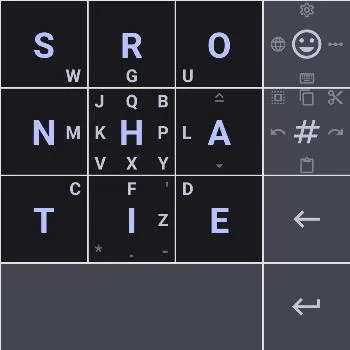
A keyboard made for two thumbs: nine big keys in a 3×3 grid, the commonest letters on taps and the rest on swipes, so you learn where letters are instead of relying on word prediction.
Needs:No root · Android 7.0+
2113 Apps is independent, not affiliated with or endorsed by Dessalines. Official sources: source code on GitHub.
- Version
- 5.1.20
- Size
- 9.6 MB
- Requires
- Android 7.0+
- Updated
- 2026-11-02
Screenshots
Introduction
Thumb-Key is an on-screen keyboard by the developer Dessalines. Its README calls it “a privacy-conscious smart keyboard, made specifically for your thumbs” that “features a 3x3 grid layout, and uses swipes for the less common letters.” It describes itself as “a follow-up to the now unmaintained (and closed-source) MessagEase Keyboard, which is its main inspiration.” Instead of predicting words, it keeps every letter in the same place, so that, in the README’s words, you can eventually type with “your eyes never having to leave the text edit area.” It is actively developed, with releases in August, September and October 2026.
How you type
- Nine large keys. In the default English layout, the nine most common letters are plain taps. From the README: “First 9 letters by frequency are the 9 center key taps. The next 8 are swipes to the center. The next 8 are swipes on the center hub key. Z is last.”
- Two thumbs, taking turns. Vowels sit on the right and consonants on the left, so most letter pairs alternate thumbs.
- Gestures on the other keys. Swipe up or down on A to capitalise. Double-tap the space bar for a comma and triple-tap for a full stop. Swipe on the space bar to move the cursor, and left on backspace to delete a whole word. On the numbers key, swipes copy, cut, paste, undo and redo, and select all.
- The emoji key opens emoji on a tap. Swipe up for the settings, left to switch between your chosen layouts, to the bottom right for sketch mode and to the bottom left for voice input.
Layouts and languages
The app comes with a long list of layouts, in Thumb-Key’s own letter order, in the MessagEase order, and in a “type-split” variant. Portuguese has its own Thumb-Key and type-split layouts, a mixed Portuguese and English one, and a Dvorak-style one. Others cover German, French, Spanish, Russian, Polish, Arabic, Hebrew, Hindi, Bengali, Thai, Japanese and Korean, among many more; there is no Chinese layout. You can pick several and switch with a swipe, and change what any key does by writing a short YAML description in the settings.
Layouts with “compose” in their name add two ways to build characters that have no key: dead keys, and a compose key (♫) that, as the README puts it, “works like the compose key on a desktop Linux system”.
Sketch mode
Version 5.1.18, from October 2026, added handwriting for single characters. The README: “Draw a character with your finger to type it: symbols, accented letters, and letters of other scripts that aren’t on your keyboard. Recognition runs entirely on your phone, and nothing you draw leaves it.” Only characters your phone’s fonts can show are offered, and “Chinese, Japanese and Korean characters are currently not supported.” The recogniser, glyphsketch, and its data are the largest part of the APK: more than half of the 9.6 MB file.
Offline by design
Thumb-Key asks Android for no permissions of its own: the one entry in its manifest is an internal permission that the AndroidX library adds for itself. Without internet access, the app itself can’t send what you type anywhere. The clipboard history is off by default; when you turn it on, it keeps at most 20 items and clears them after 120 minutes, both of which you can change.
About this file
- This is the developer’s own build of version 5.1.20, via IzzyOnDroid, signed with the key whose fingerprint the README publishes (SHA-256 starting EA:71:95:CF). F-Droid builds Thumb-Key from source, checks that the result matches, and ships the same developer-signed file, so this file, F-Droid’s and the GitHub release update one another.
- Version 5.1.20 restores the link to Android’s input-method settings, makes layout search match layout titles, adds a
ToggleHideLettersaction for custom key modifications, and removes the FreeDroidWarn registration notice. The preceding 5.1.19 release added an input-method switching mode and the Magma theme, corrected seven layout identifiers fromThumbkeytoThumbKey, and allowed key modifications to override the caps-lock legend. - Thumb-Key used to be on Google Play as a paid download, which the developer described in 2024 as “a way to donate”. In October 2026 the Play links were removed from the README, and on 22 October the Play listing no longer opened.
- The 9.6 MB file runs on Android 7.0 and later, on ARM and x86, 32- and 64-bit. Our scan found no trackers.
- Thumb-Key is licensed under the AGPL-3.0. The handwriting model comes with its own notice inside the APK, crediting the data it was trained on, among them the Detexify database (ODbL), the UJI Pen Characters set (CC BY 4.0) and Omniglot (MIT).
What’s inside the APK
Trackers
No code matching the Exodus Privacy tracker signatures.
Native code
Runs on 64-bit and older 32-bit ARM phones.
Android versions
Built for Android 17 (target API 37).
Permissions
0 of them need your approval first.
CPU types in this build: arm64-v8a (64-bit ARM, almost every phone since 2017); armeabi-v7a (32-bit ARM, older and budget phones); x86 (32-bit Intel, emulators); x86_64 (64-bit Intel, emulators and Chromebooks).
Defined by other apps (1)
Permissions that belong to another app or to this app itself.
- com.dessalines.thumbkey.DYNAMIC_RECEIVER_NOT_EXPORTED_PERMISSION
More Information
- Package name
- com.dessalines.thumbkey
- Version
- 5.1.20 (build 190)
- File size
- 9.6 MB (9,553,002 bytes)
- Requires
- Android 7.0 or later
- Category
- Productivity
- License
- AGPL-3.0-only
- Developer
- Dessalines
- Source code
- github.com/dessalines/thumb-key
- Released
- Nov 2, 2026
- Signer SHA-256
- ea7195cfce638ae6b1a8002ddc0d4863366095ea5b8d95c1cd5e25db0fe2e7c3
- File SHA-256
- ee1e9ab71f283413aed0619af2a92899e806feda7c4da73d79e156eab867e329
- Checked
- , against the IzzyOnDroid index · how we check · verify it yourself
Common questions
Is this APK the official Thumb-Key release?
Yes. It is the developer’s own release of Thumb-Key 5.1.20, byte for byte as IzzyOnDroid distributes it. Its SHA-256 matches IzzyOnDroid’s signed index, and it is signed with the certificate IzzyOnDroid records for the app (SHA-256 ea7195cfce638ae6b1a8002ddc0d4863366095ea5b8d95c1cd5e25db0fe2e7c3).
What Android version does Thumb-Key need?
Android 7.0 or later (API level 24). Version 5.1.20 is built for Android 17 (target API 37). Runs on 64-bit and older 32-bit ARM phones.
Can Thumb-Key access the internet?
No. The APK doesn’t request Android’s internet permission, so the app can’t go online by itself. In total it declares 1 permission, and none of them needs your approval first.
Does Thumb-Key contain trackers?
No known trackers: our scan of version 5.1.20 found no code matching the Exodus Privacy tracker signatures. The scan covers known tracker libraries; it doesn’t show what data the app itself sends.
Is Thumb-Key open source?
Yes. Thumb-Key is released under the AGPL-3.0-only licence, and its source code is published at https://github.com/dessalines/thumb-key.
Can I use the original MessagEase layout?
Yes. Thumb-Key’s own English layout moves letters around so that vowels and consonants alternate between your thumbs, but its README says “the original MessagEase Keyboard layout is available in the settings”, and the app lists several layouts named after MessagEase.
Does it have autocorrect or word suggestions?
No. The README sets Thumb-Key against “profit-driven, privacy-offending word and sentence prediction” and relies on “large keys with predictable positions” instead, so that, with practice, the positions go into muscle memory.
How do I type a character that isn’t on the keys?
Layouts with “compose” in their name have dead keys and a compose key (♫) that follows the X11 compose table used on desktop Linux. Since 5.1.18 you can also draw the character in sketch mode, which recognises it on the phone; Chinese, Japanese and Korean characters aren’t supported there.
Can I dictate with it?
Swiping to the bottom left on the emoji key turns on voice input, but only with a separate voice-typing app installed. The README names FUTO Voice Input, Transcribro and Whisper IME.
Recent releases
| Version | Released | Size | Requires |
|---|---|---|---|
| v5.1.20 · this download | Nov 2, 2026 | 9.6 MB | Android 7.0+ |
| v5.1.19 | Oct 25, 2026 | 9.6 MB | Android 7.0+ |
| v5.1.18 | Oct 6, 2026 | 9.6 MB | Android 7.0+ |
Versions currently kept in the IzzyOnDroid repository. We host and check only the newest one. Full changelog.
Alternatives and related apps
-
 Unexpected Keyboard Also built on swipes, but toward the corners of a conventional layout, for symbols, with word suggestions from dictionaries you download.Download
-
 HeliBoard A conventional keyboard with word suggestions and spell check from dictionaries you add, also fully offline.Download
-
 FlorisBoard A full keyboard with a theme editor, clipboard history and extensions, and also no internet access.Download