Flycast
by flyinghead · GPL-2.0 · open source
Play Dreamcast discs and Naomi and Atomiswave arcade games you own on Android, with upscaling, controller support and the online modes of some Dreamcast games. A Dreamcast BIOS is optional.
Needs:Your own games · Android 5.0+ · OpenGL ES 2.0
2113 Apps is independent, not affiliated with or endorsed by flyinghead. Official sources: source code on GitHub.
- Version
- v2.7-1-g44e4c7b50
- Size
- 36.3 MB
- Requires
- Android 5.0+
- Updated
- 2026-08-19
Screenshots
Introduction
Flycast is an open-source emulator, in its README’s words, for the “Sega Dreamcast, Naomi, Naomi 2, and Atomiswave”, derived from the older reicast and developed by Flyinghead. It runs on Android, desktop computers and as a RetroArch core. On Google Play it is free, with no ads, and has more than 100,000 downloads. It is not affiliated with Sega.
What it runs
- Dreamcast games from disc images (CHD, CDI, GDI, CUE), including games built on Windows CE.
- Naomi, Naomi 2 and Atomiswave, Sega’s and Sammy’s arcade boards of the same era, from ROM sets in .zip or .7z files. Version 2.7 added multi-screen support for Airline Pilot, Sega Strike Fighter and Derby Owners Club.
- Graphics through OpenGL ES or Vulkan, with a higher internal resolution than the original and optional widescreen hacks for many games (off by default). On phones with Adreno graphics, custom GPU drivers can be loaded.
- Controls: game controllers, an on-screen gamepad you can move and resize, adapters for real Dreamcast controllers, and rumble. Android TV has its own launcher entry.
- RetroAchievements, off until you sign in, and VMU memory card saves, which Android’s own backup can copy since version 2.7.
The BIOS, and what is built in
Flycast ships no Sega BIOS. For Dreamcast games it falls back to reios, its own replacement written in C++, which, as its source header says, draws on public reverse-engineering notes of the original boot ROM and bits of the redream emulator. The source also writes three small values into the emulated BIOS area to work around bugs in three games: The Grinch, a Jeremy McGrath motocross game and Rent a Hero. The font table the BIOS normally provides is rebuilt from freely licensed X11 fonts. The community wiki recommends a real BIOS where you can, and a few titles, plus MIL-CD discs, won’t start without one (see the questions below).
Two other things are built in. Settings presets for some arcade games, such as free play or a printer switched on, are loaded only when a game has no saved settings yet. And a table of game information taken from MAME, the arcade emulator (the file is marked LGPL-2.1+), includes the game keys that Flycast uses to decrypt many protected Naomi M1 and M2 and Atomiswave cartridges. For Naomi M4 cartridges the table holds only an ID: the decryption data comes from a key file inside the ROM set itself. Either way, they are useful only with ROM sets you supply. Box art and achievement lists come from online services, not from the app.
What goes online
- Crash reports: on by default. When Flycast starts after a crash, it uploads the crash dump and a log to Sentry, a crash-reporting service. The log contains the last log lines, the app version, the renderer, your GPU driver and the ID of the game you were playing; the setting says “No personal information is included.” Turn it off in Settings › Advanced. Our scan lists no trackers because this code is part of Flycast’s own native library, not a separate SDK.
- Box art: on by default. Flycast looks up the games in your library by ID or name on TheGamesDB.net, and arcade artwork on the project’s own GitHub site. Turn it off in Settings › General.
- Online play: Dreamcast games that dial out connect through DCNet (flyca.st), the project’s free service. Naomi network play, GGPO and Battle Cable matchmaking only connect when you use them.
- In our reading of the code, another app on the phone can set the RetroAchievements server address, a feature meant for offline proxy tools; it matters only after you sign in to RetroAchievements.
- There is no update check.
The microphone permission is asked for at runtime, for games that used a microphone peripheral. Android’s backup copies Flycast’s settings and its data folder, which includes a BIOS file if you keep one there.
About this file
- This is the project’s own build of Flycast 2.7, from its GitHub release of 19 August 2026, signed with the developer’s key (Flyinghead). The build file names that key “uploadkey”, so the Google Play version is most likely signed differently by Google; we couldn’t check, so don’t count on updating one with the other. The Play version may also be newer.
- 2.7 added frame-rate detection and pacing, translations including Brazilian Portuguese, better modem emulation and fixes for the online features of several games.
- The 36.3 MB file runs on ARM and x86, 32- and 64-bit, and needs Android 5.0 with OpenGL ES 2.0.
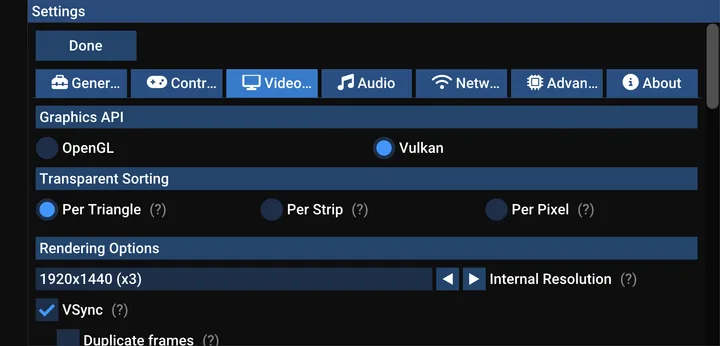
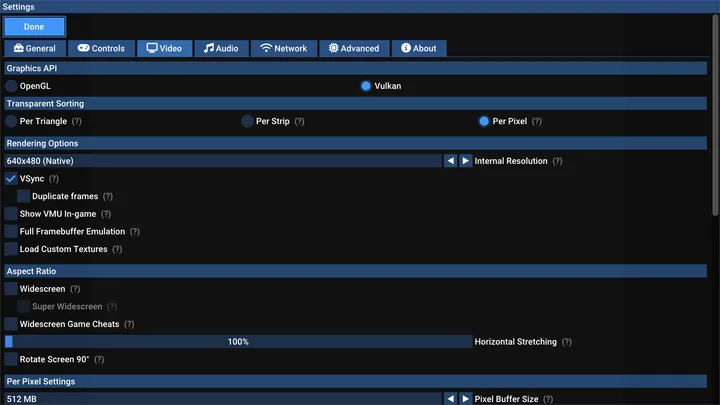
- The screenshots are the project’s own, showing the video settings on a phone and on a TV; the project’s other screenshots are mostly of commercial games.
- Flycast is licensed under the GPL-2.0 or later; some bundled components, such as the xBRZ scaler, are GPL-3.0.
What’s inside the APK
Trackers
No code matching the Exodus Privacy tracker signatures.
Native code
Runs on 64-bit and older 32-bit ARM phones.
Android versions
Built for Android 15 (target API 35).
Permissions
3 of them need your approval first.
CPU types in this build: arm64-v8a (64-bit ARM, almost every phone since 2017); armeabi-v7a (32-bit ARM, older and budget phones); x86 (32-bit Intel, emulators); x86_64 (64-bit Intel, emulators and Chromebooks).
Asks you first (3)
Android shows a prompt before the app can use these.
- Read shared storage (Android 12 and older) · READ_EXTERNAL_STORAGE
- Record audio with the microphone · RECORD_AUDIO
- Write shared storage (Android 10 and older) · WRITE_EXTERNAL_STORAGE
Granted at install (6)
Low-risk permissions Android grants automatically, plus any we have not classified.
- ACCESS_NETWORK_STATE
- ACCESS_WIFI_STATE
- BLUETOOTH
- CHANGE_WIFI_MULTICAST_STATE
- INTERNET
- VIBRATE
Defined by other apps (1)
Permissions that belong to another app or to this app itself.
- com.flycast.emulator.DYNAMIC_RECEIVER_NOT_EXPORTED_PERMISSION
More Information
- Package name
- com.flycast.emulator
- Version
- v2.7-1-g44e4c7b50 (build 3302)
- File size
- 36.3 MB (36,280,670 bytes)
- Requires
- Android 5.0 or later
- Category
- Console Emulators
- License
- GPL-2.0
- Developer
- flyinghead
- Source code
- github.com/flyinghead/flycast
- Released
- Aug 19, 2026
- Signer SHA-256
- 0774794c54c7e463004754e2caba432a2057d917e64c5e24460606a7471b1395
- File SHA-256
- 1ac54d77b8283f6d58d077396d0916ec12c15b7e4ada9d957836a64590756c00
- Checked
- , against the v2.7 release on GitHub · how we check · verify it yourself
Common questions
Is this APK the official Flycast release?
Yes. It is the file from the project’s v2.7 release on GitHub, byte for byte, and it matches the SHA-256 checksum GitHub publishes for it. It is signed with the certificate we recorded when we first checked Flycast (SHA-256 0774794c54c7e463004754e2caba432a2057d917e64c5e24460606a7471b1395); a release signed with a different key would not be published here.
What Android version does Flycast need?
Android 5.0 or later (API level 21). Version v2.7-1-g44e4c7b50 is built for Android 15 (target API 35). Runs on 64-bit and older 32-bit ARM phones.
Can Flycast access the internet?
Yes. The APK requests Android’s internet permission. In total it declares 10 permissions, and 3 of them need your approval first.
Does Flycast contain trackers?
No known trackers: our scan of version v2.7-1-g44e4c7b50 found no code matching the Exodus Privacy tracker signatures. The scan covers known tracker libraries; it doesn’t show what data the app itself sends.
Is Flycast open source?
Yes. Flycast is released under the GPL-2.0 licence, and its source code is published at https://github.com/flyinghead/flycast.
Do I need a BIOS?
For Dreamcast games, usually not: without one, Flycast uses its own replacement BIOS. The community wiki says a real one gives the best experience, and a few games, plus MIL-CD discs, refuse to start without it. Naomi and Atomiswave games need their BIOS files (naomi.zip, awbios.zip and others). Flycast includes none, and this site doesn’t provide them.
Which game files does it open?
Dreamcast discs as CHD, CDI, GDI or CUE images, and Naomi, Naomi 2 and Atomiswave games as .zip or .7z ROM sets. The Play listing: “No games are included in the app so you must own the games you use with Flycast. Or you can play free homebrew games available online.”
Can I play Dreamcast games online?
Some, yes. Flycast connects games that dial out to DCNet, the project’s free service for Dreamcast online modes; the community wiki lists about 30 supported games. Network play for Naomi games, GGPO rollback and Battle Cable match codes are separate options, all off until you use them.
How do I stop Flycast sending crash reports?
In Settings › Advanced, untick “Automatically Report Crashes”. It is on by default in this build. To stop box-art downloads too, untick “Fetch Box Art” in Settings › General.
Recent releases
| Version | Released | Size |
|---|---|---|
| v2.7 · this download | Aug 19, 2026 | 36.3 MB |
| v2.6 | Jan 10, 2026 | 31.3 MB |
| v2.5 | May 7, 2025 | 31.5 MB |
| v2.4 | Oct 23, 2024 | 30.0 MB |
| v2.3 | Mar 16, 2024 | 27.0 MB |
Recent releases on the project’s GitHub. We host and check only the newest one. Full changelog.