

UniPatcher
by Boris Timofeev · GPL-3.0-or-later · open source
Apply a fan translation or a ROM hack to a game you already own, on the phone: pick the ROM, the patch and where to save the result. It reads eleven patch formats and leaves the original alone.
Needs:No root · Android 7.0+
2113 Apps is independent, not affiliated with or endorsed by Boris Timofeev. Official sources: source code on GitHub.
- Version
- 0.19
- Size
- 8.3 MB
- Requires
- Android 7.0+
- Updated
- 2026-10-15
Screenshots
Introduction
UniPatcher is a ROM patcher by Boris Timofeev, in its own description “an Android tool for applying patches to ROM images of various video game consoles”. A patch, as the app’s FAQ explains, is “a file that contains the differences between the original version of a ROM and the hacked version”: fan translations and ROM hacks are shared that way, as the FAQ puts it, “to reduce download size and avoid copyright issues”. You need both files already; UniPatcher contains no games and no patches, and doesn’t download either. It is for old console games, not Android games: “UniPatcher is not designed to hack the Android games.”
Patch formats
IPS and IPS32, UPS, BPS, APS (both the Game Boy Advance and the Nintendo 64 variants), PPF (versions 1 to 3), DPS, EBP (EarthBound patches), and xdelta versions 1 and 3, eleven in all. The app picks the format from the patch’s file extension; for xdelta files it then reads the file’s header to tell the two versions apart. BPS, UPS, xdelta and PPF (versions 2 and 3) patches can check that your ROM is the one they were made for (see the questions below); the setting to ignore checksums doesn’t apply to XDelta1 patches.
Patching a game
- Choose the patch file and the ROM file in Android’s file picker. UniPatcher needs no storage permission for this; cloud storage and SD cards work too.
- Choose where to save the patched game. The suggested name is the ROM’s, with “[patched]” added.
- Tap the button at the bottom right and keep the app open. A window shows each step and ends with “Patching complete”.
UniPatcher copies both files into its own temporary storage, applies the patch there and writes the result to the file you chose, so the original ROM isn’t touched. That is why it needs free space of roughly twice the ROM’s size plus the patch; since version 0.19 it checks before starting and says how much it needs. If saving fails with “Permission denied”, the developer advises saving to an ordinary folder such as Download or Documents, not to Android/data, another app’s folder or a problematic SD card.
Other tools
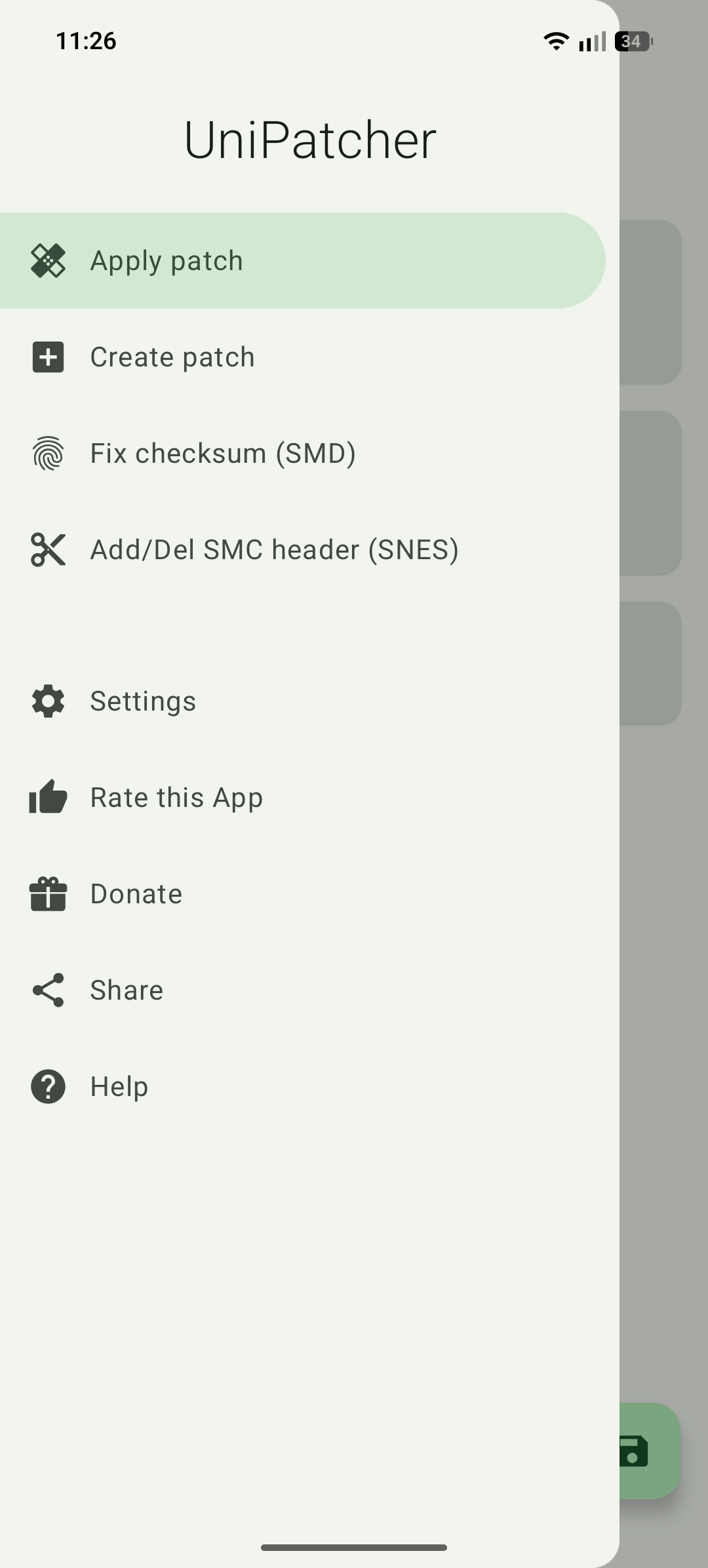
- Create patch: make your own xdelta3 patch from an original file and a modified one.
- Fix checksum (SMD): for Sega Mega Drive (Genesis) ROMs, it fixes, in the app’s words, “the red screen of death”. This one overwrites the file you pick, without a backup, so copy it first.
- Add/Del SMC header (SNES): some Super Nintendo patches need a ROM with or without the extra 512-byte header that some ROM files have. The tool removes the header if the ROM has one and adds one otherwise, optionally from a header file of your own; the result is saved as a new file. Adding came back in version 0.19, after being removed in 0.17.
- Settings: light, dark or system theme, and the option to ignore checksums. On Android 12 and later the app takes its colours from your wallpaper.
What goes online
Nothing. UniPatcher has no internet permission. After a crash it shows a notification; if you tap Send, your e-mail app opens with a report addressed to the developer, and nothing is sent unless you send it. That crash library, ACRA, is what our scan lists. Links to the project’s GitHub, its translation site and Bitcoin donations open in other apps when you tap them; in this edition, once you have patched something, a donation request appears now and then when you open the app.
About this file
- This is F-Droid’s build of version 0.19, released on 13 October 2026, signed with F-Droid’s key. The versions on Google Play (with more than a million downloads) and GitHub are signed by the developer, so you can’t install one over the other without uninstalling first. The Play version has no donation menu.
- 32-bit ARM works again. Version 0.18 raised the minimum to Android 7.0 and, without saying so in the release notes, dropped 32-bit processors. The developer: “I thought there were none left. I’ll add it back in the next version.” Version 0.19 runs on 32-bit and 64-bit ARM and on 64-bit x86; 32-bit x86 devices still aren’t supported.
- 0.19 also redesigns the app in Material 3, checks free space before patching, offers itself in “Open with” for patch files, and falls back to picking a folder on devices without Android’s save dialog.
- The 8.3 MB file, up from about 3 megabytes in 0.18, contains the xdelta 3.1.0 and XZ libraries the app builds itself, now also xdelta 1.x with the part of the GLib library it needs, which accounts for most of the growth, and six small patch files from EBPatcher that convert known non-standard dumps of EarthBound to the standard one before an EBP patch is applied. Our scan found one library, ACRA, used for the crash reports above.
- The screenshot is the project’s own and shows version 0.19’s menu; we left out the other one, which shows a commercial game’s file name.
- UniPatcher is licensed under the GPL-3.0 or later; the xdelta 1.x code it now includes is under the GPL-2.0 or later, and GLib under the LGPL.
What’s inside the APK
Trackers
Code from these SDKs is in the package. That shows it is bundled, not how it is used.
Native code
Runs on 64-bit and older 32-bit ARM phones.
Android versions
Built for Android 16 (target API 36).
Permissions
1 of them need your approval first.
CPU types in this build: arm64-v8a (64-bit ARM, almost every phone since 2017); armeabi-v7a (32-bit ARM, older and budget phones); x86_64 (64-bit Intel, emulators and Chromebooks).
Asks you first (1)
Android shows a prompt before the app can use these.
- Show notifications (Android 13+) · POST_NOTIFICATIONS
Defined by other apps (1)
Permissions that belong to another app or to this app itself.
- org.emunix.unipatcher.DYNAMIC_RECEIVER_NOT_EXPORTED_PERMISSION
More Information
- Package name
- org.emunix.unipatcher
- Version
- 0.19 (build 190000)
- File size
- 8.3 MB (8,314,258 bytes)
- Requires
- Android 7.0 or later
- Category
- Console Emulators
- License
- GPL-3.0-or-later
- Developer
- Boris Timofeev
- Source code
- github.com/btimofeev/UniPatcher
- Released
- Oct 15, 2026
- Signed by
- F-Droid, which built this APK from the published source code. Because the key is F-Droid’s, it won’t install over a copy from Google Play or GitHub (or the other way round) without uninstalling first.
- Signer SHA-256
- febcbed69a1f017f79a17a1c1fe30a46ba4f9f9e0a91d6b5be2e2c2cd8695bf6
- File SHA-256
- 12b83efacee7c522ac583e0894d1a2108bedb10e85a57d525784abc8b6956e89
- Checked
- , against the F-Droid index · how we check · verify it yourself
Common questions
Is this APK the official UniPatcher release?
It is F-Droid’s build rather than the developer’s own: F-Droid compiled UniPatcher 0.19 from the published source code and signed it with its own key. Its SHA-256 matches F-Droid’s signed index. Because the key is F-Droid’s, it won’t install over a copy from Google Play or GitHub without uninstalling first.
What Android version does UniPatcher need?
Android 7.0 or later (API level 24). Version 0.19 is built for Android 16 (target API 36). Runs on 64-bit and older 32-bit ARM phones.
Can UniPatcher access the internet?
No. The APK doesn’t request Android’s internet permission, so the app can’t go online by itself. In total it declares 2 permissions, and 1 of them needs your approval first.
Does UniPatcher contain trackers?
Yes. Version 0.19 contains code from ACRA, which matches an Exodus Privacy tracker signature. That shows the code is bundled, not how the app uses it.
Is UniPatcher open source?
Yes. UniPatcher is released under the GPL-3.0-or-later licence, and its source code is published at https://github.com/btimofeev/UniPatcher.
It says the ROM is not compatible with the patch. What now?
The checksum stored in the patch doesn’t match your ROM, so the patch was made for another release of the game: another region, revision or dump. The app’s FAQ suggests comparing your ROM with the checksum the patch’s author published. A setting can ignore checksums, but the FAQ warns the game “may contain bugs or be completely unplayable”. IPS patches have no checksum at all.
Where is the patched game saved? Is my original ROM changed?
You choose where in the save dialog; the suggested name is the ROM’s with “[patched]” added. UniPatcher works on temporary copies and writes the result to the new file, so the original ROM stays as it was. It needs free space of about twice the ROM’s size plus the patch, and tells you how much if there isn’t enough. Only the Mega Drive checksum fix edits the file you pick, without a backup.
Can I open a patch or ROM that is in a .zip file?
No. The FAQ: “Currently UniPatcher can not extract archives, so you need to unpack your archive in a different program.” Unpack the .zip, .7z or .rar first, then pick the files inside.
Patching an xdelta file used to fail with an internal error. Is that fixed?
For the most common cause, yes. Older versions couldn’t read some xdelta3 patches that use DJW compression; version 0.19 lists “Fixed applying some XDelta3 patches with DJW compression that previously failed with an error”. It also reads XDelta1 patches, which earlier versions rejected. The error, if you still get one, now reads “XDelta internal error”.
Recent releases
| Version | Released | Size | Requires |
|---|---|---|---|
| v0.19 · this download | Oct 15, 2026 | 8.3 MB | Android 7.0+ |
| v0.18 | Sep 17, 2026 | 3.1 MB | Android 7.0+ |
| v0.17.3 | Nov 16, 2024 | 3.0 MB | Android 5.0+ |
Versions currently kept in the F-Droid repository. We host and check only the newest one. Full changelog.