

Proton Authenticator
by Proton · GPL-3.0-or-later · open source
Generate two-factor codes without an account, keep automatic backups in a local folder, and sign in to Proton only for encrypted sync. This is the separate F-Droid package.
Needs:Android 8.1+ · camera optional for QR codes
2113 Apps is independent, not affiliated with or endorsed by Proton. Official sources: proton.me · source code on GitHub.
- Version
- 1.3.9
- Size
- 93.5 MB
- Requires
- Android 8.1+
- Updated
- 2026-07-15
Screenshots
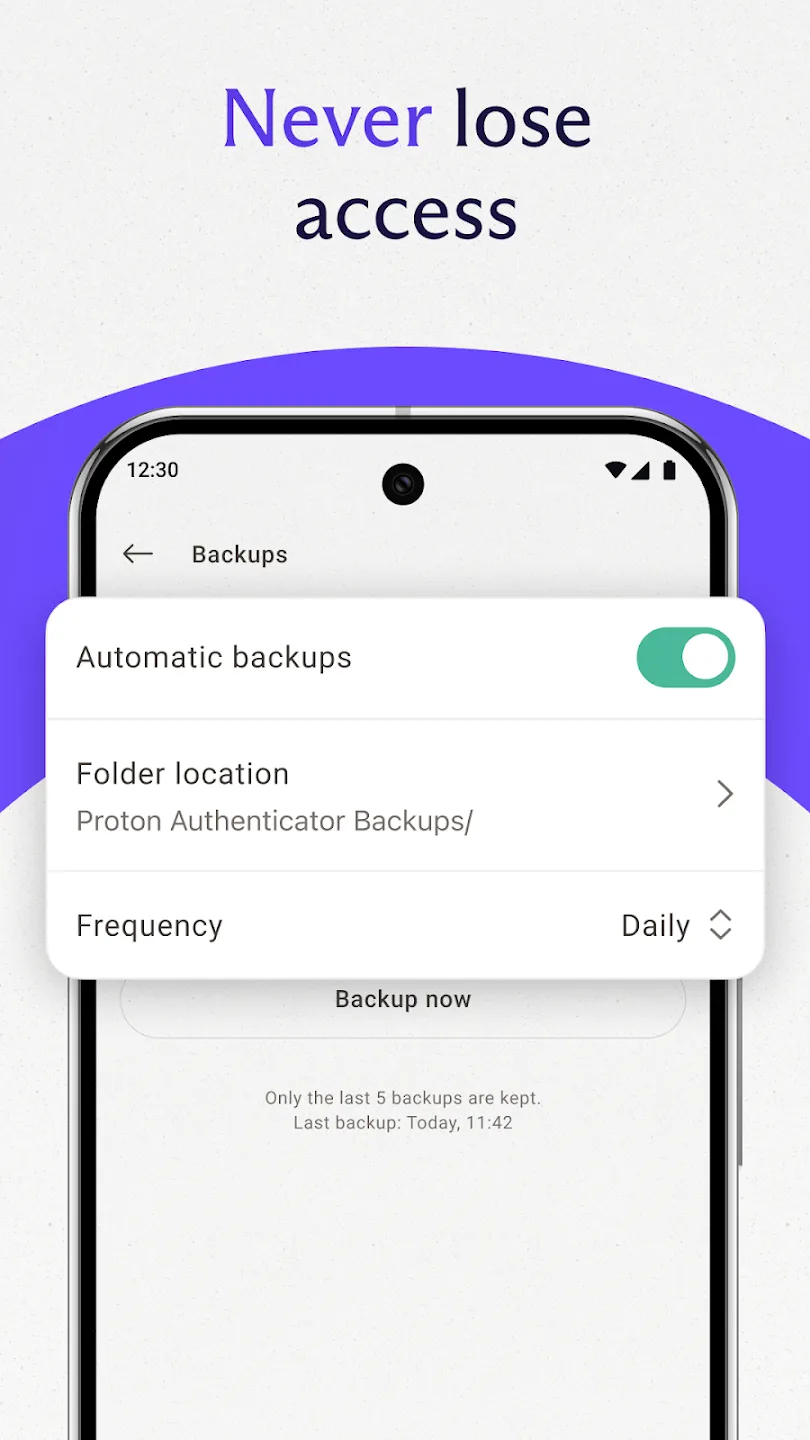
Introduction
Proton Authenticator is an open-source TOTP app from Proton, the company behind Proton Mail and Proton Pass. Scan a service’s QR code or enter its secret manually, and the app generates the rotating login code on the phone. Codes do not need a network connection, and the vault can be protected with the device’s fingerprint or other biometric lock.
Local use, backup and sync
An account is optional. Without one, entries stay in the local app and can be exported. The separate automatic backup option is also local: it is off by default, writes JSON files into a folder you choose, needs no account and is scheduled with no network requirement. It keeps the five newest automatic backups. If you set a backup password, the export is password-protected; without one, the JSON contains the secrets in plaintext, so choose a private folder and protect or encrypt any copy you move elsewhere.
A Proton account is for end-to-end encrypted synchronization across devices. That changes the network boundary: encrypted vault and account operations use Proton’s service, even though TOTP calculation and local folder backups do not.
The app supports importing existing codes, organising entries, searching them and copying either the current or upcoming code. QR scanning uses the camera only when you choose it. Before moving a live two-factor account, save the website’s recovery codes and verify a generated code at the website; never rely on an untested export as the only copy of the secret.
The F-Droid privacy difference
This package is the project’s F-Droid flavour. In its source, the F-Droid implementation forces usage telemetry off and removes the setting; its Sentry initializer is a no-op and the APK contains no Sentry SDK. Our scan also found no recognised tracker SDKs.
It is not network-free. The common startup code starts Proton’s feature-flag refresh service, and account sign-in and encrypted sync reach Proton. F-Droid marks NonFreeNet because the app contacts a proprietary backend to decide whether progressively rolled-out experimental features are enabled. It separately marks Tracking with the repository warning that users can be fingerprinted even when they do not use online features.
There is also a distinct third-party request path. The app maps recognised issuer names to remote logo URLs and Coil downloads them for entry cards, caching the result on disk. Most mappings use Google’s favicon service and others use DuckDuckGo or Clearbit. A request can disclose the user’s IP address and, through the requested service domain, which issuer has a two-factor entry on that device—even when the user has not signed in to Proton. The interface has no switch to disable these logo downloads; an unmapped issuer falls back to a generated letter icon.
Version 1.3.9
The 1.3.9 release notes contain core-library and translation updates rather than a new user feature. This page therefore describes capabilities present in the measured build without attributing all of them to that update.
About this file
- This is F-Droid’s build of Proton Authenticator 1.3.9, compiled from source and signed with F-Droid’s key. Because its package name and signer differ from the Play build, Android keeps the two installations separate.
- The 93.5 MB APK runs on Android 8.1 or later and contains native libraries for 64-bit ARM, 32-bit ARM and x86_64. It declares ten permissions for network state, internet, the optional camera, biometrics, notifications, boot, a foreground service and wake lock.
- Our scan found no tracker SDKs; the F-Droid anti-feature disclosures and the remote issuer-logo requests above still apply.
- The source is licensed under GPL-3.0-or-later. We retain only the F-Droid listing’s automatic-backup settings screenshot; the other listing images prominently reproduce third-party service or competing-app logos.
What’s inside the APK
Trackers
No code matching the Exodus Privacy tracker signatures.
Native code
Runs on 64-bit and older 32-bit ARM phones.
Android versions
Built for Android 15 (target API 35).
Permissions
2 of them need your approval first.
Flagged by F-Droid:
- NonFreeNet: Relies on or promotes a proprietary network service.
- Tracking: IzzyOnDroid flags this app for tracking or reporting user activity.
CPU types in this build: arm64-v8a (64-bit ARM, almost every phone since 2017); armeabi-v7a (32-bit ARM, older and budget phones); x86_64 (64-bit Intel, emulators and Chromebooks).
Asks you first (2)
Android shows a prompt before the app can use these.
- Use the camera · CAMERA
- Show notifications (Android 13+) · POST_NOTIFICATIONS
Granted at install (7)
Low-risk permissions Android grants automatically, plus any we have not classified.
- ACCESS_NETWORK_STATE
- FOREGROUND_SERVICE
- INTERNET
- RECEIVE_BOOT_COMPLETED
- USE_BIOMETRIC
- USE_FINGERPRINT
- WAKE_LOCK
Defined by other apps (1)
Permissions that belong to another app or to this app itself.
- proton.android.authenticator.fdroid.DYNAMIC_RECEIVER_NOT_EXPORTED_PERMISSION
More Information
- Package name
- proton.android.authenticator.fdroid
- Version
- 1.3.9 (build 10309000)
- File size
- 93.5 MB (93,490,403 bytes)
- Requires
- Android 8.1 or later
- Category
- Network & Privacy
- License
- GPL-3.0-or-later
- Developer
- Proton
- Source code
- github.com/protonpass/android-authenticator
- Released
- Jul 15, 2026
- Signed by
- F-Droid, which built this APK from the published source code. Because the key is F-Droid’s, it won’t install over a copy from Google Play or GitHub (or the other way round) without uninstalling first.
- Signer SHA-256
- bc606789f8023cfa3a677157796048e0f58fadd4b1a0598c999b2980eab7919d
- File SHA-256
- 0cb40f2618f7ee2bedbfdee0fbd048f9df99ce042a510f344b759e2fb32d1e3d
- Checked
- , against the F-Droid index · how we check · verify it yourself
Common questions
Is this APK the official Proton Authenticator release?
It is F-Droid’s build rather than the developer’s own: F-Droid compiled Proton Authenticator 1.3.9 from the published source code and signed it with its own key. Its SHA-256 matches F-Droid’s signed index. Because the key is F-Droid’s, it won’t install over a copy from Google Play or GitHub without uninstalling first.
What Android version does Proton Authenticator need?
Android 8.1 or later (API level 27). Version 1.3.9 is built for Android 15 (target API 35). Runs on 64-bit and older 32-bit ARM phones.
Can Proton Authenticator access the internet?
Yes. The APK requests Android’s internet permission. In total it declares 10 permissions, and 2 of them need your approval first.
Does Proton Authenticator contain trackers?
No known trackers: our scan of version 1.3.9 found no code matching the Exodus Privacy tracker signatures. The scan covers known tracker libraries; it doesn’t show what data the app itself sends.
Is Proton Authenticator open source?
Yes. Proton Authenticator is released under the GPL-3.0-or-later licence, and its source code is published at https://github.com/protonpass/android-authenticator.
Do I need a Proton account?
No. TOTP codes, local entries, imports, exports and automatic folder backups work without signing in. A Proton account is needed only for end-to-end encrypted synchronization across devices.
Can it replace Google Authenticator?
It can store the same standard time-based one-time-password secrets and can import from other authenticator apps. Keep an independent recovery method before deleting the old app: a working six-digit code does not prove that backup or every account transferred correctly.
Is the F-Droid build fully offline?
Code generation works offline, and this flavour disables usage telemetry and omits the Sentry SDK. It still starts Proton’s feature-flag refresh. Entry logos are not bundled: when an issuer matches its map, the app fetches an image from Google’s favicon service or, for some issuers, DuckDuckGo or Clearbit. There is no setting to turn those icon requests off.
Will it update the Google Play version?
No. This build uses the package name `proton.android.authenticator.fdroid`, while Google Play uses `proton.android.authenticator`. They install as separate apps with separate data and do not update one another.
Recent releases
| Version | Released | Size | Requires |
|---|---|---|---|
| v1.3.9 · this download | Jul 15, 2026 | 93.5 MB | Android 8.1+ |
| v1.3.7 | Apr 3, 2026 | 92.2 MB | Android 8.1+ |
| v1.3.6 | Feb 7, 2026 | 91.5 MB | Android 8.1+ |
Versions currently kept in the F-Droid repository. We host and check only the newest one. Full changelog.
Alternatives and related apps
-
 Ente Auth Another open-source authenticator with encrypted cross-device sync and a web viewer.Download
-
 Aegis Authenticator An Android-first offline vault with detailed import, export, grouping and backup controls.Download