

Ente Auth
by ente · AGPL-3.0-only · open source
An open-source authenticator for two-factor codes. Use it offline with no account, or with an Ente account so the codes sync, end-to-end encrypted, to your other phones, computers and the web.
Needs:Android 7.0+ · account optional
2113 Apps is independent, not affiliated with or endorsed by ente. Official sources: ente.com · source code on GitHub.
- Version
- 4.4.26
- Size
- 65.4 MB
- Requires
- Android 7.0+
- Updated
- 2026-10-25
Screenshots
Introduction
Ente Auth is a two-factor authenticator by Ente, the company behind the Ente Photos backup service. It shows the time-based codes that websites ask for at sign-in, and also handles counter-based (HOTP) and Steam codes. It runs on Android, iPhone, Windows, macOS, Linux and in a web browser, and the project’s README promises: “Ente Auth is free, and will remain free forever.”
With or without an account
- Without an account, choose Use without backups. The FAQ: “Yes. Choose Use without backups to use Auth entirely offline, with no account and no connection to Ente’s servers.” The codes then live only on that phone and “cannot be restored from Ente’s servers”; the app also excludes itself from Android’s own backup. Back them up yourself (see below).
- With an account, the codes sync to your other devices. Each code is encrypted on the phone before it’s uploaded: “Due to E2EE, the server doesn’t know anything about your codes. Everything is encrypted, including the tags, type, account, issuer, notes, pinned or trash status, etc.” Ente says its cryptography has been audited externally; the audit report it published in 2023 doesn’t name Ente Auth specifically.
Signing in needs “around 1 GB of free RAM”, the FAQ says, for a deliberately heavy password step; on phones with little memory it can fail with a wrong-password message.
Features
- Tags, pinning, notes, search and a preview of the next code.
- Import from Google Authenticator, Aegis, 2FAS, Bitwarden, andOTP, LastPass, Proton, Raivo and OTP Auth, or from a plain list of otpauth links.
- Export as an encrypted file protected by a password you choose, as plain text, or as an HTML page with a QR code for each account, which is the documented way back into Google Authenticator.
- Local backups, once you set a backup password: the app “Creates one local backup per day when you open the app” and keeps up to five.
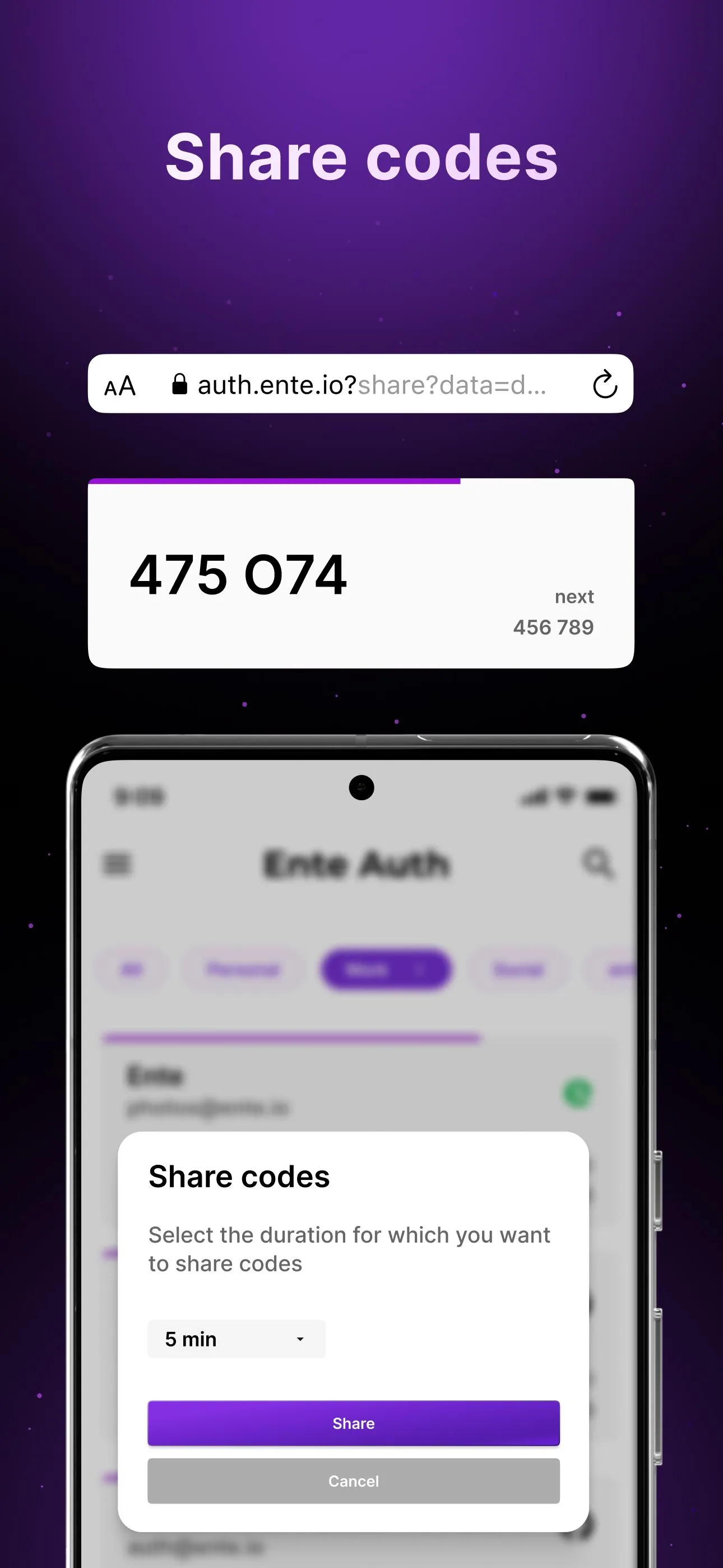
- Sharing a code with someone for 2, 5 or 10 minutes: the app calculates the codes for that time, encrypts them and puts the key in a link to Ente’s website, so the link itself carries everything.
- App lock with your phone’s lock, a PIN or a password. The FAQ is frank about it: “It does not introduce a layer of cryptographic security.” Screenshots are blocked by default.
Logos for each account
To show a logo next to each code, the app carries about 3,800 of them: 3,247 from the Simple Icons project and 548 contributed by Ente’s users. Simple Icons is published under CC0, but its disclaimer adds that this “doesn’t mean to imply that all icons within the project are also CC0”: the logos belong to their brands, most come without a licence of their own, and a few of the bundled ones are under non-commercial or no-derivatives licences. F-Droid distributes the app with these logos and flags no anti-feature for them. The screenshot on this page is the one of Ente’s own that shows no other company’s logos.
What goes online
- Without an account, nothing, as far as we can see in the code; the sync is skipped entirely in offline mode. With an account, the code talks only to Ente’s server, or to your own if you host one.
- Crash reports are off unless you turn on Crash & error reporting in the general settings; reports then go to Ente’s own Sentry server with a random ID. Ente’s privacy note: “Ente Auth collects no data by default.” Our scan found the Sentry library, which is why it shows below.
- No update check in this build; the developer’s GitHub version checks for updates, F-Droid’s doesn’t.
About this file
- This is F-Droid’s build of version 4.4.26, released on 19 October 2026 and added to F-Droid on 25 October, signed with F-Droid’s key. The Play version (more than 100,000 downloads) uses the same package name, but Ente says Play and F-Droid “may use different signing keys”, so don’t count on updating one with the other.
- 4.4.26 fixes imports from 2FAS and from OTP Auth entries without an issuer, imports multi-part Google Authenticator exports in one go, keeps notes when importing from Aegis and Bitwarden, and explains what to do when an offline-only install can’t reach its encryption key. 4.4.25, from August, redesigned the settings, setup and import screens.
- A known issue in this version: the QR code that shows an account’s secret draws its corner squares in the accent colour, which some hardware tokens with small cameras can’t read (#13336); phone cameras weren’t affected, according to the report. The issue is closed: a later change lets you tap the code to switch the corner colour, but it isn’t in 4.4.26.
- The 65.4 MB file runs on Android 7.0 and later, on 32- and 64-bit ARM and 64-bit x86. Its 10 permissions include the camera for QR codes, fingerprint unlock, internet access for sync, and storage on older Android versions for imports and exports.
- Ente Auth is licensed under the AGPL-3.0. F-Droid’s source archive for this exact build, which includes the logos, is at https://f-droid.org/repo/io.ente.auth_1118_src.tar.gz.
What’s inside the APK
Trackers
Code from these SDKs is in the package. That shows it is bundled, not how it is used.
Native code
Runs on 64-bit and older 32-bit ARM phones.
Android versions
Built for Android 16 (target API 36).
Permissions
4 of them need your approval first.
CPU types in this build: arm64-v8a (64-bit ARM, almost every phone since 2017); armeabi-v7a (32-bit ARM, older and budget phones); x86_64 (64-bit Intel, emulators and Chromebooks).
Asks you first (4)
Android shows a prompt before the app can use these.
- Use the camera · CAMERA
- Show notifications (Android 13+) · POST_NOTIFICATIONS
- Read shared storage (Android 12 and older) · READ_EXTERNAL_STORAGE
- Write shared storage (Android 10 and older) · WRITE_EXTERNAL_STORAGE
Granted at install (5)
Low-risk permissions Android grants automatically, plus any we have not classified.
- ACCESS_NETWORK_STATE
- INTERNET
- USE_BIOMETRIC
- USE_FINGERPRINT
- VIBRATE
Defined by other apps (1)
Permissions that belong to another app or to this app itself.
- io.ente.auth.DYNAMIC_RECEIVER_NOT_EXPORTED_PERMISSION
More Information
- Package name
- io.ente.auth
- Version
- 4.4.26 (build 1118)
- File size
- 65.4 MB (65,404,071 bytes)
- Requires
- Android 7.0 or later
- Category
- Network & Privacy
- License
- AGPL-3.0-only
- Developer
- ente
- Source code
- github.com/ente-io/ente/
- Released
- Oct 25, 2026
- Signed by
- F-Droid, which built this APK from the published source code. Because the key is F-Droid’s, it won’t install over a copy from Google Play or GitHub (or the other way round) without uninstalling first.
- Signer SHA-256
- bf5452863281d81bffcdf8550320ca2a300844541bef5c4859b066c2305c6352
- File SHA-256
- b0d14c249d656371dba9456a9c88cccaba9c96802b1da67d6941ba12498469d9
- Checked
- , against the F-Droid index · how we check · verify it yourself
Common questions
Is this APK the official Ente Auth release?
It is F-Droid’s build rather than the developer’s own: F-Droid compiled Ente Auth 4.4.26 from the published source code and signed it with its own key. Its SHA-256 matches F-Droid’s signed index. Because the key is F-Droid’s, it won’t install over a copy from Google Play or GitHub without uninstalling first.
What Android version does Ente Auth need?
Android 7.0 or later (API level 24). Version 4.4.26 is built for Android 16 (target API 36). Runs on 64-bit and older 32-bit ARM phones.
Can Ente Auth access the internet?
Yes. The APK requests Android’s internet permission. In total it declares 10 permissions, and 4 of them need your approval first.
Does Ente Auth contain trackers?
Yes. Version 4.4.26 contains code from Sentry, which matches an Exodus Privacy tracker signature. That shows the code is bundled, not how the app uses it.
Is Ente Auth open source?
Its code is. The source code of Ente Auth is released under the AGPL-3.0-only licence and published at https://github.com/ente-io/ente/. The roughly 3,800 brand logos it carries belong to their brands; most have no licence of their own, and a few are under non-commercial or no-derivatives licences.
Do I need an Ente account?
No. Ente’s FAQ: “Choose Use without backups to use Auth entirely offline, with no account and no connection to Ente’s servers.” Codes kept that way exist only on that phone, and Android’s own backup doesn’t include them, so make an encrypted export or a local backup.
Can I move my codes from Google Authenticator or Aegis?
Yes. The import screen reads Google Authenticator’s export QR codes, Aegis backups, including encrypted ones, and 2FAS, Bitwarden, andOTP, LastPass, Proton, Raivo and OTP Auth files, as well as a plain list of otpauth links. Version 4.4.25 fixed incomplete imports of multi-part Google Authenticator exports, 4.4.26 imports them in a single session, keeps the notes from Aegis and Bitwarden exports and fixes 2FAS imports.
Why can’t I take a screenshot of the app?
The Hide content option is on by default: it “Hides app content in the app switcher and disables screenshots”. You can turn it off in the app’s lock screen settings.
Can I switch to the Play Store or GitHub version?
Not by updating. This file is built and signed by F-Droid. The Play version has the same package name but, in Ente’s words, “may use different signing keys”, and the GitHub APK is a separate app (io.ente.auth.independent) that installs alongside this one. Export your codes before you uninstall.
Recent releases
| Version | Released | Size | Requires |
|---|---|---|---|
| v4.4.26 · this download | Oct 25, 2026 | 65.4 MB | Android 7.0+ |
| v4.4.25 | Aug 6, 2026 | 64.6 MB | Android 7.0+ |
| v4.4.23 | Jun 10, 2026 | 58.4 MB | Android 7.0+ |
Versions currently kept in the F-Droid repository. We host and check only the newest one. Full changelog.
Alternatives and related apps
-
 Aegis Authenticator An authenticator with an encrypted vault that never goes online and no account at all, for Android only.Download
-
 KeePassDX A password manager that can also generate two-factor codes stored in your own KeePass file.Download