
Keepass2Android
by PhilippC · GPL-3.0 · open source
A password manager for KeePass files that can keep your database in your own cloud storage or server, unlock it again with a few characters, and fill in passwords in apps and browsers.
Needs:Android 5.0+ · a KeePass database or a new one
2113 Apps is independent, not affiliated with or endorsed by PhilippC. Official sources: play.google.com · source code on GitHub.
- Version
- 1.15-r6
- Size
- 73.1 MB
- Requires
- Android 5.0+
- Updated
- 2026-10-15
Screenshots
Introduction
Keepass2Android is a password manager by Philipp Crocoll for databases in the KeePass format, the open format of the Windows password manager KeePass. It has more than a million downloads on Google Play, and KeePass’s own website lists it among unofficial KeePass ports. The same database file can be opened on a computer with KeePass or KeePassXC.
Where your database lives
The app can open and save databases on the phone, through Android’s file picker, or directly in Dropbox, Google Drive, OneDrive, pCloud, MEGA, a WebDAV server such as Nextcloud, an SFTP, FTP or FTPS server, or a Windows (SMB) share. For remote databases it keeps a copy in its own storage by default, so “This allows to use databases even while the database file is not accessible”, and since version 1.15, with Synchronize in background switched on, it loads and saves that copy first and synchronises with the remote file afterwards. Version 1.15-r6 extends this to adding groups, deleting and moving entries, and opens the database from the copy straight away instead of waiting for the remote file. Background sync can be limited to Wi-Fi, or to chosen Wi-Fi networks, and can also run periodically while a database is unlocked; both are off by default.
Features
- KeePass formats up to KDBX 4.1, and the older KeePass 1 format, with AES, ChaCha20 or Twofish encryption and Argon2 key derivation.
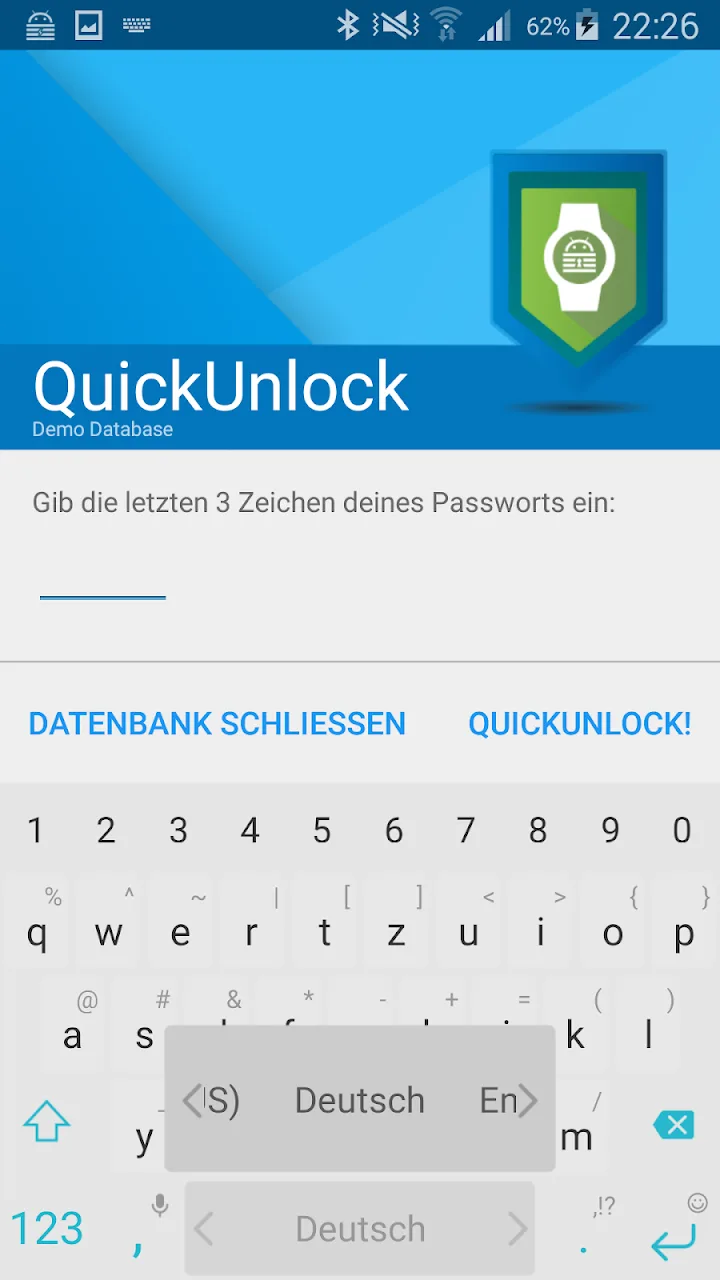
- QuickUnlock, on by default: after you open the database once with the full password, the last three characters of the password, or your fingerprint, open it again. Since version 1.13, unlocking with password characters is blocked if the phone has no screen lock.
- Autofill through Android’s autofill service, and a built-in keyboard for typing passwords, which the wiki recommends because it’s “safe against clipboard loggers”.
- Two-factor codes stored in entries, in several plugin formats; you can scan a QR code to add one.
- Unlocking with a key file, a YubiKey or other challenge-response devices, entry templates, and a backup copy made after each successful load.
What goes online
For your database, the app connects only to the storage you set up: the privacy policy says “The app does not integrate analytics, advertising, or tracking SDKs. Connections to third-party cloud services occur only when you explicitly configure them.” We found no update check and no icon downloads in the code.
The exception is Google’s code. The full version contains closed-source Google libraries: Google Play services for Google Drive sign-in, and Google’s ML Kit code scanner for QR codes, with Google’s logging component. Keepass2Android starts the scanner when you tap the scan button for a two-factor code, and Google says ML Kit collects device information, app versions, performance and error data “for diagnostics and usage analytics”. Whether these libraries send anything if you never use the scanner or Google Drive we couldn’t check, as their code is closed. They are why the app isn’t on F-Droid, and the Offline version leaves them all out.
Our scan flags “OpenTelemetry (OpenCensus, OpenTracing)”. That comes from Google’s HTTP library for Google Drive, which contains the OpenCensus interface but no implementation or exporter, so, as far as we can tell, it records and sends nothing. Our scan reads only the app’s Java code, though; Keepass2Android’s own code is written in .NET, which the scan doesn’t cover.
Back on Google Play
In early October 2026 Google removed the app from Play. The developer explained: “Google banned the app because they say it was violating their guidelines (because it has the “donations” links built in which lead to Paypal payments).” He then “published a release without the donation menu option to make sure it’s back quickly”, and the app is on Play again. A full-screen donation reminder still exists: it appears only after more than five uses, in a few short periods of the year, and the setting Never ever ask for donation turns it off.
About this file
- This is the developer’s own build of version 1.15-r6, published on GitHub on 15 October 2026: the regular version with cloud storage, as one APK for all processors. It is signed with the developer’s key from 2013, which still uses the older SHA-1 signature algorithm.
- 1.15-r6 fixes connection problems with WebDAV servers, with longer timeouts and an error message when the server can’t be reached instead of a progress window that never closes, fixes background sync, and saves Wi-Fi names containing “|” correctly. 1.15-r5, a week earlier, removed the donation menu.
- Open reports: on Android 16 the built-in keyboard can overlap the app’s bottom toolbar (#3301), and one user reported that adding attachments damaged other attachments in the database (#3298), which hasn’t been confirmed yet.
- The 73.1 MB file runs on Android 5.0 and later, on ARM and x86, 32- and 64-bit. Of its 20 permissions, location is used only for Wi-Fi names, and account access only for choosing a Google account for Google Drive.
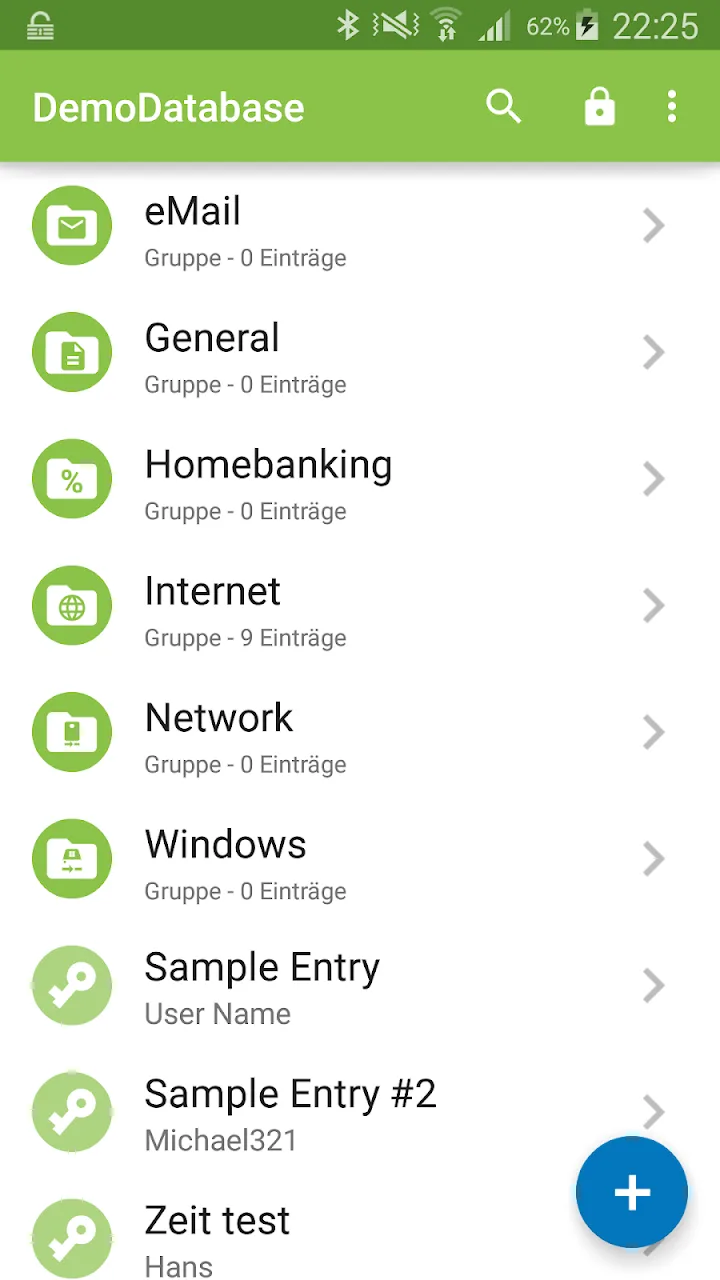
- The screenshots are from the app’s Google Play listing and show an older version in German.
- Keepass2Android is licensed under the GPL-3.0. The source of this version is at https://github.com/PhilippC/keepass2android/tree/v1.15-r6. It isn’t affiliated with KeePass or its developer, Dominik Reichl.
What’s inside the APK
Trackers
Code from these SDKs is in the package. That shows it is bundled, not how it is used.
Native code
Runs on 64-bit and older 32-bit ARM phones.
Android versions
Built for Android 16 (target API 36).
Permissions
5 of them need your approval first.
CPU types in this build: arm64-v8a (64-bit ARM, almost every phone since 2017); armeabi-v7a (32-bit ARM, older and budget phones); x86 (32-bit Intel, emulators); x86_64 (64-bit Intel, emulators and Chromebooks).
Asks you first (5)
Android shows a prompt before the app can use these.
- Precise location · ACCESS_FINE_LOCATION
- See the accounts on the device · GET_ACCOUNTS
- Show notifications (Android 13+) · POST_NOTIFICATIONS
- Read shared storage (Android 12 and older) · READ_EXTERNAL_STORAGE
- Write shared storage (Android 10 and older) · WRITE_EXTERNAL_STORAGE
Granted at install (11)
Low-risk permissions Android grants automatically, plus any we have not classified.
- ACCESS_NETWORK_STATE
- ACCESS_WIFI_STATE
- FOREGROUND_SERVICE
- FOREGROUND_SERVICE_DATA_SYNC
- FOREGROUND_SERVICE_SPECIAL_USE
- INTERNET
- MANAGE_ACCOUNTS
- USE_BIOMETRIC
- USE_CREDENTIALS
- USE_FINGERPRINT
- VIBRATE
Defined by other apps (4)
Permissions that belong to another app or to this app itself.
- com.samsung.android.providers.context.permission.WRITE_USE_APP_FEATURE_SURVEY
- keepass2android.keepass2android.DYNAMIC_RECEIVER_NOT_EXPORTED_PERMISSION
- keepass2android.keepass2android.permission.KP2aInternalFileBrowsing
- keepass2android.keepass2android.permission.KP2aInternalSearch
More Information
- Package name
- keepass2android.keepass2android
- Version
- 1.15-r6 (build 254)
- File size
- 73.1 MB (73,146,574 bytes)
- Requires
- Android 5.0 or later
- Category
- Network & Privacy
- License
- GPL-3.0
- Developer
- PhilippC
- Source code
- github.com/PhilippC/keepass2android
- Released
- Oct 15, 2026
- Signer SHA-256
- 0bf8056d3a394ed7c77173c4b42c800565b4f0a42977569cf3472c271c562939
- File SHA-256
- c43668f11ef3f031437a7448e539770c597341cd99e9cebba5445197ab511145
- Checked
- , against the v1.15-r6 release on GitHub · how we check · verify it yourself
Common questions
Is this APK the official Keepass2Android release?
Yes. It is the file from the project’s v1.15-r6 release on GitHub, byte for byte, and it matches the SHA-256 checksum GitHub publishes for it. It is signed with the certificate we recorded when we first checked Keepass2Android (SHA-256 0bf8056d3a394ed7c77173c4b42c800565b4f0a42977569cf3472c271c562939); a release signed with a different key would not be published here.
What Android version does Keepass2Android need?
Android 5.0 or later (API level 21). Version 1.15-r6 is built for Android 16 (target API 36). Runs on 64-bit and older 32-bit ARM phones.
Can Keepass2Android access the internet?
Yes. The APK requests Android’s internet permission. In total it declares 20 permissions, and 5 of them need your approval first.
Does Keepass2Android contain trackers?
Yes. Version 1.15-r6 contains code from OpenTelemetry (OpenCensus, OpenTracing), which matches an Exodus Privacy tracker signature. That shows the code is bundled, not how the app uses it.
Is Keepass2Android open source?
Its code is. The source code of Keepass2Android is released under the GPL-3.0 licence and published at https://github.com/PhilippC/keepass2android. This full version also contains closed-source Google libraries, for Google Drive sign-in and for the ML Kit QR code scanner.
Is this Keepass2Android or Keepass2Android Offline?
The regular one, with the built-in cloud and server connections. The Offline version, which the wiki says “can only read/write files through the Android file browser, but therefore does not request Internet permission”, has a different package name, so the two install side by side.
Will Google Play update this copy?
Probably. In 2025 the developer explained that, without Google’s app signing on Play, the Play and GitHub versions “have the same signature”, and in 2026 a user saw Play update a copy installed from GitHub. The same message mentions a planned switch to Google’s app signing, which would end that.
Why does a password manager ask for my location?
Only if you limit background sync to certain Wi-Fi networks: “Location permission is needed to read your current Wi-Fi SSID. This is required if you want to restrict background synchronization to certain SSIDs.” The app asks for it on that settings screen only.
Does it support passkeys?
Not in this version. Experimental passkey support is only in the 1.16 test releases, which the developer marks “only use for testing, please!”.
Recent releases
| Version | Released | Size |
|---|---|---|
| v1.15-r6 · this download | Oct 15, 2026 | 73.1 MB |
| v1.15-r5 | Oct 8, 2026 | 73.1 MB |
| v1.15-r3 | Jul 20, 2026 | 73.1 MB |
| v1.15-r2 | May 29, 2026 | 73.1 MB |
| v1.14-r4 | Dec 1, 2025 | 45.4 MB |
Recent releases on the project’s GitHub. We host and check only the newest one. Full changelog.
Alternatives and related apps
-
 KeePassDX Opens the same KeePass files with no internet permission at all; syncing is left to other apps.Download
-
 Aegis Authenticator To keep two-factor codes in a separate app instead of in the password database.Download