

KeePassDX
by Kunzisoft · GPL-3.0-or-later · open source
Your passwords in an encrypted KeePass file that you keep wherever you like. KeePassDX fills in logins and passkeys, generates passwords and one-time codes, and never goes online.
Needs:No root · Android 4.4+ (passkeys: Android 14+)
2113 Apps is independent, not affiliated with or endorsed by Kunzisoft. Official sources: keepassdx.com · source code on GitHub.
- Version
- 4.5.8
- Size
- 16.8 MB
- Requires
- Android 4.4+
- Updated
- 2026-11-01
Screenshots
Introduction
KeePassDX is a password manager for the KeePass file format, developed by Jeremy Jamet of Kunzisoft in France as a fork of the older KeePassDroid. There is no account and no cloud service behind it: your passwords live in one encrypted .kdbx file, and KeePassDX opens it, edits it and fills in logins from it. This is the Libre build, which the FAQ describes as having “no proprietary code” and not being “linked to any closed services”.
The password file
- Formats: KeePass 1 (.kdb) and KeePass 2 (.kdbx, up to version 4.1), so the same file opens in KeePassXC, KeePass and other compatible apps.
- Encryption: AES, Twofish or ChaCha20, with AES-KDF, Argon2d or Argon2id to slow down password guessing. When you create a new database, KeePassDX times the key derivation on your phone to set its strength.
- Unlocking: a master password, a key file (KeePassDX can generate one), or a hardware key such as a YubiKey through HMAC-SHA1 challenge-response. The hardware key needs Kunzisoft’s separate Key Driver app, and the wiki calls this support “only available in beta for testing”.
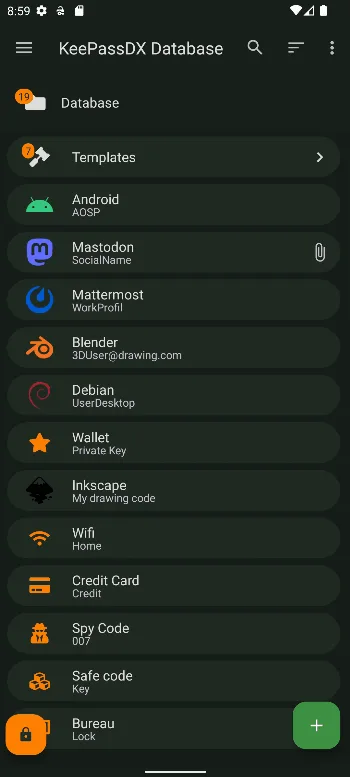
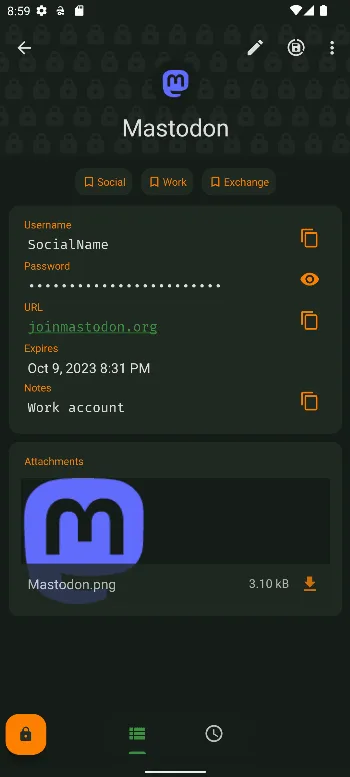
- Inside the entries: passkeys, file attachments with an image viewer, and one-time codes (TOTP and HOTP). Steam uses a code format of its own: entries that already have a Steam code, for example from KeePassXC, show it in every version, but choosing that format for a new code is unlocked only for contributors (see Libre, Free and Pro below). KeePassDX has no QR scanner: you share an
otpauth://link to it from a scanner app. - Where the file is: anywhere Android’s file picker reaches, including cloud apps that support it. KeePassDX keeps no copy of its own; when the file changes elsewhere, it offers to merge or reload. Syncing is the job of your file manager or sync app (see the questions below).
Filling in passwords and passkeys
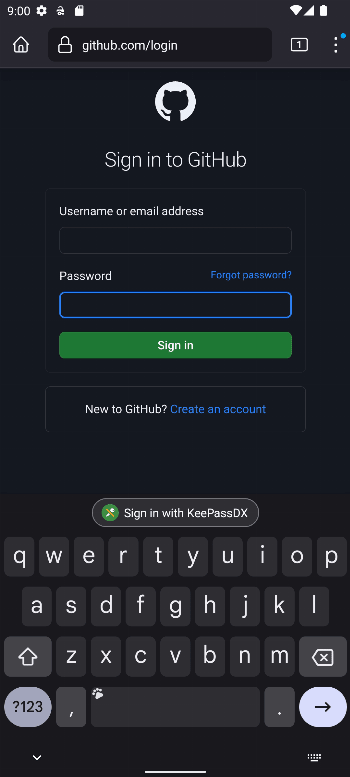
- Autofill, on Android 8.0 and later, through Android’s own autofill service. The inline suggestions shown on some keyboards are off by default.
- Magikeyboard, its own keyboard, which types an entry’s fields without the clipboard and also works on older phones.
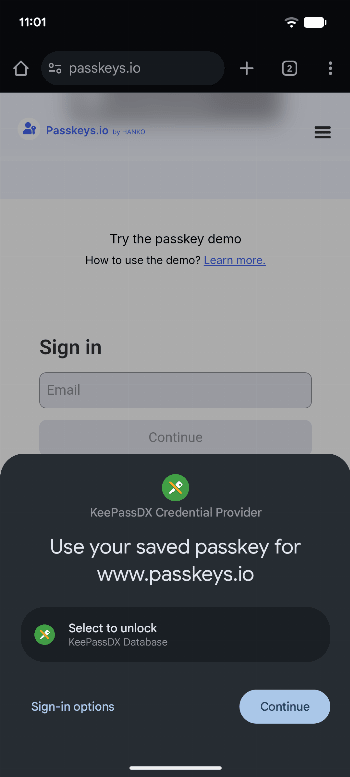
- Passkeys, since version 4.2.0, on Android 14 and later: KeePassDX creates passkeys and keeps their private keys in your database. In this Libre build, one step is different. The Google Play build trusts a ready-made list of browsers that may ask for passkeys; the Libre build has no such list, so the first time a browser like Chrome asks, KeePassDX offers to add it to Settings › Form filling › Passkeys settings › Privileged apps. Signing in to a computer with a passkey on the phone also needs Google Play services added there.
- Earlier 4.5 versions, from August and September 2026, added the passkey PRF extension, which some apps use for encrypted backups, and the post-quantum ML-DSA passkey algorithms. 4.5.6, from October, lets autofill match web addresses that have no top-level domain, such as
localhost.
Unlocking with your fingerprint
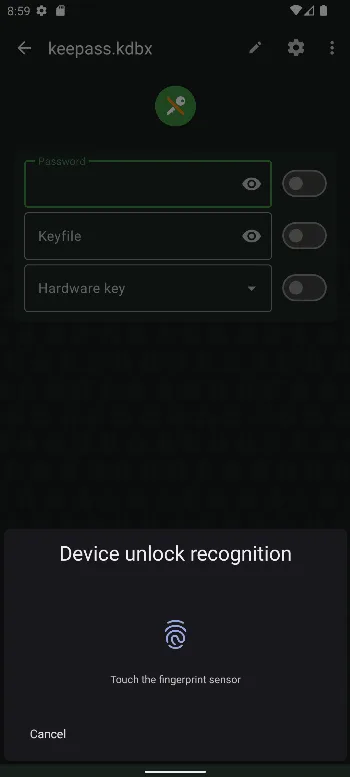
Device unlock stores your master password encrypted, with a key in the Android Keystore that only works after you authenticate, inside a dedicated security chip (StrongBox) when the phone has one. You need a screen lock set up for it. The wiki is clear that “Device unlocking does not exempt you from remembering the master password of your database.”
What goes online
Nothing. The app has no internet permission, and we found no network code: no analytics, no crash reporting, no icon downloads. Android’s own backup copies the app’s settings, but not the database or the stored unlock keys. Screenshots of the app are blocked by default.
Libre, Free and Pro
- Libre (this file,
com.kunzisoft.keepass.libre): on IzzyOnDroid, F-Droid and the project’s GitHub. - Free (
com.kunzisoft.keepass.free), on Google Play. The FAQ: “All versions currently have the same usage features”, but it lists two additions to this one that it calls “not entirely consistent with the ethics of libre software”: Steam one-time codes, which don’t follow the OTP standards, and Google’s list of browsers trusted for passkeys. In the 4.5.6 code, though, choosing Steam for a new code depends on contributor status in both versions (see Pro); the browser list is what differs. - Pro isn’t a separate password manager. “KeePro Support” is a paid app on Google Play ($10 in the US); installed next to KeePassDX, it marks you as a contributor, which unlocks extra visual themes and the manual choice of Steam codes. The FAQ: “Manual selection of this algorithm can therefore only be unlocked after a contribution.” People who contribute in other ways can ask the developer for an unlock procedure by e-mail.
Because their package names differ, Libre and Free install side by side, and neither updates the other. To switch, install the other one and open the same .kdbx file.
About this file
- This is the developer’s own build of version 4.5.8, from October 2026, via IzzyOnDroid: the same file, byte for byte, as the Libre APK on KeePassDX’s GitHub releases. Its signing certificate matches the fingerprint published in the README. F-Droid builds and signs its own Libre copy with a different key, so moving between F-Droid’s and this one means uninstalling first (see the questions below for what that removes).
- Version 4.5.7 fixed the autofill menu and the extension used when saving a new database file, but also enabled code shrinking for every build, including Libre; Libre users reported crashes, including one report of a database becoming a zero-byte file. Version 4.5.8 reverts that shrinking change. This site did not host 4.5.7.
- The 16.8 MB file runs on ARM and x86 phones and needs Android 4.4 or later; passkeys need Android 14. Our scan found no trackers.
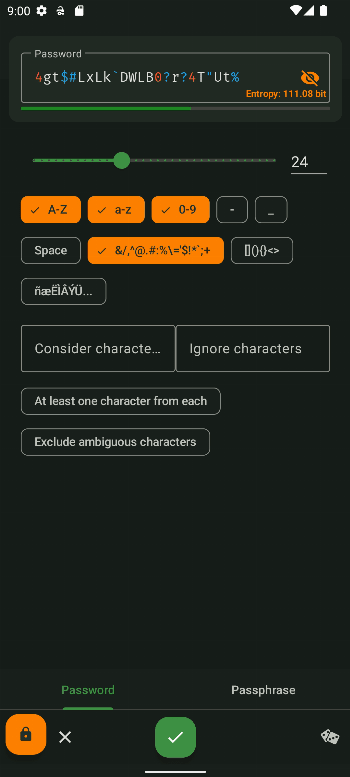
- The screenshots are the project’s own. Apart from the first, with the passkey prompt, they date from 2023, so details of today’s screens differ.
- KeePassDX is licensed under the GPL-3.0 or later. Its built-in icon packs are based on Nuvola (LGPL-2.1) and Font Awesome (CC BY 4.0).
What’s inside the APK
Trackers
No code matching the Exodus Privacy tracker signatures.
Native code
Runs on 64-bit and older 32-bit ARM phones.
Android versions
Built for Android 16 (target API 36).
Permissions
1 of them need your approval first.
CPU types in this build: arm64-v8a (64-bit ARM, almost every phone since 2017); armeabi-v7a (32-bit ARM, older and budget phones); x86 (32-bit Intel, emulators); x86_64 (64-bit Intel, emulators and Chromebooks).
Asks you first (1)
Android shows a prompt before the app can use these.
- Show notifications (Android 13+) · POST_NOTIFICATIONS
You switch these on in Settings (1)
Special app access. Nothing is granted until you turn it on yourself.
- Alarms and reminders · SCHEDULE_EXACT_ALARM
Granted at install (6)
Low-risk permissions Android grants automatically, plus any we have not classified.
- FOREGROUND_SERVICE
- FOREGROUND_SERVICE_DATA_SYNC
- FOREGROUND_SERVICE_SPECIAL_USE
- USE_BIOMETRIC
- USE_FINGERPRINT
- VIBRATE
Defined by other apps (1)
Permissions that belong to another app or to this app itself.
- com.kunzisoft.keepass.libre.DYNAMIC_RECEIVER_NOT_EXPORTED_PERMISSION
More Information
- Package name
- com.kunzisoft.keepass.libre
- Version
- 4.5.8 (build 45800)
- File size
- 16.8 MB (16,786,874 bytes)
- Requires
- Android 4.4 or later
- Category
- Network & Privacy
- License
- GPL-3.0-or-later
- Developer
- Kunzisoft
- Source code
- github.com/Kunzisoft/KeePassDX
- Released
- Nov 1, 2026
- Signer SHA-256
- 7d55b8af210381aabf960f07e17cf7857b6d2a642ca2da6bf0bdf1b200362f04
- File SHA-256
- 8aaac6a0c55a9de760147990856726e197efbbcdc5ce2f6bfb4d4ab2a3d65f74
- Checked
- , against the IzzyOnDroid index · how we check · verify it yourself
Common questions
Is this APK the official KeePassDX release?
Yes. It is the developer’s own release of KeePassDX 4.5.8, byte for byte as IzzyOnDroid distributes it. Its SHA-256 matches IzzyOnDroid’s signed index, and it is signed with the certificate IzzyOnDroid records for the app (SHA-256 7d55b8af210381aabf960f07e17cf7857b6d2a642ca2da6bf0bdf1b200362f04).
What Android version does KeePassDX need?
Android 4.4 or later (API level 19). Version 4.5.8 is built for Android 16 (target API 36). Runs on 64-bit and older 32-bit ARM phones.
Can KeePassDX access the internet?
No. The APK doesn’t request Android’s internet permission, so the app can’t go online by itself. In total it declares 9 permissions, and 1 of them needs your approval first.
Does KeePassDX contain trackers?
No known trackers: our scan of version 4.5.8 found no code matching the Exodus Privacy tracker signatures. The scan covers known tracker libraries; it doesn’t show what data the app itself sends.
Is KeePassDX open source?
Yes. KeePassDX is released under the GPL-3.0-or-later licence, and its source code is published at https://github.com/Kunzisoft/KeePassDX.
Can KeePassDX import a CSV file from another password manager?
No. The project’s wiki says it “does not and will not offer this plaintext import feature” and recommends importing the CSV into KeePass 2 or KeePassXC on a computer, then opening the resulting .kdbx file on the phone. Our guide walks through this for Google Password Manager: https://h5.2113.net/guides/google-password-manager-to-keepassdx.html
Does it sync with KeePassXC or Google Drive?
It opens the same .kdbx files as KeePassXC and KeePass, but syncing is left to other apps: a file manager or cloud app that works with Android’s file picker. The wiki says Google Drive works only “Partially”, and warns that users saw corrupted files when Syncthing synced while the database was being saved.
How do I make it fill in passwords?
In KeePassDX, open Settings › Form filling › Credential provider service and choose KeePassDX in the Android screen that opens. In Chrome, also choose Autofill settings › Autofill using another service. Autofill needs Android 8.0 or later; on older phones, the Magikeyboard types entries in instead.
What happens to my passwords if I uninstall the app?
Nothing, as long as you keep the file. The FAQ: “The application will be deleted from your phone, but your database (stored in a .kdbx file) will remain.” You lose the app’s settings, its list of recent files and the keys for fingerprint unlocking, which you set up again.
Recent releases
| Version | Released | Size | Requires |
|---|---|---|---|
| v4.5.8 · this download | Nov 1, 2026 | 16.8 MB | Android 4.4+ |
| v4.5.7 | Oct 31, 2026 | 12.8 MB | Android 4.4+ |
Versions currently kept in the IzzyOnDroid repository. We host and check only the newest one. Full changelog.
Alternatives and related apps
-
 Aegis Authenticator If you want two-factor codes in a separate app from your passwords; Aegis has no internet permission either.Download
-
 Keepass2Android Opens the same KeePass files and syncs them itself with Dropbox, Google Drive, OneDrive, WebDAV or SFTP, so it needs internet access.Download