
MJ PDF
by Mudlej · GPL-3.0-or-later · open source
A PDF library and reader with continuous, single- and dual-page layouts, text reflow, search, bookmarks, annotations, forms and signatures.
Needs:Android 6.0+ · 64-bit ARM device
2113 Apps is independent, not affiliated with or endorsed by Mudlej. Official sources: source code on GitLab.
- Version
- 3.1.0
- Size
- 9.0 MB
- Requires
- Android 6.0+
- Updated
- 2026-08-16
Screenshots
Introduction
MJ PDF is an open-source PDF reader by Mudlej. It combines a recent-files screen and folder-based library with reading and editing tools that a minimal viewer leaves out. The emphasis is still PDF: this is not an EPUB library or an office suite.
The hosted file is the project’s official 3.1.0 APK. We matched it byte for byte to the current download at the developer’s site and confirmed the same release and arm64 asset in the project’s release records. IzzyOnDroid distributes it with the developer’s signature unchanged.
Library and reading layouts
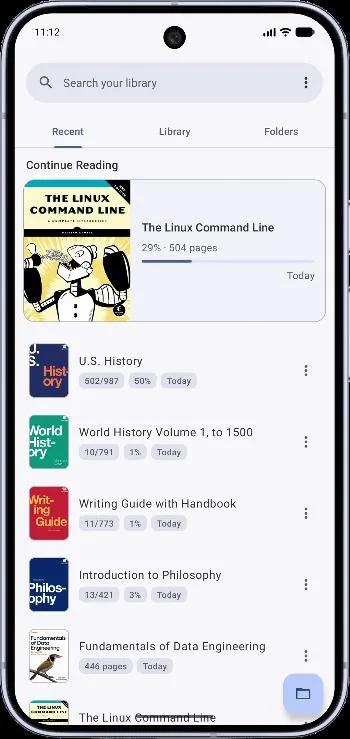
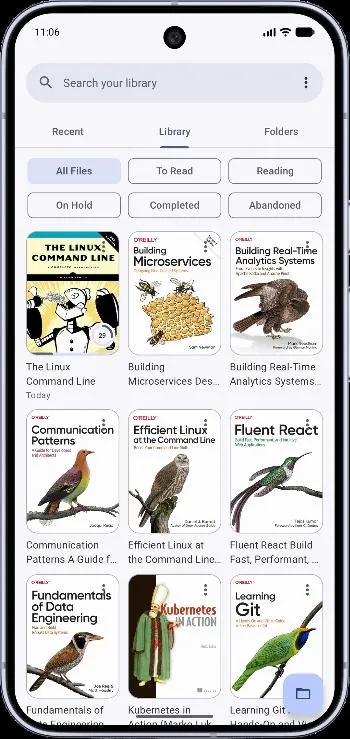
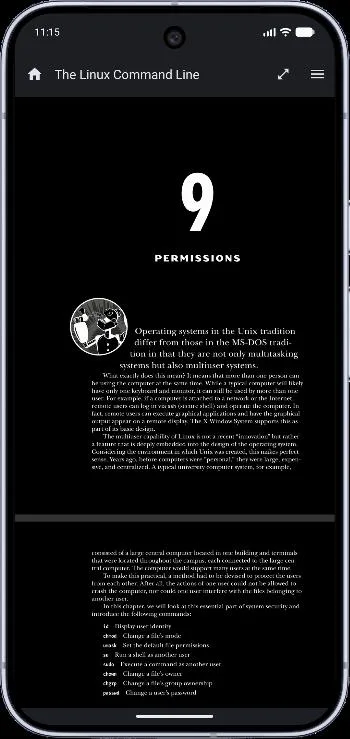
The home screen keeps Recent, Library and Folders views. You can search known PDFs, open a file through Android’s picker or grant broader file access so the app can find and organise documents across storage. Reading status helps separate new, in-progress and finished files, and the app can continue from the last position.
Inside a PDF, the source and interface include:
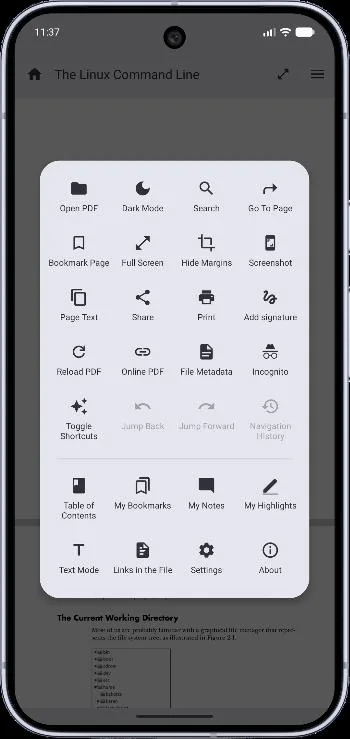
- continuous vertical, horizontal, single-page and dual-page layouts;
- page fit and margin-hiding options, right-to-left direction and full-screen reading;
- outline/table-of-contents navigation, page bookmarks and in-document search;
- a dark-PDF mode and auto-scroll;
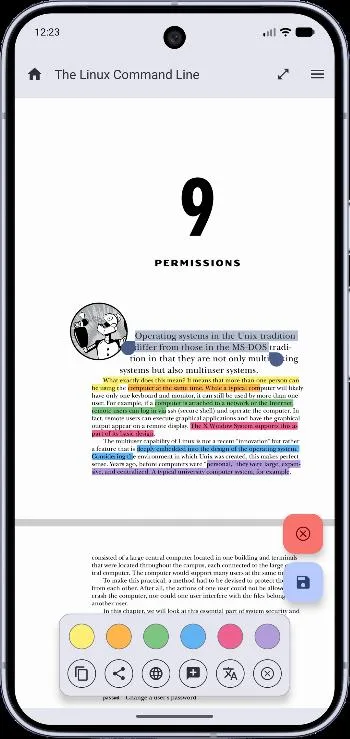
- selectable text, highlighting and notes stored in the document;
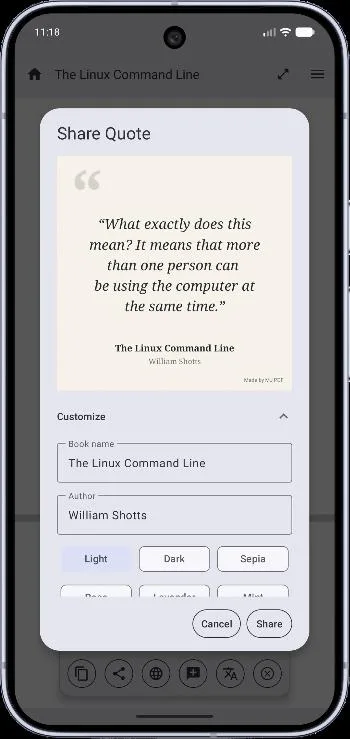
- form filling, handwritten signatures, printing and sharing; and
- Text Mode, which extracts and reflows text for a narrow screen.
Text Mode depends on how the PDF was made. A scan that contains only page images may have no useful text layer, and complex columns or equations may not reflow cleanly. Dark mode can also change how a page looks; neither feature alters the meaning or accessibility of the original document.
MJ PDF can open password-protected documents and PDFs from an online address. The internet permission supports online files, crash reporting and optional offline-dictionary downloads from GitLab; local reading does not require an account. Incognito is intended for files you do not want kept in recent history. Backup and restore cover the app’s library information and settings, but important annotated documents should still be backed up as files.
File access and crash reports
On recent Android versions, choosing a document or folder through the system picker gives narrower access. MJ PDF also supports Android’s all-files access for scanning and managing PDFs across shared storage. That is a powerful permission: grant it only if the library scan is useful to you.
Our APK scanner detected ACRA, an open-source crash-reporting library, and labels it as one tracker. Ordinary crashes present a consent dialog and require pressing Send; the form lists field names rather than showing each field’s content. However, the APK records embedded source commit c3c5ccc, before the later cffaf43 consent fix. In this file, PDF main-thread violations are sent to ACRA as silent exceptions. Reports go to a third-party Back4App endpoint and can include stack traces, app and Android details, device model, logcat and memory information. We verified the code path but did not measure how often a document triggers it.
The V3.1.0 tag’s release notes describe correctness and stability changes, including single-page and fit behaviour, inline search and safer document saving and backups. This APK identifies an earlier commit from the same release line, so we do not attribute every tag change to the exact binary. The notes also do not guarantee that every unusual or damaged PDF will render correctly.
About this file
- This is the developer-signed 3.1.0 arm64 APK, mirrored unchanged by IzzyOnDroid. Its hash and size match the APK served by the project’s own website.
- It needs Android 6.0 or later and a 64-bit ARM processor. The 9.0 MB file has no 32-bit ARM or x86 library.
- It declares nine permissions. ACRA is the one crash-reporting library detected; ordinary crashes ask before sending, but PDF main-thread violations can take the silent-report path described above.
- MJ PDF is licensed under GPL-3.0 or later. Its bundled PDF engine and other libraries retain their own open-source licences.
What’s inside the APK
Trackers
Code from these SDKs is in the package. That shows it is bundled, not how it is used.
Native code
Needs a 64-bit ARM phone; 32-bit-only devices are not supported.
Android versions
Built for Android 16 (target API 36).
Permissions
2 of them need your approval first.
CPU types in this build: arm64-v8a (64-bit ARM, almost every phone since 2017).
Asks you first (2)
Android shows a prompt before the app can use these.
- Read shared storage (Android 12 and older) · READ_EXTERNAL_STORAGE
- Write shared storage (Android 10 and older) · WRITE_EXTERNAL_STORAGE
You switch these on in Settings (1)
Special app access. Nothing is granted until you turn it on yourself.
- All files access · MANAGE_EXTERNAL_STORAGE
Granted at install (5)
Low-risk permissions Android grants automatically, plus any we have not classified.
- ACCESS_NETWORK_STATE
- FOREGROUND_SERVICE
- INTERNET
- RECEIVE_BOOT_COMPLETED
- WAKE_LOCK
Defined by other apps (1)
Permissions that belong to another app or to this app itself.
- com.gitlab.mudlej.MjPdfReader.DYNAMIC_RECEIVER_NOT_EXPORTED_PERMISSION
More Information
- Package name
- com.gitlab.mudlej.MjPdfReader
- Version
- 3.1.0 (build 2058)
- File size
- 9.0 MB (8,952,640 bytes)
- Requires
- Android 6.0 or later
- Category
- Reading & Maps
- License
- GPL-3.0-or-later
- Developer
- Mudlej
- Source code
- gitlab.com/mudlej_android/mj_pdf_reader
- Released
- Aug 16, 2026
- Signer SHA-256
- af92a1a81b45b9d6a5d9f1637fd6be98fd889b48128c009da9afd7ba0fc2f089
- File SHA-256
- c095c1d339aa58eb9dddca701054419c373957941bd518df50eacca33737a5d2
- Checked
- , against the IzzyOnDroid index · how we check · verify it yourself
Common questions
Is this APK the official MJ PDF release?
Yes. It is the developer’s own release of MJ PDF 3.1.0, byte for byte as IzzyOnDroid distributes it. Its SHA-256 matches IzzyOnDroid’s signed index, and it is signed with the certificate IzzyOnDroid records for the app (SHA-256 af92a1a81b45b9d6a5d9f1637fd6be98fd889b48128c009da9afd7ba0fc2f089).
What Android version does MJ PDF need?
Android 6.0 or later (API level 23). Version 3.1.0 is built for Android 16 (target API 36). Needs a 64-bit ARM phone; 32-bit-only devices are not supported.
Can MJ PDF access the internet?
Yes. The APK requests Android’s internet permission. In total it declares 9 permissions, and 2 of them need your approval first.
Does MJ PDF contain trackers?
Yes. Version 3.1.0 contains code from ACRA, which matches an Exodus Privacy tracker signature. That shows the code is bundled, not how the app uses it.
Is MJ PDF open source?
Yes. MJ PDF is released under the GPL-3.0-or-later licence, and its source code is published at https://gitlab.com/mudlej_android/mj_pdf_reader.
Why won’t this APK install on my phone?
This hosted 3.1.0 file contains only arm64-v8a native code. It needs a 64-bit ARM device; Android 6.0 is the minimum. The project’s GitLab release also provides universal, armeabi-v7a, x86 and x86_64 APKs for other processors, but those files are not hosted on this page.
Does MJ PDF silently upload crash reports?
Sometimes. Ordinary crashes open an ACRA dialog and require **Send**, but this APK’s embedded source commit predates the later consent fix: PDF main-thread violations are passed to ACRA as silent exceptions. Reports go to Back4App and can include logcat plus app and device details. We did not measure how often that path fires.
Alternatives and related apps
-
 MuPDF viewer A much smaller viewer with no annotation tools and no internet permission.Download
-
 Librera Reader A full e-book library for EPUB, PDF, MOBI, comics and read-aloud.Download