

MuPDF viewer
by Artifex Software LLC · AGPL-3.0-or-later · open source
Artifex’s own Android viewer for its MuPDF engine: it opens PDF, XPS, EPUB, MOBI, FB2 and CBZ comic files for reading, with search and a table of contents, and does little else.
Needs:No root · Android 5.0+
2113 Apps is independent, not affiliated with or endorsed by Artifex Software LLC. Official sources: mupdf.com · source code on GitHub.
- Version
- 1.28.5a
- Size
- 17.1 MB
- Requires
- Android 5.0+
- Updated
- 2026-09-27
Screenshots
Introduction
MuPDF is the PDF and document engine of Artifex Software, the company that also makes Ghostscript, and it is used inside many other apps, including Librera Reader. MuPDF viewer is Artifex’s own small Android app around it. The README describes it as “a simplified variant of the full MuPDF Android app that only supports viewing documents”. New versions follow each MuPDF release; 1.28.5a came out in September 2026. Artifex also publishes an even more minimal app, MuPDF mini.
What it does
- Opens documents through Android’s file picker, or from another app with Open with: PDF, XPS and OpenXPS, EPUB, MOBI, FB2 and CBZ comic archives.
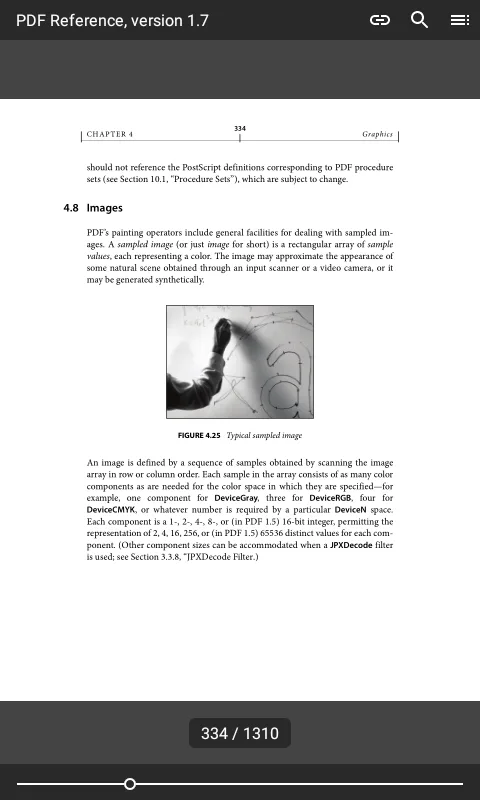
- Reading: pinch to zoom; tap near an edge to move back or forward, and in the middle to show the toolbars. A slider and a page counter at the bottom.
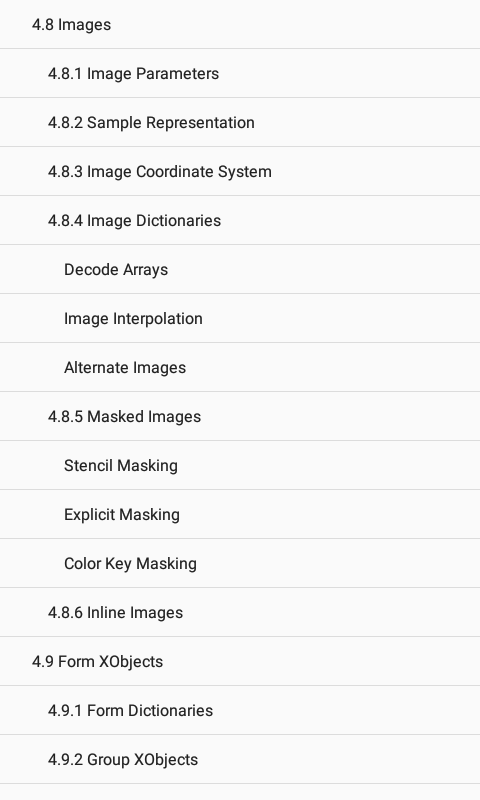
- Search with highlighted hits, and the table of contents when the document has one.
- Password-protected PDFs ask for the password.
- Text size for EPUB, MOBI and FB2, which are laid out to fit the screen.
- It remembers the page you were on in each document.
To stay small, the Android build leaves out MuPDF’s own fallback fonts and uses the phone’s system fonts when a document doesn’t embed its own. Files up to 8 megabytes are read into memory, larger ones as needed. The menus are in English only.
What it doesn’t do
It is a viewer and nothing else: no annotations, form filling, text selection or copying, saving, printing or sharing, no night mode, no continuous vertical scrolling and no jump to a page number. F-Droid’s description says MuPDF supports “annotations, searching, form editing and more”; that describes the engine, not this app.
Two open bug reports to know about: on EPUB files the remembered page can drift further on each reopening, and the page slider can disappear and not come back.
What goes online
Nothing. The app declares no internet permission and contains no analytics or crash-reporting code. A web link you tap, once links are switched on, is handed to your browser.
About this file
- This is F-Droid’s build of version 1.28.5a, compiled from Artifex’s tagged source, with the MuPDF library also built from source rather than downloaded ready-made from Artifex, and signed with F-Droid’s key. The Google Play version has the same package name but another key, so neither updates the other. Artifex offers no APK download of its own.
- The 17.1 MB file runs on Android 5.0 and later, on ARM, 32- and 64-bit, and on 32-bit x86. It declares 1 permission, reading storage, which the code never asks for; files reach it through the file picker or Open with, so it most likely reads only the documents you open in it.
- MuPDF viewer and MuPDF are licensed under the AGPL-3.0 or later. Artifex sells commercial licences to developers who build MuPDF into products that can’t meet the AGPL; that doesn’t concern using the app. The engine includes open-source libraries such as FreeType, HarfBuzz, OpenJPEG and zlib.
- F-Droid has no screenshots for this app; ours are from its Google Play listing, which doesn’t say which version they show.
What’s inside the APK
Trackers
No code matching the Exodus Privacy tracker signatures.
Native code
Runs on 64-bit and older 32-bit ARM phones.
Android versions
Built for Android 16 (target API 36).
Permissions
1 of them need your approval first.
CPU types in this build: arm64-v8a (64-bit ARM, almost every phone since 2017); armeabi-v7a (32-bit ARM, older and budget phones); x86 (32-bit Intel, emulators).
Asks you first (1)
Android shows a prompt before the app can use these.
- Read shared storage (Android 12 and older) · READ_EXTERNAL_STORAGE
More Information
- Package name
- com.artifex.mupdf.viewer.app
- Version
- 1.28.5a (build 270)
- File size
- 17.1 MB (17,128,961 bytes)
- Requires
- Android 5.0 or later
- Category
- Reading & Maps
- License
- AGPL-3.0-or-later
- Developer
- Artifex Software LLC
- Source code
- github.com/ArtifexSoftware/mupdf-android-viewer
- Released
- Sep 27, 2026
- Signed by
- F-Droid, which built this APK from the published source code. Because the key is F-Droid’s, it won’t install over a copy from Google Play or GitHub (or the other way round) without uninstalling first.
- Signer SHA-256
- f7de6763f66a3c6e7b0c8b78e528cb1c1f5dd3b3b0e2859e36e49988d7fadcce
- File SHA-256
- 18c1f0b47d89870ddbf3b93d4f4d444e479c686377c696ef54dbe0e73a7b0a0e
- Checked
- , against the F-Droid index · how we check · verify it yourself
Common questions
Is this APK the official MuPDF viewer release?
It is F-Droid’s build rather than the developer’s own: F-Droid compiled MuPDF viewer 1.28.5a from the published source code and signed it with its own key. Its SHA-256 matches F-Droid’s signed index. Because the key is F-Droid’s, it won’t install over a copy from Google Play or GitHub without uninstalling first.
What Android version does MuPDF viewer need?
Android 5.0 or later (API level 21). Version 1.28.5a is built for Android 16 (target API 36). Runs on 64-bit and older 32-bit ARM phones.
Can MuPDF viewer access the internet?
No. The APK doesn’t request Android’s internet permission, so the app can’t go online by itself. In total it declares 1 permission, and 1 of them needs your approval first.
Does MuPDF viewer contain trackers?
No known trackers: our scan of version 1.28.5a found no code matching the Exodus Privacy tracker signatures. The scan covers known tracker libraries; it doesn’t show what data the app itself sends.
Is MuPDF viewer open source?
Yes. MuPDF viewer is released under the AGPL-3.0-or-later licence, and its source code is published at https://github.com/ArtifexSoftware/mupdf-android-viewer.
Can I highlight, annotate or fill in PDF forms with it?
No. Its README: “The annotation editing and form filling features are not present here.” It can’t select or copy text, save, print or share either. Those are requests in the project’s issue tracker.
Does it read EPUB, FB2 and MOBI, and can I change the text size?
Yes. For those formats, which reflow to fit the screen, the menu sets the font size from 6 to 16 points, 10 by default. The Play listing speaks of “unprotected EPUB”: books locked with DRM won’t open.
Why don’t links work when I tap them?
Links are off by default. Tap the link button in the top bar to highlight them and make them tappable. Web links then open in another app, since the viewer itself has no internet access; links to local files aren’t followed.
Will it reopen a document at the page where I stopped?
It saves the page for each document when you leave and goes back to it when you open the file again. With EPUB files, an open bug report describes the restored page drifting further on each reopening.
Recent releases
| Version | Released | Size | Requires |
|---|---|---|---|
| v1.28.5a · this download | Sep 27, 2026 | 17.1 MB | Android 5.0+ |
| v1.28.4a | Sep 17, 2026 | 17.1 MB | Android 5.0+ |
| v1.28.3a | Aug 27, 2026 | 17.1 MB | Android 5.0+ |
Versions currently kept in the F-Droid repository. We host and check only the newest one. Full changelog.
Alternatives and related apps
-
 Librera Reader Built on the same MuPDF engine, with bookmarks, read-aloud, dictionaries and many more formats and settings.Download
-
 KOReader A full e-book reader with highlights, notes, dictionaries and Calibre sync, made first for e-ink devices.Download