MMRL
by Der_Googler · GPL-3.0-only · open source
A module manager for rooted phones: browse repositories, read what a module contains, and install, update or remove it through your root solution’s own installer.
Needs:Root with Magisk, KernelSU or APatch for installing
2113 Apps is independent, not affiliated with or endorsed by Der_Googler. Official sources: source code on GitHub.
- Version
- v34296-release
- Size
- 7.5 MB
- Requires
- Android 8.0+
- Updated
- 2026-03-09
Screenshots
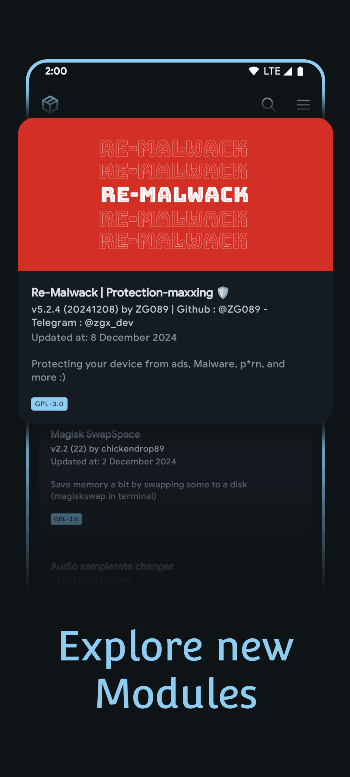
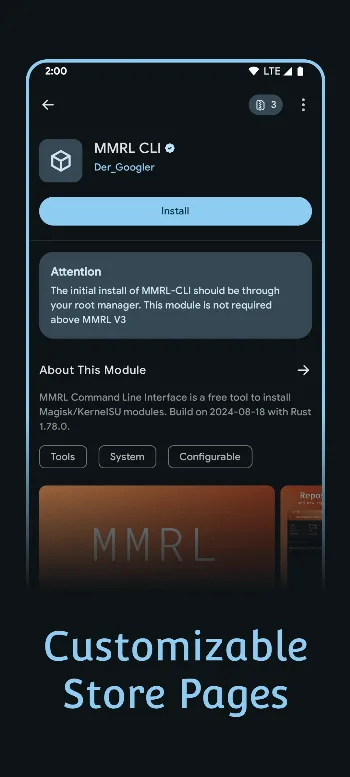
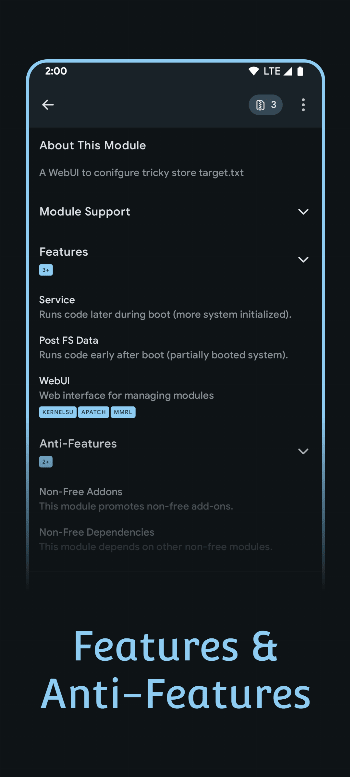
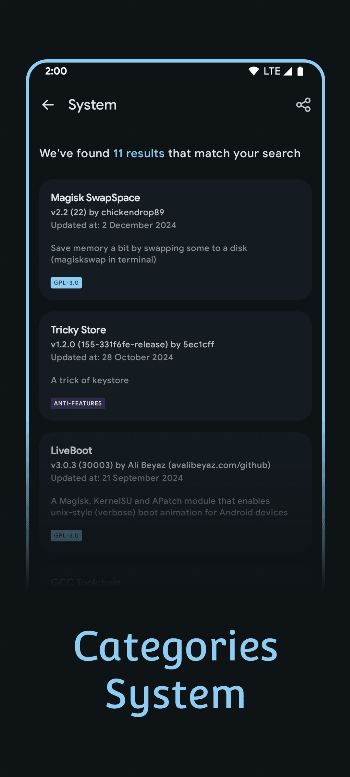
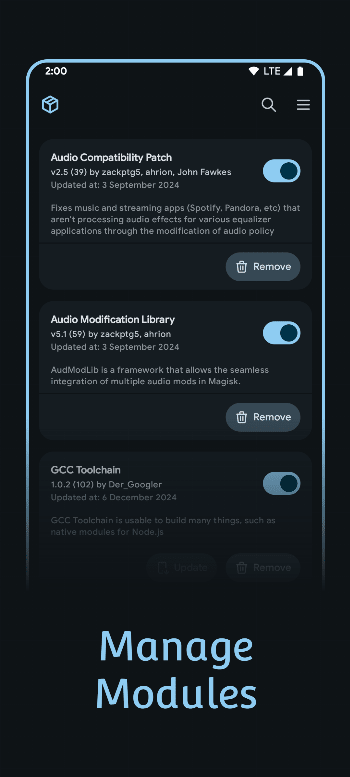
Introduction
MMRL, short for Magisk Module Repo Loader, is a store app for root modules. It describes itself as “an app for managing, sharing, and exploring Magisk modules across repositories”. It doesn’t root anything: installing goes through the root solution already on your phone, using that solution’s own command (magisk --install-module, ksud module install or apd module install).
What it works with
When you first open it, you pick a working mode: Magisk, KernelSU (and the rsuntk and 5ec1cff forks of it), KernelSU Next, APatch, SukiSU Ultra, or Non-Root. Without root, MMRL can browse repositories and download modules, but not install them.
On KernelSU and KernelSU Next, installing through MMRL still runs their own installer, so their rules apply: KernelSU Next’s check for known malicious modules, for example, and the need for a metamodule before modules are mounted.
Repositories
MMRL adds one repository by default, the Googlers Magisk Repo, run by MMRL’s developer. Its guidelines say a moderator approves each submission, and they forbid “deleting core files, breaking system intentionally, adware, spyware, or any kind of module harmful to the end user”; programs included in a module need their source code. An Explore screen suggests about ten more repositories from other people, each added only if you choose to; their rules are their own.
Two things MMRL adds on top:
- A blacklist, kept by the MMRL project and checked at every start, which warns about modules it lists; its notes on one entry read “Sends device specs to external server - Includes APK without source - Includes obfuscated scripts”.
- Anti-features, labels in the style of F-Droid’s that a repository can set on a module, such as Ads, Tracking, non-free network services, obfuscated code, or written by an AI model.
Neither is a malware scan. Before installing, a module’s page shows the files it contains and what it changes.
Other features
- Installing several modules at once, and handling dependencies between modules.
- Module pages with descriptions, screenshots, version history and the developer’s donation link.
- Shortcuts on the home screen for modules with a web interface. Those interfaces now open in the separate app WebUI X: Portable, which MMRL asks you to install the first time.
- Optional background services that check repositories and module updates, all off by default, and an optional encrypted-DNS workaround for countries that block repository sites, also off.
What goes online
From the v34296 source code:
- The MMRL blacklist, from mmrl.dev, each time the app starts. There is no setting for it.
- An update check against a changelog file on mmrl.dev each time you open the home screen; on by default, and it can be turned off. The Download button opens the GitHub release in your browser.
- Repository lists from each repository’s own server when you refresh or add one, and module covers, screenshots and readmes from wherever the module’s developer hosts them, when you open a module.
We found no analytics, crash-reporting or advertising code. The home screen has a permanent Support Me card that links to the developer’s GitHub Sponsors page. F-Droid labels the app as depending on its developer’s servers.
About this file
- This is the developer’s own build of version v34296, published on GitHub on 9 March 2026 Hong Kong time, delivered through IzzyOnDroid: byte for byte the GitHub release
MMRL-v34296-release-official.apk, signed by Jimmy Boehm (Der_Googler). Its release notes only list translations. - It is the latest release outside Google Play. Development has gone on since: the main branch is 59 commits ahead, with code changes until July 2026, and Google Play has builds from June 2026 that aren’t on GitHub. The project hasn’t said why. One change since this release adds a component from a package repository that isn’t public, so we’ll check that newer versions can still be built from public source before hosting them.
- We don’t host the spoofed build, which is the same app under a random package name, generated once per release.
- A known problem: several users report that the app crashes on Android 17 (#652, open).
- The screenshots are the project’s own, from December 2024, older than this version; we left out one that shows another project’s module.
- The 7.5 MB file runs on Android 8.0 and later and declares 15 permissions, mostly for downloads, notifications and the optional background services. Root actions go through your root solution, not Android permissions.
- MMRL is licensed under the GPL-3.0. Its terms of service say anyone may “Host and distribute the original or modified versions”, and ask for a link to the official site, which is https://mmrl.dev. The source of this version is at https://github.com/MMRLApp/MMRL/tree/v34296.
What’s inside the APK
Trackers
No code matching the Exodus Privacy tracker signatures.
Native code
Runs on 64-bit and older 32-bit ARM phones.
Android versions
Built for Android 16 (target API 36).
Permissions
3 of them need your approval first.
CPU types in this build: arm64-v8a (64-bit ARM, almost every phone since 2017); armeabi; armeabi-v7a (32-bit ARM, older and budget phones); mips; mips64; x86 (32-bit Intel, emulators); x86_64 (64-bit Intel, emulators and Chromebooks).
Asks you first (3)
Android shows a prompt before the app can use these.
- Show notifications (Android 13+) · POST_NOTIFICATIONS
- Read shared storage (Android 12 and older) · READ_EXTERNAL_STORAGE
- Write shared storage (Android 10 and older) · WRITE_EXTERNAL_STORAGE
Granted at install (7)
Low-risk permissions Android grants automatically, plus any we have not classified.
- ACCESS_NETWORK_STATE
- FOREGROUND_SERVICE
- FOREGROUND_SERVICE_DATA_SYNC
- FOREGROUND_SERVICE_SPECIAL_USE
- INTERNET
- RECEIVE_BOOT_COMPLETED
- WAKE_LOCK
Defined by other apps (5)
Permissions that belong to another app or to this app itself.
- com.android.launcher.permission.INSTALL_SHORTCUT
- com.dergoogler.mmrl.permission.MODCONF
- com.dergoogler.mmrl.permission.WEBUI_LEGACY
- com.dergoogler.mmrl.permission.WEBUI_X
- moe.shizuku.manager.permission.API_V23
More Information
- Package name
- com.dergoogler.mmrl
- Version
- v34296-release (build 34296)
- File size
- 7.5 MB (7,493,186 bytes)
- Requires
- Android 8.0 or later
- Category
- Root & Mods
- License
- GPL-3.0-only
- Developer
- Der_Googler
- Source code
- github.com/MMRLApp/MMRL
- Released
- Mar 9, 2026
- Signer SHA-256
- 102c2579a177579073dfc69bdf889ad04de9e7c53726a99d65873ec122183860
- File SHA-256
- ec259dae03336bd93b97c52198a4a6ab3ac8de8f76fa50b36522b569eb00dd3b
- Checked
- , against the IzzyOnDroid index · how we check · verify it yourself
Common questions
Is this APK the official MMRL release?
Yes. It is the developer’s own release of MMRL v34296-release, byte for byte as IzzyOnDroid distributes it. Its SHA-256 matches IzzyOnDroid’s signed index, and it is signed with the certificate IzzyOnDroid records for the app (SHA-256 102c2579a177579073dfc69bdf889ad04de9e7c53726a99d65873ec122183860).
What Android version does MMRL need?
Android 8.0 or later (API level 26). Version v34296-release is built for Android 16 (target API 36). Runs on 64-bit and older 32-bit ARM phones.
Can MMRL access the internet?
Yes. The APK requests Android’s internet permission. In total it declares 15 permissions, and 3 of them need your approval first.
Does MMRL contain trackers?
No known trackers: our scan of version v34296-release found no code matching the Exodus Privacy tracker signatures. The scan covers known tracker libraries; it doesn’t show what data the app itself sends.
Is MMRL open source?
Yes. MMRL is released under the GPL-3.0-only licence, and its source code is published at https://github.com/MMRLApp/MMRL.
Does MMRL need root?
Only for installing. In its own words: “Non-Root: Not require Root permissions, only the download module function is available.” To install, enable or remove modules you need Magisk, KernelSU (or one of two forks of it), KernelSU Next, APatch or SukiSU Ultra. Its store description still says it won’t work without root, which is out of date.
Are the modules checked?
Only by whoever runs each repository. The one MMRL adds by default, the Googlers Magisk Repo, approves submissions by hand and requires source code for included programs. MMRL itself adds a shared blacklist with warnings and labels such as Tracking or Ads that repositories can set. It doesn’t scan modules for malware.
Why does a module’s web interface ask me to install another app?
Since recent versions, module web interfaces open in a separate app from the same developer, WebUI X: Portable. Without it, MMRL shows a sheet asking you to install it.
Can I update between this file and the F-Droid or Play Store versions?
Not with F-Droid’s, which F-Droid builds itself and signs with its own key. The Play Store gets separate builds, newer than this one, and we couldn’t check their signing key. This file is the same as the developer’s GitHub release and IzzyOnDroid’s copy, so it updates over those.
Recent releases
| Version | Released | Size | Requires |
|---|---|---|---|
| v34296-release · this download | Mar 9, 2026 | 7.5 MB | Android 8.0+ |
| v34292-release | Feb 22, 2026 | 7.5 MB | Android 8.0+ |
Versions currently kept in the IzzyOnDroid repository. We host and check only the newest one. Full changelog.
Alternatives and related apps
-
 KernelSU Next Its manager now has a module catalogue of its own, from curated lists.Download
-
 Magisk The root solution MMRL was first written for; its own app installs modules from files.Download