

personalDNSfilter
GPL-2.0-only · open source
A small DNS filter by Ingo Zenz: it answers lookups for blocked ad, tracker and malware domains with an empty address, filtering on the phone through a local VPN that carries only DNS.
Needs:No root · Android 4.2+ · Private DNS off
2113 Apps is independent, not affiliated with or endorsed by the personalDNSfilter developers. Official sources: zenz-solutions.de · source code on GitHub.
- Version
- 1.50.61.5
- Size
- 0.6 MB
- Requires
- Android 4.2+
- Updated
- 2026-10-25
Screenshots
Introduction
personalDNSfilter blocks ads, trackers and malware at the level of DNS, the lookups that turn a name such as ads.example.com into an address. When an app asks for a domain on its filter lists, personalDNSfilter answers with an empty address, 0.0.0.0, and the app’s request goes nowhere. It is made by Ingo Zenz of Zenz Solutions in Germany; the code dates from 2017, and releases come several times a year, the latest, 1.50.61.5, on 18 October 2026. The same program also runs on Windows and Linux computers.
It isn’t a VPN service. The developer’s FAQ: “personalDNSfilter is not a VPN application that connects to a server to hide your IP. The local VPN is only used to filter the DNS requests.”
How it filters
By default it starts a local VPN whose only route is a virtual DNS server address, 10.10.10.10, so only DNS lookups pass through the app; the rest of your traffic goes out as usual. Two other modes, both off by default:
- DNS proxy without the VPN: the app listens as a DNS server on port 5300. Something has to send DNS there, which per the FAQ means root or another app that redirects it.
- Root mode, which only works together with proxy mode: with root, it uses
iptablesto send the phone’s DNS to itself on port 53, and can then also filter for other devices on your network.
In VPN mode you can exclude apps from filtering, on Android 5.0 and later. On Android 7 and 8 the code always excludes five Google apps, Play Store, Drive, Photos, Gmail and Translate, with the comment that Android “has an issue with VPN in combination with some google apps”. It also checks the aliases (CNAMEs) in answers, so a tracker hidden behind a harmless-looking name is blocked too.
Filter lists
The lists aren’t built in. On first start, and then every 7 days, the app downloads and combines the ones switched on:
| On by default | Off by default, among others |
|---|---|
| 1Hosts Lite | AdAway, Dan Pollock’s hosts |
| StevenBlack’s ads and malware | StevenBlack’s fake news, gambling, porn and social lists |
| Hagezi Pro | Hagezi Light, Normal, Pro++ and Ultimate; OISD; URLhaus |
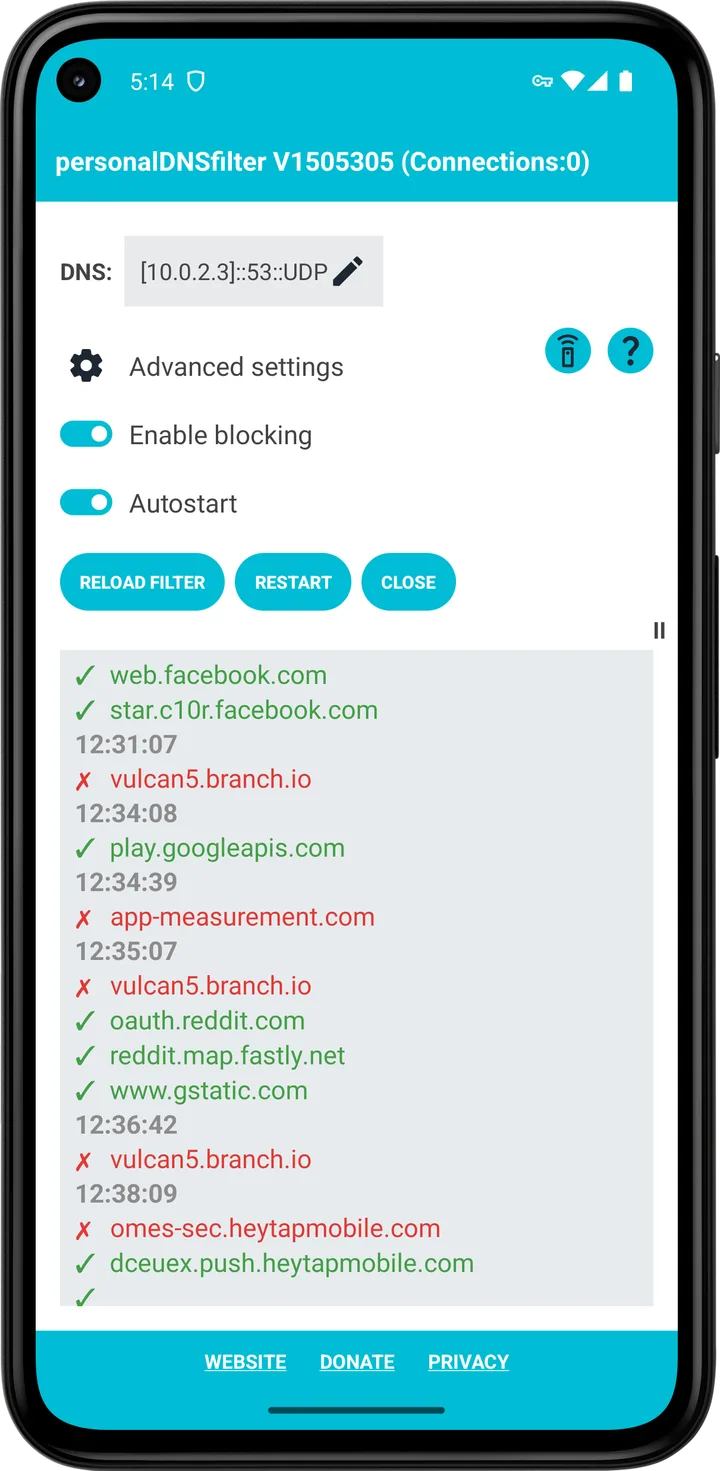
Your own rules go in a text file: domains to block, ! for exceptions, * wildcards, and >name address to point a name at an address of your choice. The main screen shows a live log of lookups, blocked ones in red. Some ads are out of reach of any DNS filter; the FAQ: “Those ads can’t be blocked via DNS filtering, because they are loaded from the same domains/hosts as the videos or content.”
Defaults to know
From the default configuration of this version:
- DNS servers: the ones your network provides, over plain DNS. A fallback list, used when none is detected or in root mode, has AdGuard’s non-filtering servers and two encrypted ones, censurfridns over TLS and LibreDNS over TLS or HTTPS; Google, Quad9, Mullvad and Cloudflare are listed but switched off. Among the active servers it picks the fastest. DNS over HTTPS uses HTTP/2 on Android 10 and later.
- A log of every lookup is kept on the phone, as described in the questions below.
- It starts on boot, and the first-run message asks you to exempt it from battery optimization, “as otherwise Android might kill the service!”
- Remote control of the filter over the network is off; if you turn it on, change the default passphrase, which is published in the configuration file.
- Updating keeps your own settings: only values you never changed take the new defaults.
Before you install
- Turn off Private DNS in Android’s network settings, and in Chrome, its own “Use secure DNS” setting, as the FAQ advises; both can bypass the filter.
- Don’t use Android’s “Block connections without VPN” with it. The FAQ: “This is why your internet connection is blocked then.”
- Voice and video calls: users report Telegram and Viber calls failing while it runs. The developer assumes those apps can’t call over the VPN interface and suggests excluding them.
What goes online
- Your DNS lookups, to the servers above. When the servers change, it sends each one five test lookups for random names to measure its speed.
- Filter list downloads at first start and every 7 days, from GitHub and the jsDelivr CDN. There is no setting to limit this to Wi-Fi; you can switch lists off.
- Nothing else: no analytics, crash reports or update check, and no connection to the developer’s servers, in line with its privacy policy, which says “there is no connection to our servers”. The policy’s list of filter sources is out of date and doesn’t name jsDelivr.
About this file
- This is F-Droid’s build of version 1.50.61.5, compiled from the developer’s tagged source and signed with F-Droid’s key. Its release notes add configurable bootstrap DNS servers to the non-Android edition and align the version number with a special release, so they list no Android behaviour change. The APK on GitHub and the developer’s website is signed with the developer’s own key, a 1024-bit RSA certificate named “test32”, so the two can’t update each other: back up your settings in the app first, then uninstall to switch. Whether Google Play’s copy uses the developer’s key we couldn’t check.
- The 0.6 MB file runs on Android 4.2 and later and declares 11 permissions: internet and network state, foreground service and notifications for the filter, starting at boot, a wake lock during list updates, or all the time if you turn on keep-awake, the list of installed apps for the exclusion picker, and storage, which the code only checks to move the settings folder of old versions.
- personalDNSfilter is licensed under the GPL-2.0; F-Droid lists it as GPL-2.0-only, while half the source files say “or (at your option) any later version”. It uses no third-party libraries at all.
- The screenshot is from the developer’s website and shows version 1.50.53.5.
What’s inside the APK
Trackers
No code matching the Exodus Privacy tracker signatures.
Native code
Pure Java/Kotlin, so it runs on any CPU.
Android versions
Built for Android 16 (target API 36).
Permissions
3 of them need your approval first.
Asks you first (3)
Android shows a prompt before the app can use these.
- Show notifications (Android 13+) · POST_NOTIFICATIONS
- Read shared storage (Android 12 and older) · READ_EXTERNAL_STORAGE
- Write shared storage (Android 10 and older) · WRITE_EXTERNAL_STORAGE
Granted at install (8)
Low-risk permissions Android grants automatically, plus any we have not classified.
- ACCESS_NETWORK_STATE
- FOREGROUND_SERVICE
- FOREGROUND_SERVICE_SPECIAL_USE
- FOREGROUND_SERVICE_SYSTEM_EXEMPTED
- INTERNET
- QUERY_ALL_PACKAGES
- RECEIVE_BOOT_COMPLETED
- WAKE_LOCK
More Information
- Package name
- dnsfilter.android
- Version
- 1.50.61.5 (build 1506105)
- File size
- 0.6 MB (641,769 bytes)
- Requires
- Android 4.2 or later
- Category
- Network & Privacy
- License
- GPL-2.0-only
- Source code
- github.com/IngoZenz/personaldnsfilter
- Released
- Oct 25, 2026
- Signed by
- F-Droid, which built this APK from the published source code. Because the key is F-Droid’s, it won’t install over a copy from Google Play or GitHub (or the other way round) without uninstalling first.
- Signer SHA-256
- d7d98dc22da624e1bb36815b3c426d3555c23c53acd3e6585ab383de874c9f35
- File SHA-256
- 73489010f4d28800cc7ea8fa10b2c8b340c3f19ce81ba56760b4dc4054869039
- Checked
- , against the F-Droid index · how we check · verify it yourself
Common questions
Is this APK the official personalDNSfilter release?
It is F-Droid’s build rather than the developer’s own: F-Droid compiled personalDNSfilter 1.50.61.5 from the published source code and signed it with its own key. Its SHA-256 matches F-Droid’s signed index. Because the key is F-Droid’s, it won’t install over a copy from Google Play or GitHub without uninstalling first.
What Android version does personalDNSfilter need?
Android 4.2 or later (API level 17). Version 1.50.61.5 is built for Android 16 (target API 36). Pure Java/Kotlin, so it runs on any CPU.
Can personalDNSfilter access the internet?
Yes. The APK requests Android’s internet permission. In total it declares 11 permissions, and 3 of them need your approval first.
Does personalDNSfilter contain trackers?
No known trackers: our scan of version 1.50.61.5 found no code matching the Exodus Privacy tracker signatures. The scan covers known tracker libraries; it doesn’t show what data the app itself sends.
Is personalDNSfilter open source?
Yes. personalDNSfilter is released under the GPL-2.0-only licence, and its source code is published at https://github.com/IngoZenz/personaldnsfilter.
Does it work with Android’s Private DNS turned on?
The developer says no. The app’s first-run message asks you to make sure Private DNS is disabled: “When enabled, personalDNSfilter might be bypassed!” It is the first thing the FAQ suggests checking when ads aren’t blocked.
Can I use it together with a VPN app?
Not in its default mode, because Android runs only one VPN at a time. It has a mode without the VPN that listens as a DNS server on port 5300; the FAQ says that works only on rooted phones or with another app that redirects DNS to it.
Are my DNS lookups encrypted?
They can be: it supports DNS over TLS and over HTTPS. By default, though, it uses the DNS servers your Wi-Fi or mobile network hands out, over plain DNS. Its built-in encrypted servers are used only if it can’t detect those, in root mode, or when you switch detection off.
Does it keep a record of the sites I visit?
On the phone, yes, by default: it logs every DNS lookup and answer to two rotating files of up to one megabyte each in its own storage folder. Nothing in the code uploads that log. You can turn it off with the enableTrafficLog setting.
Recent releases
| Version | Released | Size | Requires |
|---|---|---|---|
| v1.50.61.5 · this download | Oct 25, 2026 | 0.6 MB | Android 4.2+ |
| v1.50.61.3 | Sep 28, 2026 | 0.6 MB | Android 4.2+ |
| v1.50.60.8 | Jun 24, 2026 | 0.6 MB | Android 4.2+ |
Versions currently kept in the F-Droid repository. We host and check only the newest one. Full changelog.
Alternatives and related apps
-
 Rethink: DNS + Firewall + VPN Also filters DNS through a local VPN, and adds a per-app firewall and encrypted DNS to servers you choose.Download
-
 AdAway Blocks ads with a hosts file: with root it edits the system’s, without root it filters through a local VPN.Download