

Photo Editor
by Burhanuddin Rashid · MIT · open source
Open or take a photo, draw over it, place text, emoji and stickers, apply color effects, undo changes and save the result in the sample app for the PhotoEditor library.
Needs:Android 5.0+ · network for stickers and UI font
2113 Apps is independent, not affiliated with or endorsed by Burhanuddin Rashid. Official sources: source code on GitHub.
- Version
- 3.1.1
- Size
- 11.8 MB
- Requires
- Android 5.0+
- Updated
- 2026-10-04
Screenshots
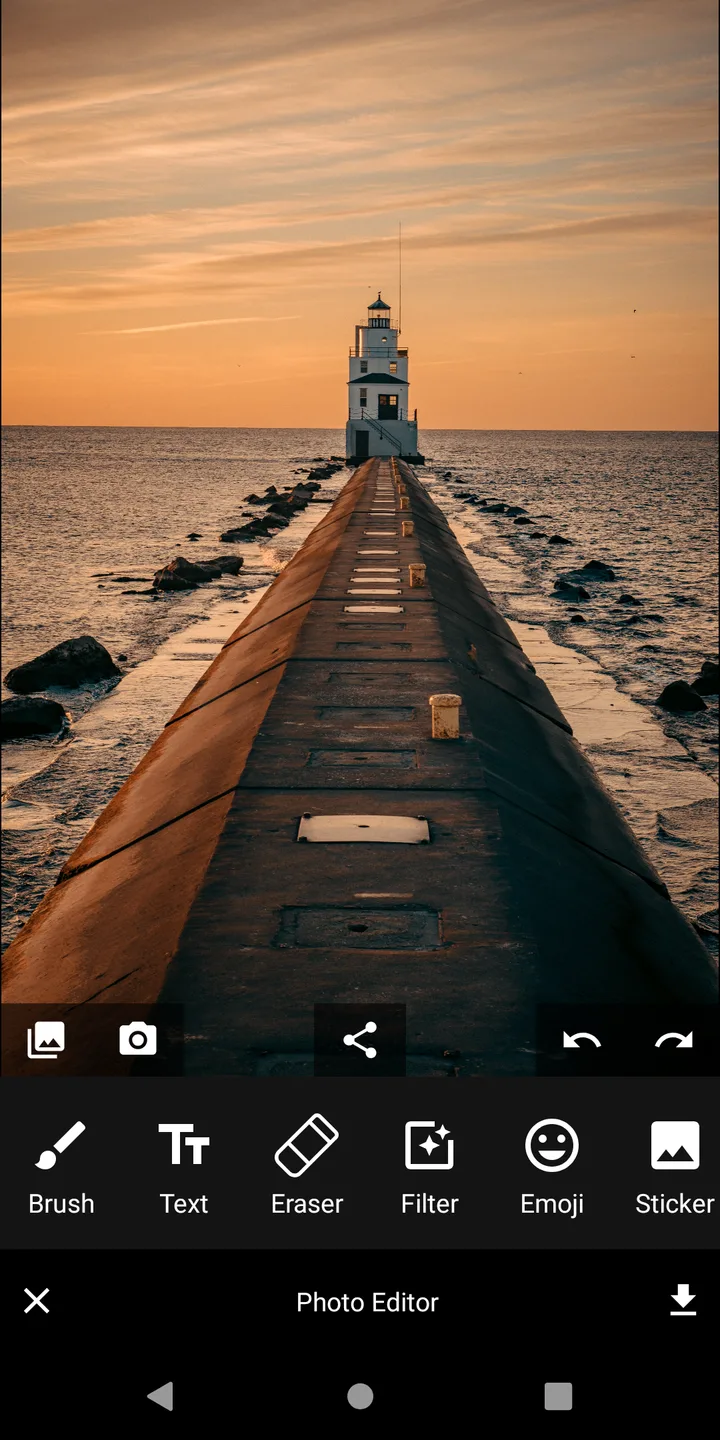
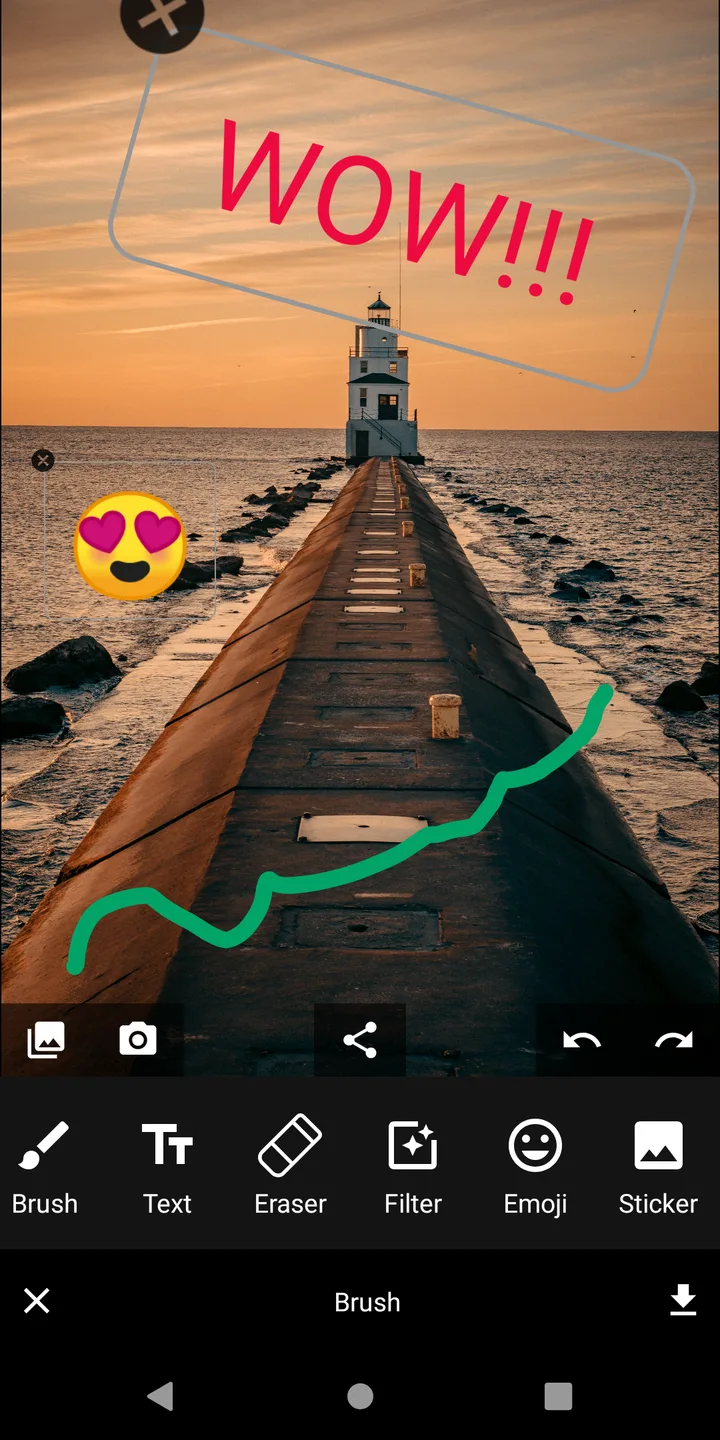
Introduction
Photo Editor is Burhanuddin Rashid’s sample app for the open-source PhotoEditor Android library. Developers embed the library in other apps; this APK exposes its main features as a small editor you can run directly. That origin explains both its useful tools and its rougher, demonstration-style interface.
What the sample app can do
- Pick an image through Android’s file chooser or open the camera; the camera path receives Android’s small preview thumbnail rather than a full-resolution capture.
- Draw freehand or use line, oval and rectangle shapes, changing color, size and opacity; switch to the eraser when needed.
- Tap a position on the image, enter text there, then drag, rotate or scale the resulting layer. Version 3.1.1 removes the previous limitation that always inserted text in the center.
- Add Unicode emoji and nine food stickers loaded from Flaticon.
- Apply more than twenty Android MediaEffect filters, including brightness, contrast, grayscale, sepia, saturation, vignette, fisheye, rotate and horizontal or vertical flip.
- Undo and redo layer and brush changes, delete a selected layer, save the edited image, and share it through another app.
There is no crop tool, no layer list, no project file for returning to an edit later, and no batch workflow. Filters have open upstream reports for scaling, memory use and the GLSurfaceView implementation. Those limits make Image Toolbox a better choice for general conversion and crop work; this app is useful when its exact draw/text/filter set is enough or when you want to inspect the library’s sample.
What goes online
The sticker picker downloads the chosen image from cdn-icons-png.flaticon.com. The emoji row uses Android’s downloadable-font provider for Roboto Medium, which can ask Google Play services to fetch the font when it is not cached. There is no account, photo upload, analytics or update check, and our APK scan found no tracker. A photo stays local unless you explicitly share it through another app.
The APK declares internet, the old Android storage write permission, and an internal receiver permission. On current Android versions, file selection and saving go through system-managed storage instead of unrestricted file access.
About this file
- This is F-Droid’s build of version 3.1.1, added on 4 October 2026 and signed with F-Droid’s key. It was built from the same repository as the PhotoEditor library.
- The 11.8 MB file runs on Android 5.0 and later and contains no native CPU-specific library.
- Version 3.1.1 adds explicit placement for new text and corresponding tests and documentation. The prior 3.1.0 release added filled or outlined shapes and proper undo/redo state counters.
- The project code is MIT licensed. The sample’s online food stickers come from Flaticon. Its bundled Beyond Wonderland font says “All Rights Reserved” in its name record but has no repository licence; the EmojiOne font is CC BY 4.0 and needs attribution; the built-in
paris_tower.jpgexample has no stated source.
What’s inside the APK
Trackers
No code matching the Exodus Privacy tracker signatures.
Native code
Pure Java/Kotlin, so it runs on any CPU.
Android versions
Built for Android 14 (target API 34).
Permissions
1 of them need your approval first.
Flagged by F-Droid:
- NonFreeNet: Relies on or promotes a proprietary network service.
Asks you first (1)
Android shows a prompt before the app can use these.
- Write shared storage (Android 10 and older) · WRITE_EXTERNAL_STORAGE
Granted at install (1)
Low-risk permissions Android grants automatically, plus any we have not classified.
- INTERNET
Defined by other apps (1)
Permissions that belong to another app or to this app itself.
- com.burhanrashid52.photoediting.DYNAMIC_RECEIVER_NOT_EXPORTED_PERMISSION
More Information
- Package name
- com.burhanrashid52.photoediting
- Version
- 3.1.1 (build 12)
- File size
- 11.8 MB (11,753,687 bytes)
- Requires
- Android 5.0 or later
- Category
- Media
- License
- MIT
- Developer
- Burhanuddin Rashid
- Source code
- github.com/burhanrashid52/PhotoEditor
- Released
- Oct 4, 2026
- Signed by
- F-Droid, which built this APK from the published source code. Because the key is F-Droid’s, it won’t install over a copy from Google Play or GitHub (or the other way round) without uninstalling first.
- Signer SHA-256
- 124b62c501b71e3100f5fa7df0d4600dbfc7c7ec1b00af72b08c454ec3027eca
- File SHA-256
- 23c1ad5275a5d3b07b0c024b8931333367349bfbc8527ca1eaf11c492c63518f
- Checked
- , against the F-Droid index · how we check · verify it yourself
Common questions
Is this APK the official Photo Editor release?
It is F-Droid’s build rather than the developer’s own: F-Droid compiled Photo Editor 3.1.1 from the published source code and signed it with its own key. Its SHA-256 matches F-Droid’s signed index. Because the key is F-Droid’s, it won’t install over a copy from Google Play or GitHub without uninstalling first.
What Android version does Photo Editor need?
Android 5.0 or later (API level 21). Version 3.1.1 is built for Android 14 (target API 34). Pure Java/Kotlin, so it runs on any CPU.
Can Photo Editor access the internet?
Yes. The APK requests Android’s internet permission. In total it declares 3 permissions, and 1 of them needs your approval first.
Does Photo Editor contain trackers?
No known trackers: our scan of version 3.1.1 found no code matching the Exodus Privacy tracker signatures. The scan covers known tracker libraries; it doesn’t show what data the app itself sends.
Is Photo Editor open source?
Its code is. The source code of Photo Editor is released under the MIT licence and published at https://github.com/burhanrashid52/PhotoEditor. The sample bundles Beyond Wonderland with an ‘All Rights Reserved’ name record but no licence, and a Paris photo with no stated source. Its EmojiOne font requires CC BY 4.0 attribution.
Is this a full photo-editing app or a demo?
It is the project’s runnable sample app for its PhotoEditor Android library. The controls work and saved images are real, but the project’s priority is demonstrating the library API, not matching a large consumer editor.
Can it crop or resize a photo?
No crop tool is implemented; the project’s FAQ explicitly says it dropped that work. It can rotate or flip through filters and scale added text, emoji and sticker layers, but it does not resize the source canvas.
Why does an editor need internet access?
The sticker panel loads nine food stickers from Flaticon’s CDN with Glide. The emoji row also requests Google’s downloadable Roboto Medium font through Play services when it is not cached. F-Droid marks this build NonFreeNet; linking that label to either exact path is our inference because its metadata gives no reason.
Are the screenshots from version 3.1.1?
No. F-Droid’s signed metadata records are empty files, so this page uses the two real screenshots in the project repository instead. They were added in February 2021 and show an older interface; they establish the sample’s editing workflow, not the exact current layout.
Recent releases
| Version | Released | Size | Requires |
|---|---|---|---|
| v3.1.1 · this download | Oct 4, 2026 | 11.8 MB | Android 5.0+ |
| v3.1.0 | Mar 15, 2026 | 11.7 MB | Android 5.0+ |
| v3.0.2 | Jun 21, 2024 | 11.1 MB | Android 5.0+ |
Versions currently kept in the F-Droid repository. We host and check only the newest one. Full changelog.
Alternatives and related apps
-
 ImageToolbox A full image utility with crop, resize, format conversion and batch tools; this Photo Editor is primarily a demonstration of a developer library.Download
-
 Fossify Gallery A gallery with simple crop, resize, rotate, flip, drawing and filters, plus photo browsing and organization.Download
-
 Tux Paint A drawing app built for children, starting from a blank canvas rather than editing a photo with text and filters.Download