

Syncthing-Fork
by researchxxl · MPL-2.0 · open source
The community-maintained Android app for Syncthing: choose folders on your phone and keep them in sync with your computer or other phones, device to device, and decide when it’s allowed to run.
Needs:Android 6.0+ · Syncthing on your other devices
2113 Apps is independent, not affiliated with or endorsed by researchxxl. Official sources: source code on GitHub.
- Version
- 2.1.7.0
- Size
- 62.0 MB
- Requires
- Android 6.0+
- Updated
- 2026-10-21
Screenshots
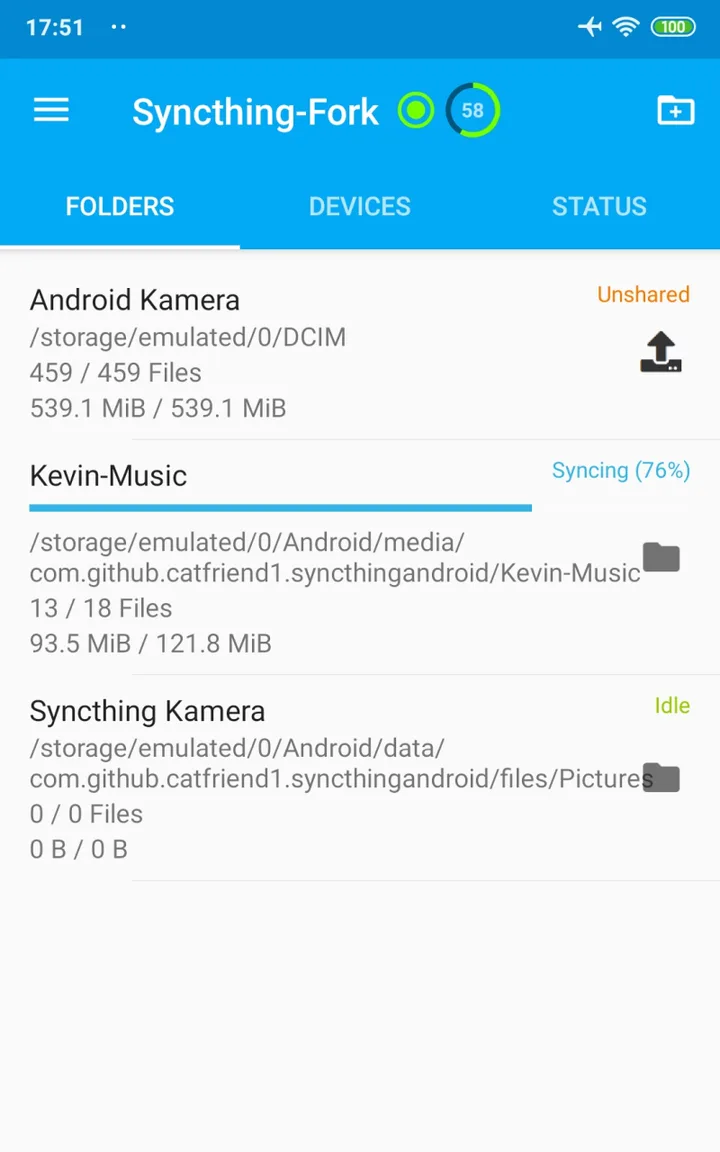
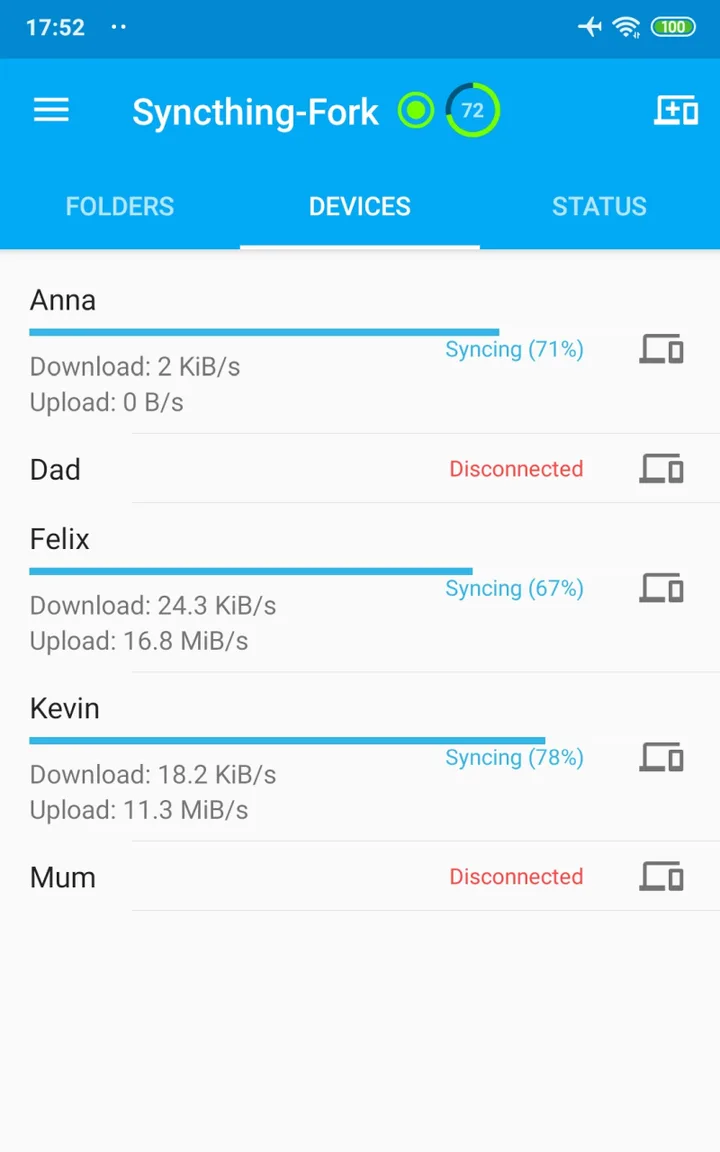
Introduction
Syncthing is an open-source program that keeps folders in sync between your devices. In its documentation’s words, it “does not upload your data to the cloud but exchanges your data across your machines as soon as they are online at the same time”, and “All device to device traffic is protected by TLS.” Syncthing-Fork is an Android app built around it: it runs the official Syncthing program, version 2.1.7 in this file, in the background, and adds Android screens for folders and devices and rules for when syncing is allowed. You install Syncthing on your computer or other devices as well, and connect them by device ID or QR code.
Who makes it
Syncthing’s own Android app was discontinued; its README says “This app is discontinued. The last release on Github and F-Droid will happen with the December 2024 Syncthing version.” Syncthing-Fork, which had been forked from that app and maintained by a developer known as Catfriend1, carried on.
In November 2025 the project’s repository moved to a new maintainer, researchxxl. In February 2026, on Syncthing’s forum, Catfriend1 wrote: “I did hand over all my stuff to my inheritant @researchxxl inluding the com.github.catfriend1* apps, digital signing material”. Syncthing’s lead developer had criticised how it was done: “this is approximately the opposite of how I’d recommend doing one, in terms of communication and building trust.” Releases have continued about monthly since then, still signed with the “Catfriend1” certificate that the project’s wiki lists for its GitHub and F-Droid builds.
The Syncthing-Fork on Google Play is a separate release by another developer, nel0x, under the older package name. It doesn’t update this app, and this app doesn’t update it.
What it adds to Syncthing
- Android screens for folders, devices and status, so you don’t need Syncthing’s web interface. Devices are added by scanning their QR code with the built-in scanner, or picked from those found on the same network. The web interface is still there, but the wiki says it “should as far as possible be considered as read only”, because the app can overwrite changes made in it.
- Run conditions decide when Syncthing runs. Out of the box it runs on Wi-Fi or Ethernet, but not on metered Wi-Fi or mobile data; on battery as well as on the charger; and stops when Battery Saver is on. You can limit it to chosen Wi-Fi networks or to charging, follow a time schedule (by default 5 minutes in every hour, when switched on), and set exceptions for each folder or device.
- Folder types from Syncthing: send and receive, send only, receive only, and receive encrypted, plus versioning that keeps old or deleted files. New folders on the phone start with a trash can that keeps deleted files for 14 days.
- Extras: a list of recent changes, sharing files into a synced folder from other apps, Quick Settings tiles, settings export and import, Android TV support, and an optional “Syncthing Camera” that takes photos straight into a shared folder.
Our guide How to back up your Android photos to your computer walks through a one-way photo backup with it.
What goes online
- Your devices connect directly where they can. To find each other they use Syncthing’s defaults, all switched on: local discovery on your network; global discovery, which every 30 minutes sends your device ID and listening ports to Syncthing’s discovery servers; NAT traversal; and relays, which are used only when devices can’t connect directly. Relays can be run by anyone; they can’t read the files, but they learn your IP address and device ID. Each of these can be switched off in Settings › Syncthing Options.
- Usage reports stay off unless you agree. From three days after the first start, the app asks whether to allow “Anonymous Usage Reporting”.
- Crash reports: Syncthing’s crash-report setting is on by default, but this app starts Syncthing in a mode that skips the code that uploads them, so presumably none are sent. That is from reading the code; we haven’t checked it on a phone.
- No update checks: this build of Syncthing is compiled with its automatic upgrades turned off, and the app doesn’t look for updates itself.
- The web interface listens only on the phone itself (127.0.0.1:8384); access from other devices is a setting, off by default. The privacy policy: “The developer of the Syncthing-Fork Wrapper doesn’t have access to or gather any form of data from users of the application.”
Keeping it running
The first-run screens ask you to exempt the app from battery optimization; the wiki warns that “The app will cease to function if the permission is revoked.” A permanent notification keeps it running as a foreground service and can’t be turned off in the app. Autostart after a reboot is off by default (Settings › Behaviour). Some brands stop background apps anyway; the wiki has notes for Xiaomi, Huawei and Nokia phones.
The wiki also warns against syncing the Android/data, Android/media and WhatsApp folders: “Syncing constantly changing files like logs or databases is not supported. It may cause massive battery drain.”
About this file
- This is the developer’s own build of version 2.1.7.0, from the project’s GitHub releases (21 October 2026). F-Droid publishes the same developer-signed files once it has rebuilt them from source and confirmed they match, so updates from GitHub or F-Droid install over this one. On 22 October F-Droid offered 2.1.6.0.
- Since 2.1.6.0 the app includes the fix for a problem caused by Android’s September 2026 security patches: other apps, such as the KeePassDX password manager, lost access to a file whenever Syncthing replaced it. It asks for the new local network permission on Android 17, and 2.1.7.0 bundles Syncthing 2.1.7.
- One open issue: the “Run on metered Wi-Fi” condition can misjudge networks; a user reported the app refusing to run on an unmetered network with the message that it was “disallowed … to run on metered WiFi connections”.
- The 62.0 MB file runs on Android 6.0 and later, on ARM and x86, 32- and 64-bit. It asks for 19 permissions, including all files access (to sync any folder), location (only for Wi-Fi names) and the camera (for QR codes and Syncthing Camera). Our scan found no trackers.
- The screenshots are the project’s own, from 2019, and show an older version of the app.
- Syncthing-Fork and Syncthing are licensed under the MPL-2.0. The source of this version is at https://github.com/researchxxl/syncthing-android/tree/v2.1.7.0. It is smaller than 2.1.6.0 because this release turned on code and resource shrinking.
What’s inside the APK
Trackers
No code matching the Exodus Privacy tracker signatures.
Native code
Runs on 64-bit and older 32-bit ARM phones.
Android versions
Built for Android 17 (target API 37).
Permissions
6 of them need your approval first.
CPU types in this build: arm64-v8a (64-bit ARM, almost every phone since 2017); armeabi-v7a (32-bit ARM, older and budget phones); x86 (32-bit Intel, emulators); x86_64 (64-bit Intel, emulators and Chromebooks).
Asks you first (6)
Android shows a prompt before the app can use these.
- Location while running in the background · ACCESS_BACKGROUND_LOCATION
- Approximate location · ACCESS_COARSE_LOCATION
- Precise location · ACCESS_FINE_LOCATION
- Use the camera · CAMERA
- Show notifications (Android 13+) · POST_NOTIFICATIONS
- Write shared storage (Android 10 and older) · WRITE_EXTERNAL_STORAGE
You switch these on in Settings (1)
Special app access. Nothing is granted until you turn it on yourself.
- All files access · MANAGE_EXTERNAL_STORAGE
System-level (1)
Reserved for system apps. A normal install does not get these; they only take effect through root, ADB or Shizuku, if at all.
- INTERACT_ACROSS_USERS
Granted at install (10)
Low-risk permissions Android grants automatically, plus any we have not classified.
- ACCESS_LOCAL_NETWORK
- ACCESS_NETWORK_STATE
- ACCESS_WIFI_STATE
- CHANGE_WIFI_MULTICAST_STATE
- FOREGROUND_SERVICE
- FOREGROUND_SERVICE_SPECIAL_USE
- INTERNET
- READ_SYNC_SETTINGS
- RECEIVE_BOOT_COMPLETED
- REQUEST_IGNORE_BATTERY_OPTIMIZATIONS
Defined by other apps (1)
Permissions that belong to another app or to this app itself.
- com.github.catfriend1.syncthingfork.DYNAMIC_RECEIVER_NOT_EXPORTED_PERMISSION
More Information
- Package name
- com.github.catfriend1.syncthingfork
- Version
- 2.1.7.0 (build 2010700)
- File size
- 62.0 MB (61,975,393 bytes)
- Requires
- Android 6.0 or later
- Category
- Cloud & Self-Hosted
- License
- MPL-2.0
- Developer
- researchxxl
- Source code
- github.com/researchxxl/syncthing-android
- Released
- Oct 21, 2026
- Signer SHA-256
- d374b8de5057013143c7d1515a015598c2df403be8160cae01a58c227e6e86aa
- File SHA-256
- 1ad568a373bd36c48100796e5fac3ebd0a0e0663ffdab1dc2baac355ab140063
- Checked
- , against the v2.1.7.0 release on GitHub · how we check · verify it yourself
Common questions
Is this APK the official Syncthing-Fork release?
Yes. It is the file from the project’s v2.1.7.0 release on GitHub, byte for byte, and it matches the SHA-256 checksum GitHub publishes for it. It is signed with the certificate we recorded when we first checked Syncthing-Fork (SHA-256 d374b8de5057013143c7d1515a015598c2df403be8160cae01a58c227e6e86aa); a release signed with a different key would not be published here.
What Android version does Syncthing-Fork need?
Android 6.0 or later (API level 23). Version 2.1.7.0 is built for Android 17 (target API 37). Runs on 64-bit and older 32-bit ARM phones.
Can Syncthing-Fork access the internet?
Yes. The APK requests Android’s internet permission. In total it declares 19 permissions, and 6 of them need your approval first.
Does Syncthing-Fork contain trackers?
No known trackers: our scan of version 2.1.7.0 found no code matching the Exodus Privacy tracker signatures. The scan covers known tracker libraries; it doesn’t show what data the app itself sends.
Is Syncthing-Fork open source?
Yes. Syncthing-Fork is released under the MPL-2.0 licence, and its source code is published at https://github.com/researchxxl/syncthing-android.
Is this the official Syncthing app?
No. The official Android app was discontinued; its README says “This app is discontinued” and its last release came in December 2024. Syncthing-Fork began as a fork of it and is maintained by the community. It runs the official Syncthing program inside (version 2.1.7 in this file), and Syncthing’s documentation lists it among community projects.
Will it sync with Syncthing 1.x on my computer?
Yes. The release notes of Syncthing 1.30.0 say version 2 “remains protocol compatible with Syncthing 1”. But 1.30.0, from July 2025, was the last 1.x release, so it is worth updating the computer to version 2.
Can I install it over Syncthing-Fork from Google Play?
No. The Play version is published by another developer under a different package name, so Android treats the two as separate apps. To move, export your settings in Settings › Import and Export and import them in the other app. Updates from GitHub or F-Droid do install over this file.
Why does it ask for my location?
Only so it can read the name of the Wi-Fi network, for the option to sync on chosen networks only; Android requires location access for that. The privacy policy says: “This is completely optional and not required to use the app.”
Recent releases
| Version | Released | Size |
|---|---|---|
| v2.1.7.0 · this download | Oct 21, 2026 | 62.0 MB |
| v2.1.6.0 | Oct 6, 2026 | 68.4 MB |
| v2.1.5.0 | Sep 8, 2026 | 68.3 MB |
| v2.1.3.0 | Aug 5, 2026 | 68.4 MB |
| v2.1.2.0 | Jul 8, 2026 | 68.1 MB |
Recent releases on the project’s GitHub. We host and check only the newest one. Full changelog.
Alternatives and related apps
-
 LocalSend For sending a few files to a nearby device now and then, rather than keeping whole folders in sync.Download
-
 Immich If you want a photo library with a timeline and search on a server you run, not just copies of files.Download
-
 Nextcloud Files, calendars and contacts on a server you run, which the phone uploads to.Download