DAVx⁵
by bitfire web engineering · GPL-3.0-only · open source
Connects Android’s calendar, contacts and task apps to a CalDAV or CardDAV server you choose, such as Nextcloud, and keeps them in sync. This is the free open-source edition, from the developers.
Needs:No root · Android 7.0+ · a CalDAV/CardDAV server
2113 Apps is independent, not affiliated with or endorsed by bitfire web engineering. Official sources: davx5.com · source code on GitHub.
- Version
- 4.5.21-ose
- Size
- 17.7 MB
- Requires
- Android 7.0+
- Updated
- 2026-10-15
Screenshots
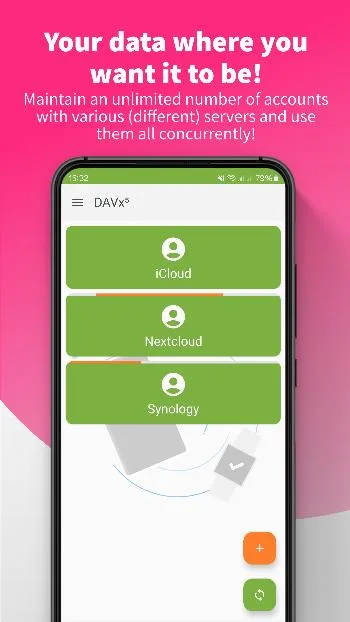
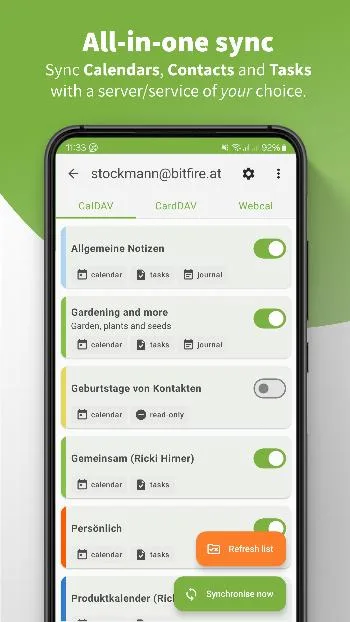
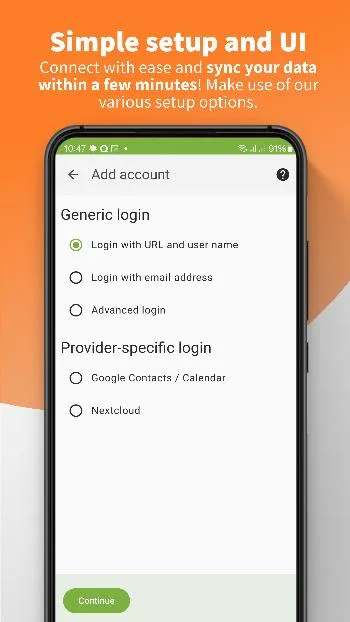
Introduction
DAVx⁵ syncs calendars, contacts and tasks between your phone and a server that speaks CalDAV and CardDAV, the open standards that Nextcloud, many hosting providers and mail services use. It doesn’t come with an app of its own for your events or contacts: it puts them into Android’s own storage, so the calendar, contacts and task apps you already use show them. Its description: “Use it with your own server or with a trusted hoster to keep your contacts, events and tasks under your control.”
It is made by bitfire web engineering in Bad Vöslau, Austria, and has been around since 2013, first under the name DAVdroid; the package name still says so. Version 4.5.21 came out on 15 October 2026. The official site is davx5.com.
What it syncs
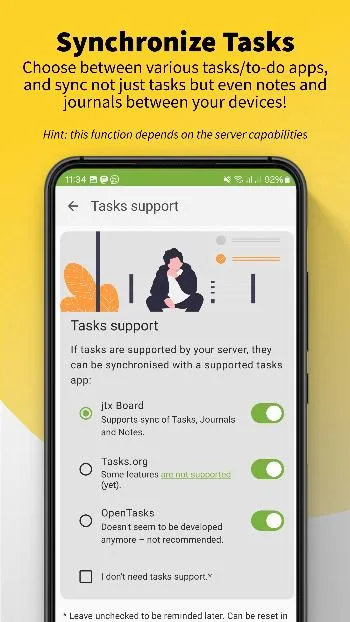
- Calendars and tasks over CalDAV, and contacts over CardDAV, in both directions. Tasks and journals go to a separate task app; DAVx⁵ itself describes the three it works with: jtx Board “Supports sync of Tasks, Journals and Notes”, Tasks.org “Some features are not supported”, and OpenTasks “Doesn’t seem to be developed anymore – not recommended.”
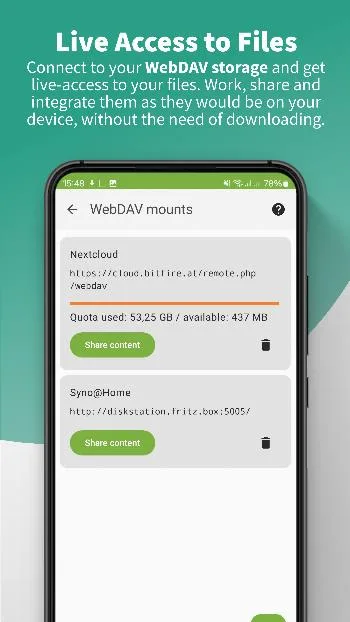
- WebDAV files appear in Android’s file picker and file managers, streamed from the server. The FAQ: “DAVx⁵ is not a files sync app … you can’t setup a folder-sync.”
- Webcal subscriptions, read-only calendar feeds, are handed to the same developers’ separate app, ICSx⁵.
For calendars from DAVx⁵ to appear in Google’s Calendar app, the FAQ says you have to turn on the DAVx⁵ accounts in that app’s settings first.
Signing in
You can log in with a server address and user name, with an e-mail address, which DAVx⁵ uses to find the server, or with advanced settings. Three providers have their own login: Nextcloud, through Nextcloud’s login flow in your browser, and Google and Fastmail, through their sign-in pages.
Defaults worth knowing
From the code of this version:
- Sync every 4 hours; events older than 90 days aren’t synced; after you log in, no calendars or address books are selected until you pick them.
- Wi-Fi only is off, and there is no restriction to particular Wi-Fi networks until you set one.
- Push is on, but only does something with servers that offer WebDAV-Push. The app then uses a UnifiedPush app if you have one; if you don’t and Google Play services is installed, it uses Google’s Firebase Cloud Messaging instead. The Use Push setting turns this off. The privacy policy doesn’t mention the Google route.
- On first start, a series of pages asks for permissions, for an exemption from battery optimization, and for a donation. On Android 17 the permissions include local network access, which DAVx⁵ needs to sync with a server on your own network; without it, the main screen shows a warning. A card on the main screen about the Keep Android Open campaign stays until you tap Dismiss forever.
What goes online
- Your servers, for setup and every sync. To find a server from an e-mail address, it looks up DNS records; on Android 7 to 9 it adds Quad9’s public resolver as a fallback.
- Google’s or Fastmail’s sign-in servers, only if you use those logins, and Firebase Cloud Messaging in the push case above.
- Links to davx5.com, when you tap them, carry the app version, the Android version and the screen you came from, which the code calls “query parameters for anonymized usage statistics”.
Apart from that, this edition doesn’t contact its developers: the privacy policy says “No personal data are ever transferred to our servers”, and we found no analytics, crash reporting or update check. When the app crashes, it shows the debug information on the phone.
Version 4.5.21 fixes a bug from 4.5.20 that stopped a calendar’s sync when the server listed an event without an ETag; such entries are now skipped and logged.
About this file
- This is the developers’ own build of 4.5.21, the “ose” edition, byte for byte the APK on the project’s GitHub release, which IzzyOnDroid distributes unchanged. Its certificate matches the fingerprint published on davx5.com.
- The Google Play edition is paid and built from a separate, non-public version of the code. There are also two other apps: Managed DAVx⁵ for organisations, which is a subscription, and the free DAVx⁵ Select, for servers of partner providers.
- The 17.7 MB file runs on Android 7.0 and later and declares 26 permissions: calendars, contacts, and the task apps above; internet, network state, and on Android 17 local network access; Wi-Fi state and location for the Wi-Fi name; Android’s sync settings; notifications; starting at boot and background work for scheduled syncs; and the battery-optimization request.
- DAVx⁵ is licensed under the GPL-3.0. Some of its illustrations come from unDraw, under unDraw’s own free licence, and it shows the Google, Firebase and Mastodon logos next to those features. DAVx⁵ is a registered trademark of bitfire web engineering.
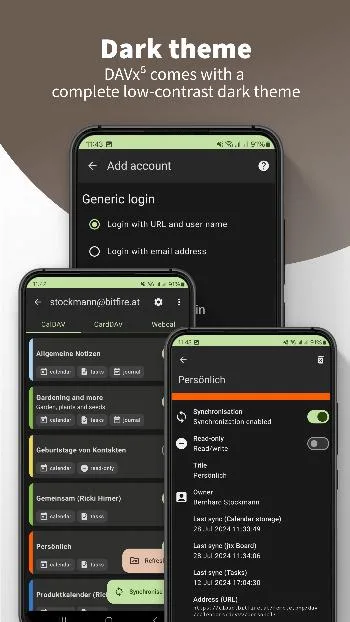
- The screenshots are the project’s own store images, from about mid-2024; the login screen in them doesn’t have the Fastmail option yet.
What’s inside the APK
Trackers
No code matching the Exodus Privacy tracker signatures.
Native code
Runs on 64-bit and older 32-bit ARM phones.
Android versions
Built for Android 17 (target API 37).
Permissions
8 of them need your approval first.
CPU types in this build: arm64-v8a (64-bit ARM, almost every phone since 2017); armeabi-v7a (32-bit ARM, older and budget phones); x86 (32-bit Intel, emulators); x86_64 (64-bit Intel, emulators and Chromebooks).
Asks you first (8)
Android shows a prompt before the app can use these.
- Location while running in the background · ACCESS_BACKGROUND_LOCATION
- Approximate location · ACCESS_COARSE_LOCATION
- Precise location · ACCESS_FINE_LOCATION
- Show notifications (Android 13+) · POST_NOTIFICATIONS
- Read calendar events · READ_CALENDAR
- Read your contacts · READ_CONTACTS
- Change calendar events · WRITE_CALENDAR
- Change your contacts · WRITE_CONTACTS
Granted at install (11)
Low-risk permissions Android grants automatically, plus any we have not classified.
- ACCESS_LOCAL_NETWORK
- ACCESS_NETWORK_STATE
- ACCESS_WIFI_STATE
- FOREGROUND_SERVICE
- INTERNET
- READ_SYNC_SETTINGS
- READ_SYNC_STATS
- RECEIVE_BOOT_COMPLETED
- REQUEST_IGNORE_BATTERY_OPTIMIZATIONS
- WAKE_LOCK
- WRITE_SYNC_SETTINGS
Defined by other apps (7)
Permissions that belong to another app or to this app itself.
- at.bitfire.davdroid.DYNAMIC_RECEIVER_NOT_EXPORTED_PERMISSION
- at.techbee.jtx.permission.READ
- at.techbee.jtx.permission.WRITE
- org.dmfs.permission.READ_TASKS
- org.dmfs.permission.WRITE_TASKS
- org.tasks.permission.READ_TASKS
- org.tasks.permission.WRITE_TASKS
More Information
- Package name
- at.bitfire.davdroid
- Version
- 4.5.21-ose (build 405210002)
- File size
- 17.7 MB (17,706,717 bytes)
- Requires
- Android 7.0 or later
- Category
- Cloud & Self-Hosted
- License
- GPL-3.0-only
- Developer
- bitfire web engineering
- Source code
- github.com/bitfireAT/davx5-ose
- Released
- Oct 15, 2026
- Signer SHA-256
- b39e7b77ec853483646b21b4a3e3ca540ba094ef8daa18e87e0be1fa4638d321
- File SHA-256
- 8a41ae9d76484b86ce326e2002bae5ad5609aa5c4ea2179037287af676fd1b41
- Checked
- , against the IzzyOnDroid index · how we check · verify it yourself
Common questions
Is this APK the official DAVx⁵ release?
Yes. It is the developer’s own release of DAVx⁵ 4.5.21-ose, byte for byte as IzzyOnDroid distributes it. Its SHA-256 matches IzzyOnDroid’s signed index, and it is signed with the certificate IzzyOnDroid records for the app (SHA-256 b39e7b77ec853483646b21b4a3e3ca540ba094ef8daa18e87e0be1fa4638d321).
What Android version does DAVx⁵ need?
Android 7.0 or later (API level 24). Version 4.5.21-ose is built for Android 17 (target API 37). Runs on 64-bit and older 32-bit ARM phones.
Can DAVx⁵ access the internet?
Yes. The APK requests Android’s internet permission. In total it declares 26 permissions, and 8 of them need your approval first.
Does DAVx⁵ contain trackers?
No known trackers: our scan of version 4.5.21-ose found no code matching the Exodus Privacy tracker signatures. The scan covers known tracker libraries; it doesn’t show what data the app itself sends.
Is DAVx⁵ open source?
Yes. DAVx⁵ is released under the GPL-3.0-only licence, and its source code is published at https://github.com/bitfireAT/davx5-ose.
Is DAVx⁵ free? Why does Google Play charge for it?
This open-source edition is free. The developers write that you can always build the app yourself and use it for free, but they “decided to put it in commercial stores for a small fee”; on 13 October 2026 the US Play Store asked $6.49. The free edition shows a donation page on first start, which you can put off for 1, 3 or 9 months.
Can I switch between this file and the F-Droid or Google Play version?
This file is signed with the official key that davx5.com publishes, so later releases from GitHub or IzzyOnDroid install over it. F-Droid’s copy is a different signature: “F-Droid compiles DAVx⁵ from the source code and signs it with their own key (so that F-Droid APKs can’t be replaced with our builds and vice versa).” Google Play’s key we couldn’t check.
Why does it ask for my location?
Only if you restrict syncing to certain Wi-Fi networks by name. Android shows the Wi-Fi name only to apps with location access, and during a background sync only with “Allow all the time”. The app says the Wi-Fi name is used only on the phone; syncing on any Wi-Fi needs no location access.
How often does it sync?
Every 4 hours by default, separately for contacts, calendars and tasks, and you can choose from every 15 minutes to once a day, or manual only. Servers that support WebDAV-Push can also trigger a sync as soon as something changes. Battery optimization can delay syncs, so the app asks to be exempted.
Recent releases
| Version | Released | Size | Requires |
|---|---|---|---|
| v4.5.21-ose · this download | Oct 15, 2026 | 17.7 MB | Android 7.0+ |
| v4.5.20-ose | Sep 27, 2026 | 17.7 MB | Android 7.0+ |
Versions currently kept in the IzzyOnDroid repository. We host and check only the newest one. Full changelog.