
Files
by surf5726 · Apache-2.0 · open source
Put Android’s built-in file browser in your launcher. This 0.2 MB shortcut opens DocumentsUI in browsing mode; it is not another file manager and never reads your files itself.
Needs:Android 8.0+ · a working system DocumentsUI app
2113 Apps is independent, not affiliated with or endorsed by surf5726. Official sources: source code on GitHub.
- Version
- 1.0.8
- Size
- 0.2 MB
- Requires
- Android 8.0+
- Updated
- 2026-06-13
Screenshots
Introduction
Files, whose project name is DocumentsUI Shortcut, does one small job: it exposes Android’s own file browser as a launcher app. Android already uses DocumentsUI when another app asks you to choose where to open or save a document, but several manufacturers hide its icon. Tapping this shortcut starts that system component in browsing mode and immediately closes the shortcut activity.
What it can and cannot do
The visible browser normally belongs to Android or your phone maker, so its layout and available storage locations differ by device. For each compatible browse or view request, the shortcut first tries the known Google and AOSP DocumentsUI packages and then sends the same request without a package restriction. Another installed app can therefore handle one of those unrestricted attempts.
It does not implement copy, move, rename, search or archive handling itself. Those functions are whatever your system Files app provides. It also cannot grant extra access to protected folders, reveal storage that the device vendor hides, or replace a broken DocumentsUI installation. For a full file manager with its own interface, use one of the alternatives above.
Version 1.0.8 raises the minimum system to Android 8.0 and adjusts the themed icon so it sits at the same visual scale as other launcher icons. Earlier 1.0.x releases added translated names, Android 13 themed-icon support and fixes for icon rendering on Huawei EMUI and HarmonyOS launchers. None of those releases changed the basic hand-off to DocumentsUI.
Privacy and permissions
The APK declares no permissions. Its manifest contains one exported launcher activity and queries for compatible system file-browser intents; it has no storage or internet permission, service or boot receiver. The app therefore cannot read a filename, upload a document or keep working in the background. After it launches DocumentsUI, any file access happens inside that system app and under Android’s own access rules.
About this file
- This is F-Droid’s build of version 1.0.8, compiled from the Apache-2.0 source and signed with F-Droid’s key. A copy from another channel can update it only if Android finds the same package name and signing key.
- The APK is 0.2 MB, contains no native libraries and runs on Android 8.0 or later. Our scan found no tracker SDKs.
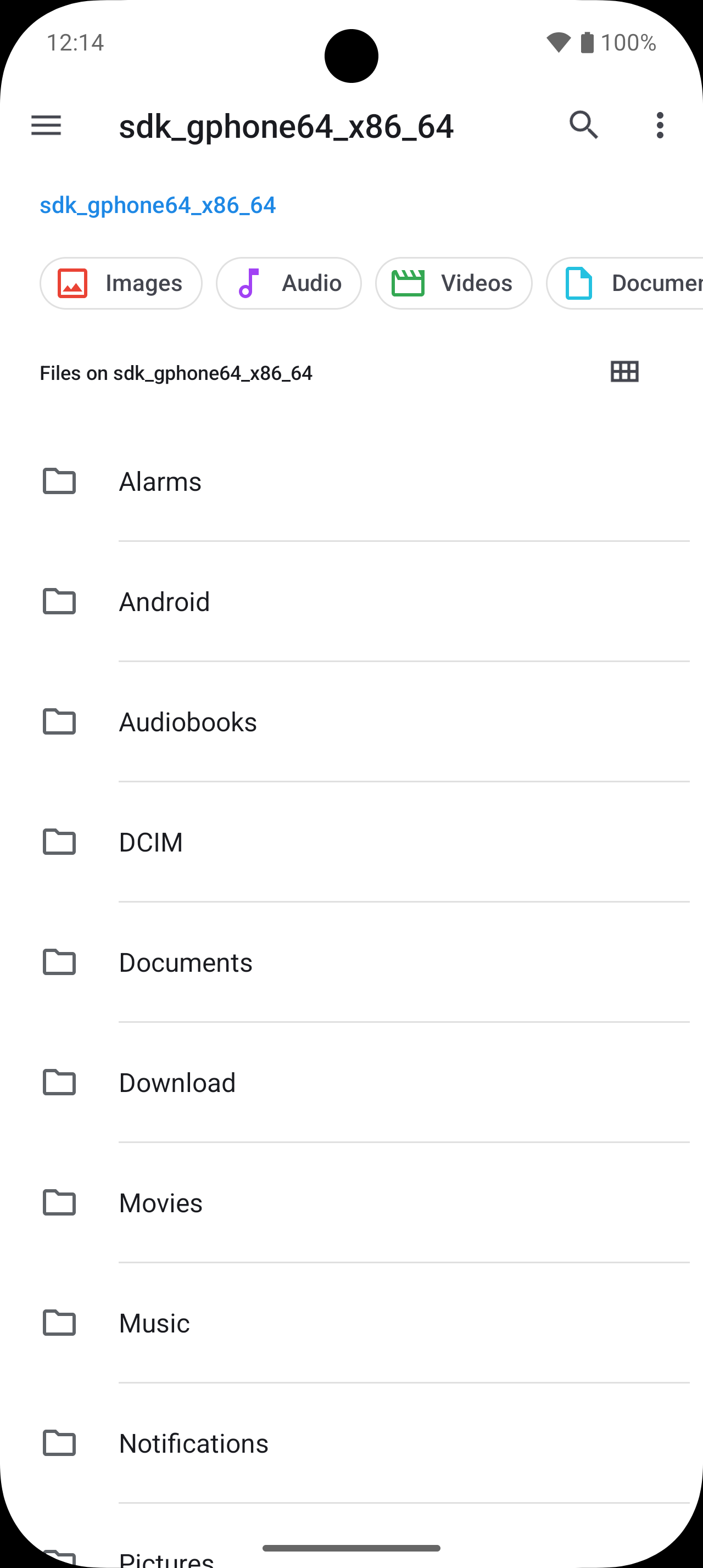
- The screenshot comes from the project’s F-Droid listing. It shows the system file browser reached through the shortcut; the exact screen on your phone may look different because DocumentsUI is supplied by the device.
What’s inside the APK
Trackers
No code matching the Exodus Privacy tracker signatures.
Native code
Pure Java/Kotlin, so it runs on any CPU.
Android versions
Built for Android 16 (target API 36).
Permissions
0 of them need your approval first.
More Information
- Package name
- com.documentsui.shortcut
- Version
- 1.0.8 (build 9)
- File size
- 0.2 MB (152,815 bytes)
- Requires
- Android 8.0 or later
- Category
- System Tools
- License
- Apache-2.0
- Developer
- surf5726
- Source code
- github.com/surf5726/documentsui-shortcut
- Released
- Jun 13, 2026
- Signed by
- F-Droid, which built this APK from the published source code. Because the key is F-Droid’s, it won’t install over a copy from Google Play or GitHub (or the other way round) without uninstalling first.
- Signer SHA-256
- ec717ac97eeaed532d1271f2eecea9de35395543f301bbc8cd3cd88e6ef9bd41
- File SHA-256
- 585e5a7e80ec262d42b2836a2d78b1e3848521b74622a2ef210351e74105bc79
- Checked
- , against the F-Droid index · how we check · verify it yourself
Common questions
Is this APK the official Files release?
It is F-Droid’s build rather than the developer’s own: F-Droid compiled Files 1.0.8 from the published source code and signed it with its own key. Its SHA-256 matches F-Droid’s signed index. Because the key is F-Droid’s, it won’t install over a copy from Google Play or GitHub without uninstalling first.
What Android version does Files need?
Android 8.0 or later (API level 26). Version 1.0.8 is built for Android 16 (target API 36). Pure Java/Kotlin, so it runs on any CPU.
Can Files access the internet?
No. The APK doesn’t request Android’s internet permission, so the app can’t go online by itself. In total it declares 0 permissions, and none of them needs your approval first.
Does Files contain trackers?
No known trackers: our scan of version 1.0.8 found no code matching the Exodus Privacy tracker signatures. The scan covers known tracker libraries; it doesn’t show what data the app itself sends.
Is Files open source?
Yes. Files is released under the Apache-2.0 licence, and its source code is published at https://github.com/surf5726/documentsui-shortcut.
Is this Files by Google?
No. Files by Google is a separate Google app. This shortcut normally opens DocumentsUI, the file browser Android uses for Open and Save dialogs. If another compatible app handles its unrestricted fallback intent, that app can supply the interface instead; it never comes from this shortcut APK.
Can it open Android/data or Android/obb?
It cannot bypass Android’s storage rules. Android 11 and later restrict those folders in the system picker, and phone makers can impose more limits. Whether a folder appears depends on Android and your device’s DocumentsUI implementation.
Why install a shortcut instead of opening a file picker?
Some phones include DocumentsUI but do not give it a launcher icon. This app asks it to open in browser mode, starting at primary storage where possible, so the same system browser becomes directly reachable from the launcher.
What if tapping the icon does nothing?
The app first targets Google’s and AOSP’s known DocumentsUI packages, then tries unrestricted compatible browse and view intents. If no system component or other compatible app can handle them, it shows a short ‘no file manager’ message; it does not supply a replacement browser.
Recent releases
| Version | Released | Size | Requires |
|---|---|---|---|
| v1.0.8 · this download | Jun 13, 2026 | 0.2 MB | Android 8.0+ |
| v1.0.6 | Jun 11, 2026 | 0.2 MB | Android 6.0+ |
| v1.0.3 | May 24, 2026 | 0.2 MB | Android 6.0+ |
Versions currently kept in the F-Droid repository. We host and check only the newest one.
Alternatives and related apps
-
 Material Files A complete file manager with archives, root access and network shares, rather than a shortcut to the system browser.Download
-
 Fossify File Manager A conventional offline file manager with search, favourites, ZIP archives, storage analysis and USB support.Download