Flicky
by MLM Games · GPL-3.0-only · open source
An app store for open-source apps that you can use with a TV remote. It browses F-Droid, IzzyOnDroid and other repositories, and installs and updates apps on Android TV and Google TV.
Needs:No root · Android 6.0+ · made for TV
2113 Apps is independent, not affiliated with or endorsed by MLM Games. Official sources: source code on GitHub.
- Version
- 4.6.1
- Size
- 4.5 MB
- Requires
- Android 6.0+
- Updated
- 2026-10-22
Screenshots
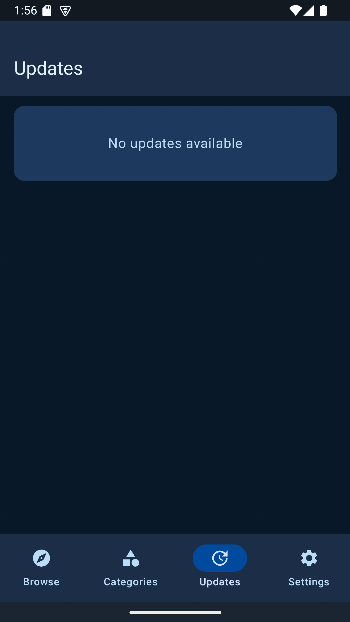
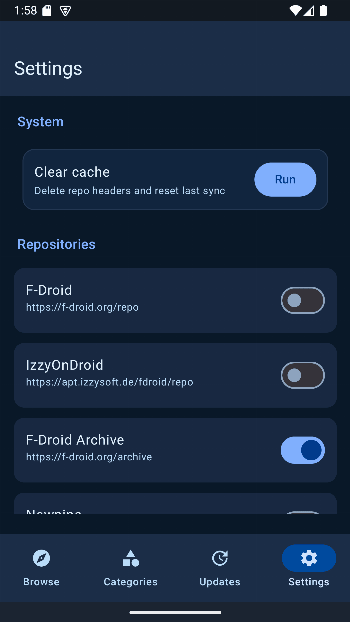
Introduction
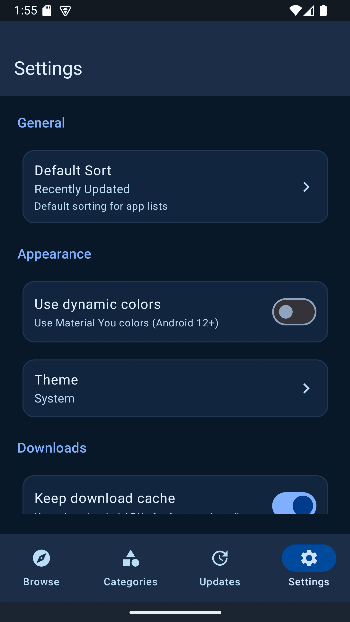
Flicky is an unofficial client for F-Droid-style repositories: an app for finding, installing and updating open-source apps. Unlike most F-Droid clients, it is built for a television. Its README says “The UI is TV oriented, Android UI is secondary.” It shows up on the Android TV home screen and is driven with the arrow keys of a remote.
It has nothing to do with Flicky, Sega’s 1984 arcade game.
What it does
- Repositories. Eight are switched on from the start: F-Droid, IzzyOnDroid, NewPipe’s own repository, KDE’s nightly builds, Cromite, IronFox, Brave and CloudBurst. More are listed but off, among them the F-Droid archive, microG, the Guardian Project, Molly, Bitwarden and LibRetro.
- Six ways to install: System, Session (the default), Root, Shizuku, App Manager and Dhizuku. A second installer can be set as a fallback if the first one fails. Since 4.5.4, Session and Dhizuku fall back to the system installer on Android 6.0 and 7.x, where they aren’t supported.
- Background updates, added in version 4.4.2 and off by default. Android 12 and later lets an app update other apps without a prompt only in certain cases, for example when that same app installed them, so expect prompts for apps you installed some other way.
- An option to skip alpha and beta versions, and a “suggested” label on the version Flicky would install.
- New in 4.5.4: up to three downloads at once when updating several apps (installs still happen one at a time), apps waiting for your confirmation are marked as such on their pages, and a language setting inside the app. 4.5.5, from October, fixes the focus highlight and the default focus on TVs.
- New in 4.6: notifications when updates are available, Google Play and market:// links that open the app’s page in Flicky (useful where the Play Store is missing), a repositories page where you can add a mirror or a username and password for a private repository, a free-space check before downloading, and support for the soft keys of keypad phones. 4.6.1 fixes the language setting.
To get Flicky onto a TV in the first place, see how to install APKs on Android TV. The README suggests a browser on the TV or sending the file from a phone with LocalSend.
How it checks what it installs
Before installing, Flicky checks the downloaded APK against the SHA-256 hash listed in the repository’s index, and it compares signing keys before updating an app that is already installed.
Since version 4.6.0, Flicky also checks the repository’s signature, as F-Droid’s own app does. From our reading of the 4.6.1 code, it first downloads the signed entry file, checks its signature, and then checks the index against the hash inside it. The keys of F-Droid’s main and archive repositories, IzzyOnDroid, NewPipe, Briar, Guardian Project and microG are built into the app; for other repositories it remembers the key from the first sync and refuses an index signed with a different one later. If a repository you haven’t synced before publishes no signed entry file, or the file can’t be downloaded from any address, Flicky falls back to the unsigned index. (Plain HTTP is possible too, but only for a repository you add and explicitly mark as a trusted local one.)
What goes online
Flicky downloads the indexes and APKs of the repositories you have switched on. When you open an app’s page, it also asks Techlore’s Plexus service how well that app works without Google services, which sends Plexus the app’s package name; we found no setting that turns this off. It downloads IzzyOnDroid’s download statistics too, but as whole files that don’t reveal which app you are looking at. Our scan found no tracker libraries.
About this file
- This is the developer’s own build, from IzzyOnDroid, signed with the developer’s key (SHA-256 fingerprint starting 4A:ED:2F:69). F-Droid also carries Flicky as builds signed by the developer, split by processor type.
- Flicky isn’t on Google Play any more (see the FAQ below).
- The 4.5 MB file runs on Android 6.0 and later, on ARM and x86, 32- and 64-bit, so it also fits TV boxes with a 32-bit system. It declares 16 permissions, 2 of which need your approval; the notifications permission, added in 4.6.0, is requested only if you turn on background updates. Installing, updating and deleting apps are among them; that is what an app store needs.
- Flicky is licensed under GPL-3.0.
What’s inside the APK
Trackers
No code matching the tracker signatures we check, including Exodus Privacy’s list and our published supplements.
Native code
Runs on 64-bit and older 32-bit ARM phones.
Android versions
Built for Android 17 (target API 37).
Permissions
2 of them need your approval first.
Shizuku API. Uses the Shizuku API, so it can do ADB-level work without root once Shizuku is running. (rikka.shizuku.Shizuku$$ExternalSyntheticLambda0)
CPU types in this build: arm64-v8a (64-bit ARM, almost every phone since 2017); armeabi-v7a (32-bit ARM, older and budget phones); x86 (32-bit Intel, emulators); x86_64 (64-bit Intel, emulators and Chromebooks).
Asks you first (2)
Android shows a prompt before the app can use these.
- Show notifications (Android 13+) · POST_NOTIFICATIONS
- Write shared storage (Android 10 and older) · WRITE_EXTERNAL_STORAGE
You switch these on in Settings (1)
Special app access. Nothing is granted until you turn it on yourself.
- Install unknown apps · REQUEST_INSTALL_PACKAGES
Granted at install (10)
Low-risk permissions Android grants automatically, plus any we have not classified.
- ACCESS_NETWORK_STATE
- ENFORCE_UPDATE_OWNERSHIP
- EXPAND_STATUS_BAR
- FOREGROUND_SERVICE
- INTERNET
- QUERY_ALL_PACKAGES
- RECEIVE_BOOT_COMPLETED
- REQUEST_DELETE_PACKAGES
- UPDATE_PACKAGES_WITHOUT_USER_ACTION
- WAKE_LOCK
Defined by other apps (3)
Permissions that belong to another app or to this app itself.
- app.flicky.DYNAMIC_RECEIVER_NOT_EXPORTED_PERMISSION
- com.rosan.dhizuku.permission.API
- moe.shizuku.manager.permission.API_V23
More Information
- Package name
- app.flicky
- Version
- 4.6.1 (build 1021)
- File size
- 4.5 MB (4,479,817 bytes)
- Requires
- Android 6.0 or later
- Category
- System Tools
- License
- GPL-3.0-only
- Developer
- MLM Games
- Source code
- github.com/mlm-games/flicky
- Released
- Oct 22, 2026
- Signer SHA-256
- 4aed2f691df64a7b0fea25a6b8c80183c6dc520e049dac0178defa1d6472228f
- File SHA-256
- adb4c192814bdd26970ee542c00a74f90083b2147a5c8a60333b8945ae08c940
- Checked
- , against the IzzyOnDroid index · how we check · verify it yourself
Common questions
Is this APK the official Flicky release?
Yes. It is the developer’s own release of Flicky 4.6.1, byte for byte as IzzyOnDroid distributes it. Its SHA-256 matches IzzyOnDroid’s signed index, and it is signed with the certificate IzzyOnDroid records for the app (SHA-256 4aed2f691df64a7b0fea25a6b8c80183c6dc520e049dac0178defa1d6472228f).
What Android version does Flicky need?
Android 6.0 or later (API level 23). Version 4.6.1 is built for Android 17 (target API 37). Runs on 64-bit and older 32-bit ARM phones.
Can Flicky access the internet?
Yes. The APK requests Android’s internet permission. In total it declares 16 permissions, and 2 of them need your approval first.
Does Flicky contain trackers?
No known trackers: our scan of version 4.6.1 found no code matching the tracker signatures it checks. Those include Exodus Privacy’s list and the published local supplements described on How We Check; the scan doesn’t show what data the app itself sends.
Is Flicky open source?
Yes. Flicky is released under the GPL-3.0-only licence, and its source code is published at https://github.com/mlm-games/flicky.
Does Flicky work on a phone?
It installs and runs on phones too, but the developer says the interface is made for TV first and that the phone layout is secondary. On a phone, the README recommends Droid-ify or F-Droid Basic instead.
Can I update this Flicky from F-Droid or IzzyOnDroid?
Yes, from the next release on. This file and F-Droid’s builds carry the same developer key; F-Droid’s metadata for Flicky allows only that key. But F-Droid builds one file per processor type with internal version codes just below the universal file’s (F-Droid’s 4.6.0 is 1007 to 1010; this 4.6.1 file is 1021), so F-Droid won’t offer its build of the same version as an update to this one.
Why isn’t Flicky on Google Play?
It was, but the README says Google suspended it under the “Device and Network Abuse” policy, which bans apps that install apps from outside Google Play. The developer says they won’t update the Google Play build.
Recent releases
| Version | Released | Size | Requires |
|---|---|---|---|
| v4.6.1 · this download | Oct 22, 2026 | 4.5 MB | Android 6.0+ |
| v4.5.5 | Oct 18, 2026 | 4.4 MB | Android 6.0+ |
| v4.5.4 | Oct 8, 2026 | 4.3 MB | Android 6.0+ |
Versions currently kept in the IzzyOnDroid repository. We host and check only the newest one. Full changelog.