

Shizuku
by Rikka apps · Apache-2.0 · open source
Lets other apps use Android’s system APIs with the same rights as ADB. You start it with wireless debugging on Android 11+, from a computer with ADB, or with root.
Needs:Android 7+ · wireless debugging, a PC with ADB, or root
2113 Apps is independent, not affiliated with or endorsed by Rikka apps. Official sources: shizuku.rikka.app · source code on GitHub.
- Version
- 13.6.0.r1086.2650830c
- Size
- 2.6 MB
- Requires
- Android 7.0+
- Updated
- 2025-05-29
Screenshots
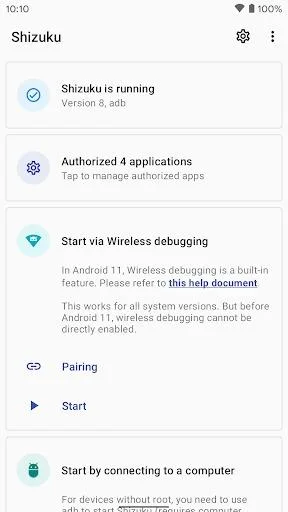
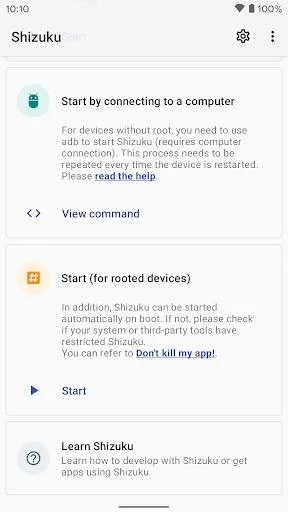
Introduction
Shizuku does nothing on its own. It is a bridge: other apps use it to call Android’s system APIs with more rights than a normal app has, without the phone being rooted. On this site, Volume Manager, Install with Options, FireWall Blocks and WG Tunnel are among the apps that use it.
How it works
Normally an app asks the system for something, such as the list of installed apps, and the system checks whether that app is allowed. Apps that needed more used to run shell commands through su. The developer’s README calls that approach slow and unreliable, because it starts a new process for every command and has to parse text output.
Shizuku takes a different route. You start a small Shizuku server process once, as ADB or as root. Apps that support Shizuku then send their requests through it. The server passes them to the system with its own rights and hands back the result. To the app it looks almost the same as calling the system API directly.
Two consequences follow from that design:
- Started via ADB, it has ADB’s rights, not root’s. That is enough for many things (installing with options, changing secure settings, per-app network rules), but not everything.
- Each app has to ask you. Shizuku shows a permission prompt the first time an app wants to use it, and you can revoke access later.
Starting it
| Method | Works on | After a reboot |
|---|---|---|
| Wireless debugging | Android 11 and later, no computer needed | Start it again |
| Computer with ADB | Android 7.0 and later | Start it again |
| Root | Rooted phones | Can start on its own |
The official manual describes the computer method as the one for unrooted phones on Android 10 and earlier, where wireless debugging doesn’t exist; it still works on newer versions if you prefer a cable.
Our step-by-step guide covers all three: How to start Shizuku, including what to do when it stops.
What 13.6.0 changed
- A new command for computers. 13.6.0 deleted the
start.shscript that the old command,adb shell sh /sdcard/Android/data/moe.shizuku.privileged.api/start.sh, ran; the project’s website still shows that one. The new command runs a file calledlibshizuku.sofrom Shizuku’s own app folder. Its path differs from phone to phone and changes with each update, so copy it from View command in the app. The release notes suggest copying the file to a fixed place such as/data/local/tmp/shizukuif you start Shizuku from a script. - Starting by itself without root, on Android 13 and later, “when connected to a trusted WLAN”, in the release notes’ words. In the code, if Shizuku was last running without root, it turns wireless debugging back on at boot, looks for the debugging service for a few seconds and starts itself. That can only work on a Wi-Fi network the phone already trusts for wireless debugging, which most likely means one where you ticked Always allow on this network when pairing. The switch that controls it is labelled Start on boot (root) but covers this too. To change those debugging settings, Shizuku now holds the write secure settings permission, which its own server grants it when it runs.
What an app you allow can do
Shizuku’s developer documentation puts it plainly: apps can “call your Java/JNI code with root/shell (ADB) identity”. Started without root, Shizuku runs requests as the shell user, the same identity a computer gets over ADB. On current Android versions that identity can install and uninstall apps, grant and revoke permissions, change secure settings, read system logs and capture the screen, but, as the same documentation notes, it “cannot access other apps’ data files”. Apps can also run their own code in a separate process with that identity (Shizuku calls these user services).
So give access only to apps you trust. The first time an app asks, Shizuku shows Allow … to access Shizuku?; you can change your answer later under Tap to manage authorized apps. Removing access force-stops that app and ends its helper processes. Changes the app already made, such as a permission it granted itself or an app it removed, stay as they are.
Known problems in 13.6.0
These are open reports in Shizuku’s issue tracker; 13.6.0, from May 2025, is still the latest release.
- Android 17. Since June 2026, users report that Shizuku shows no authorised apps and new authorisations fail, while apps authorised before the update keep working (issue #2180, open, no developer reply). Some users there point to unofficial forks; those aren’t from RikkaApps and we don’t host them.
- MediaTek phones. Apps that use user services, among them Install with Options, whose developer filed the report, fail on some MediaTek devices (#1198). A maintainer attributed it to MediaTek’s own changes to Android; no fixed release has followed. One user with a MediaTek phone reports that apps work with 13.5.4, which is in the older versions below; but 13.5.4 came out before Shizuku added support for Android 16 QPR1.
- Stopping when the screen turns off on some Xiaomi phones and Samsung phones with One UI 8 (#1426). The manual’s advice is to set Default USB configuration to No data transfer; the issue’s user-maintained summary lists Charging only or Debugging only as the setting that worked on Samsung phones with One UI 8.
Which build this is
This is Shizuku from its developers, RikkaApps, checked against IzzyOnDroid’s signed index: byte for byte the APK on the project’s GitHub release, which the maintainers build with GitHub Actions. On redistribution, a maintainer wrote in the issue tracker: “you are free to distribute our apk … Modified versions of this project cannot be publish on any app store”. That is also why IzzyOnDroid marks the app UpstreamNonFree: its explanation is that the terms forbid “redistribution of modified versions of the app”, not that Shizuku tracks you. We found no network code of its own in the app: it uses the internet permission to reach the phone’s own debugging service at 127.0.0.1.
The project’s licence forbids forks from using the name “Shizuku” or the package name moe.shizuku.privileged.api, so an app with that name and package name signed by someone else is not the developers’ release. The signer fingerprint is under More Information below.
Shizuku is also on Google Play under the same package name. If Android refuses to install this APK over a copy you already have, the usual reason is that the two were signed with different keys. Uninstall the old copy first, then start Shizuku again.
The current release, 13.6.0, came out in May 2025 and is still the latest on the project’s GitHub. Builds numbered r1090 and r1091, which some download sites offer, were made from later commits that, going by the commit list, only update translations, build tools and the licence text.
What’s inside the APK
Trackers
No code matching the tracker signatures we check, including Exodus Privacy’s list and our published supplements.
Native code
Runs on 64-bit and older 32-bit ARM phones.
Android versions
Built for Android 16 (target API 36).
Permissions
1 of them need your approval first.
Shizuku API. Uses the Shizuku API, so it can do ADB-level work without root once Shizuku is running. (rikka.shizuku.A0)
Flagged by IzzyOnDroid:
- UpstreamNonFree: The upstream source code is not entirely free software.
CPU types in this build: arm64-v8a (64-bit ARM, almost every phone since 2017); armeabi-v7a (32-bit ARM, older and budget phones); x86 (32-bit Intel, emulators); x86_64 (64-bit Intel, emulators and Chromebooks).
Asks you first (1)
Android shows a prompt before the app can use these.
- Show notifications (Android 13+) · POST_NOTIFICATIONS
System-level (1)
Reserved for system apps. A normal install does not get these; they only take effect through root, ADB or Shizuku, if at all.
- WRITE_SECURE_SETTINGS
Granted at install (3)
Low-risk permissions Android grants automatically, plus any we have not classified.
- FOREGROUND_SERVICE
- INTERNET
- RECEIVE_BOOT_COMPLETED
Defined by other apps (1)
Permissions that belong to another app or to this app itself.
- moe.shizuku.manager.permission.MANAGER
More Information
- Package name
- moe.shizuku.privileged.api
- Version
- 13.6.0.r1086.2650830c (build 1086)
- File size
- 2.6 MB (2,571,773 bytes)
- Requires
- Android 7.0 or later
- Category
- System Tools
- License
- Apache-2.0
- Developer
- Rikka apps
- Source code
- github.com/RikkaApps/Shizuku
- Released
- May 29, 2025
- Signer SHA-256
- 268b5590e868fb08bae7e0ac413564cd1ff88f5ccff74af9dbd0dc918e30db30
- File SHA-256
- 6e273ab0e991c4e79bc8b1bbb9b9dd739ccac1a8712a541a214078886b7b790f
- Checked
- , against the IzzyOnDroid index · how we check · verify it yourself
Common questions
Is this APK the official Shizuku release?
Yes. It is the developer’s own release of Shizuku 13.6.0.r1086.2650830c, byte for byte as IzzyOnDroid distributes it. Its SHA-256 matches IzzyOnDroid’s signed index, and it is signed with the certificate IzzyOnDroid records for the app (SHA-256 268b5590e868fb08bae7e0ac413564cd1ff88f5ccff74af9dbd0dc918e30db30).
What Android version does Shizuku need?
Android 7.0 or later (API level 24). Version 13.6.0.r1086.2650830c is built for Android 16 (target API 36). Runs on 64-bit and older 32-bit ARM phones.
Can Shizuku access the internet?
Yes. The APK requests Android’s internet permission. In total it declares 6 permissions, and 1 of them needs your approval first.
Does Shizuku contain trackers?
No known trackers: our scan of version 13.6.0.r1086.2650830c found no code matching the tracker signatures it checks. Those include Exodus Privacy’s list and the published local supplements described on How We Check; the scan doesn’t show what data the app itself sends.
Is Shizuku open source?
Yes. Shizuku is released under the Apache-2.0 licence, and its source code is published at https://github.com/RikkaApps/Shizuku.
Why doesn’t the old start.sh command work any more?
Shizuku 13.6.0 removed the start.sh script, and its release notes say “Update the start command”. The command is now adb shell followed by the path of a file called libshizuku.so inside Shizuku’s own app folder. That path differs from phone to phone and changes when Shizuku is updated, so open Shizuku and copy the command from View command instead of typing one from a website.
Does Shizuku keep running after a reboot?
With root, it can start by itself at boot. Started over wireless debugging or from a computer, the manual says the steps “need to be performed again after each reboot”. Since 13.6.0 there is an exception on Android 13 and later: if Shizuku was last running without root, it switches wireless debugging back on at boot and starts itself, which works when the phone is on a Wi-Fi network already trusted for wireless debugging.
Is it safe to give an app access to Shizuku?
That app gets ADB’s rights, or root’s if Shizuku runs as root. Shizuku’s developer documentation says apps can “call your Java/JNI code with root/shell (ADB) identity”. ADB can install and remove apps, grant permissions and change secure settings, though it can’t read other apps’ private files. Allow only apps you trust. Removing an app’s access in Shizuku force-stops that app.
What does “Please go through the pairing step first” mean?
Shizuku shows it when the connection to wireless debugging fails with an SSL error, which happens when the phone hasn’t been paired with Shizuku or the pairing was lost. Pair again: Developer options › Wireless debugging › Pair device with pairing code, then type the code into Shizuku’s notification. A maintainer answered the same error in the issue tracker with “Pair first”.
Older versions of Shizuku
| Version | Released | Requires | Download |
|---|---|---|---|
| v13.6.0.r1086.2650830c · current | May 29, 2025 | Android 7.0+ | Shizuku 13.6.0 APK · 2.6 MB |
| v13.5.4.r1049.0e53409 | Mar 10, 2024 | Android 7.0+ | Shizuku 13.5.4 APK · 3.4 MB |
| v13.5.3.r1036.fff3f87 | Dec 14, 2023 | Android 7.0+ | Shizuku 13.5.3 APK · 3.5 MB |
We host the current version and the 2 before it. Each older file matches the checksum in IzzyOnDroid’s signed index and is signed with the same key as the current one, so newer versions install over it as normal updates. The permissions and trackers listed above describe the current version. Full changelog.
Alternatives and related apps
-
 Install with Options One of the apps that uses Shizuku: installs APKs with options normally only available through ADB.Download
-
 Volume Manager Uses Shizuku to give each app its own volume level.Download