Lawnchair
by Lawnchair · Apache-2.0 · open source
A Pixel-style home screen app built on Android’s Launcher3, with icon packs, grid and icon-size controls. This is the Lawnchair 15 beta; the stable version is on Google Play.
Needs:No root
2113 Apps is independent, not affiliated with or endorsed by Lawnchair. Official sources: lawnchair.app · source code on GitHub.
- Version
- 15.Beta 3
- Size
- 17.3 MB
- Requires
- Android 8.0+
- Updated
- 2026-05-13
Screenshots
Introduction
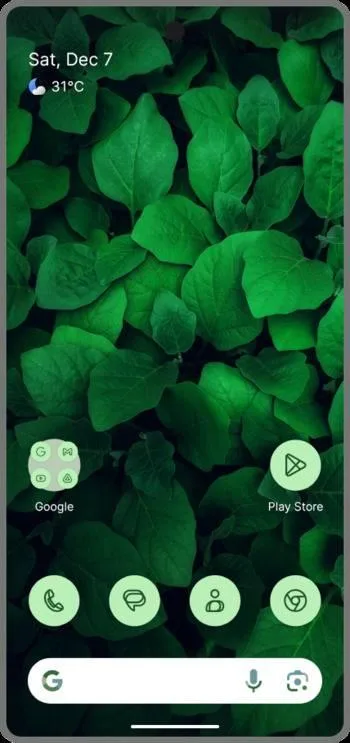
Lawnchair is a free, open-source home screen app for Android. It starts from Launcher3, the launcher code in the Android Open Source Project, and adds the features people usually want from a Pixel launcher on a phone that doesn’t ship with one: Material You colours taken from your wallpaper, an At a Glance widget, a universal search bar, and icon pack support. On top of that come the controls Pixel Launcher never had, such as icon size, labels, and the number of rows and columns on the home screen and in the app drawer.
This page is for the Lawnchair 15 beta. That build is not on Google Play.
Which Lawnchair is this?
Three different apps carry the Lawnchair name. They have different package names, so Android treats them as separate apps. You can install them side by side, but your settings won’t move between them.
| Build | Where | Package name | Status (checked Sep 27, 2026) |
|---|---|---|---|
| Lawnchair 15 Beta 3 (this page) | IzzyOnDroid, here | app.lawnchair |
Beta, released May 13, 2026 |
| Lawnchair | Google Play | app.lawnchair.play |
Stable, last updated Apr 18, 2026 |
| Lawnchair Legacy | Google Play | ch.deletescape.lawnchair.plah |
Old generation, last updated Dec 4, 2019 |
If you want the stable release and automatic updates through the Play Store, get the Play version. This beta is for people who want the Android 15-based code before it reaches Play. The developers are clear about the trade-off: these are betas of the next version, to be used at your own risk.
What the beta does
The feature list below comes from the project’s own description of this build:
- Material You theming: colours follow your wallpaper and system theme.
- At a Glance: the date and weather widget at the top of the home screen. It works with Smartspacer, an app that adds more cards to it.
- Global search: find apps, contacts and web results from the home screen.
- Icon packs, plus a customisable search pill.
- Layout controls: icon size, labels, rows and columns.
- QuickSwitch support: on Android 10 and later, Lawnchair can take over the Recents screen. This one needs root.
What stands out in the APK
The file is 17.3 MB, and the “What’s inside” section below lists everything we measured. Three things are worth knowing before you install.
No trackers. None of the 432 tracker signatures in the Exodus Privacy list match any code in this build.
57 permissions, but most will never be granted. The long list looks alarming until you read where it comes from. Lawnchair inherits Launcher3’s manifest, and Launcher3 is written to be the phone’s built-in launcher. 25 of the permissions are system-level ones, such as STATUS_BAR, MANAGE_USERS and INTERACT_ACROSS_USERS_FULL. Android only grants those to apps that ship with the phone. On a normal install they are simply ignored. They only matter if Lawnchair runs as a system app, which is what the root-only QuickSwitch setup does.
The permissions that can actually reach your data come in two kinds. Eight of them Android asks you about first: contacts (used by global search), photos, videos, audio, notifications and direct calling. Two more, all-files access and usage access, stay off until you turn them on yourself in Settings. None of the ten is granted just by installing the app.
Runs on any Android 8.0 or newer phone. The build contains native code for all four CPU types (64-bit and 32-bit ARM, 64-bit and 32-bit Intel). It targets Android 15, so newer permission rules apply to it.
Installing it
- Download the APK above. We have already matched its signing key to the one IzzyOnDroid publishes for Lawnchair (the fingerprint is under More Information). Android checks the signature again when it installs, and refuses a file that has been altered.
- Allow your browser or file manager to install unknown apps when Android asks.
- Open Lawnchair, then set it as your default home app in Settings › Apps › Default apps › Home app.
Updates to the beta are not automatic. Check back here, or use an update tool that reads the IzzyOnDroid repository.
Who should skip it
- You want something stable enough that you never have to think about your launcher. The Play Store version is the better choice.
- You rely on the Google Discover feed to the left of the home screen. The project says Lawnchair supports it, but that support has historically needed a separate companion app, and we haven’t tested it in this beta.
What’s inside the APK
Trackers
No code matching the Exodus Privacy tracker signatures.
Native code
Runs on 64-bit and older 32-bit ARM phones.
Android versions
Built for Android 15 (target API 35).
Permissions
8 of them need your approval first.
CPU types in this build: arm64-v8a (64-bit ARM, almost every phone since 2017); armeabi-v7a (32-bit ARM, older and budget phones); x86 (32-bit Intel, emulators); x86_64 (64-bit Intel, emulators and Chromebooks).
Asks you first (8)
Android shows a prompt before the app can use these.
- Place phone calls directly · CALL_PHONE
- Show notifications (Android 13+) · POST_NOTIFICATIONS
- Read your contacts · READ_CONTACTS
- Read shared storage (Android 12 and older) · READ_EXTERNAL_STORAGE
- Read music and audio files · READ_MEDIA_AUDIO
- Read photos · READ_MEDIA_IMAGES
- Read videos · READ_MEDIA_VIDEO
- Read only the photos and videos you pick · READ_MEDIA_VISUAL_USER_SELECTED
You switch these on in Settings (2)
Special app access. Nothing is granted until you turn it on yourself.
- All files access · MANAGE_EXTERNAL_STORAGE
- Usage access · PACKAGE_USAGE_STATS
System-level (25)
Reserved for system apps. A normal install does not get these; they only take effect through root, ADB or Shizuku, if at all.
- ACCESS_HIDDEN_PROFILES_FULL
- ALLOW_SLIPPERY_TOUCHES
- CAPTURE_BLACKOUT_CONTENT
- CONTROL_REMOTE_APP_TRANSITION_ANIMATIONS
- FORCE_STOP_PACKAGES
- INTERACT_ACROSS_USERS
- INTERACT_ACROSS_USERS_FULL
- INTERNAL_SYSTEM_WINDOW
- MANAGE_ACCESSIBILITY
- MANAGE_ACTIVITY_TASKS
- MANAGE_USERS
- MONITOR_INPUT
- READ_DEVICE_CONFIG
- READ_FRAME_BUFFER
- REMOVE_TASKS
- ROTATE_SURFACE_FLINGER
- SET_ORIENTATION
- START_TASKS_FROM_RECENTS
- STATUS_BAR
- STATUS_BAR_SERVICE
- STOP_APP_SWITCHES
- SUSPEND_APPS
- SYSTEM_APPLICATION_OVERLAY
- WAKEUP_SURFACE_FLINGER
- WRITE_SECURE_SETTINGS
Granted at install (17)
Low-risk permissions Android grants automatically, plus any we have not classified.
- ACCESS_HIDDEN_PROFILES
- ACCESS_RESTRICTED_SETTINGS
- ACCESS_SHORTCUTS
- BIND_APPWIDGET
- BROADCAST_CLOSE_SYSTEM_DIALOGS
- EXPAND_STATUS_BAR
- FOREGROUND_SERVICE
- FOREGROUND_SERVICE_DATA_SYNC
- INTERNET
- QUERY_ALL_PACKAGES
- READ_HISTORY_BOOKMARKS
- RECEIVE_BOOT_COMPLETED
- REQUEST_DELETE_PACKAGES
- SET_WALLPAPER
- SET_WALLPAPER_HINTS
- VIBRATE
- WRITE_HISTORY_BOOKMARKS
Defined by other apps (5)
Permissions that belong to another app or to this app itself.
- app.lawnchair.DYNAMIC_RECEIVER_NOT_EXPORTED_PERMISSION
- app.lawnchair.permission.READ_SETTINGS
- app.lawnchair.permission.WRITE_SETTINGS
- com.google.android.apps.nexuslauncher.permission.QSB
- com.kieronquinn.app.smartspacer.permission.ACCESS_SMARTSPACER
More Information
- Package name
- app.lawnchair
- Version
- 15.Beta 3 (build 1500020300)
- File size
- 17.3 MB (17,314,003 bytes)
- Requires
- Android 8.0 or later
- Category
- Customization
- License
- Apache-2.0
- Developer
- Lawnchair
- Source code
- github.com/LawnchairLauncher/lawnchair
- Released
- May 13, 2026
- Signer SHA-256
- 747c3645b357258b2e23e851e53c96747fe0add007e5ba2cd97e8c85572e4dc5
- File SHA-256
- d4200d0985169fd79ba1bd225d653f2a2fe7b50aa07cb0d05ca64c7623f86059
- Checked
- , against the IzzyOnDroid index · how we check · verify it yourself
Common questions
Is this APK the official Lawnchair release?
Yes. It is the developer’s own release of Lawnchair 15.Beta 3, byte for byte as IzzyOnDroid distributes it. Its SHA-256 matches IzzyOnDroid’s signed index, and it is signed with the certificate IzzyOnDroid records for the app (SHA-256 747c3645b357258b2e23e851e53c96747fe0add007e5ba2cd97e8c85572e4dc5).
What Android version does Lawnchair need?
Android 8.0 or later (API level 26). Version 15.Beta 3 is built for Android 15 (target API 35). Runs on 64-bit and older 32-bit ARM phones.
Can Lawnchair access the internet?
Yes. The APK requests Android’s internet permission. In total it declares 57 permissions, and 8 of them need your approval first.
Does Lawnchair contain trackers?
No known trackers: our scan of version 15.Beta 3 found no code matching the Exodus Privacy tracker signatures. The scan covers known tracker libraries; it doesn’t show what data the app itself sends.
Is Lawnchair open source?
Yes. Lawnchair is released under the Apache-2.0 licence, and its source code is published at https://github.com/LawnchairLauncher/lawnchair.
Can I keep the Google Play version of Lawnchair installed?
Yes. The Play version’s package name is app.lawnchair.play, while this beta is app.lawnchair, so Android treats them as two separate apps and you can install both. They are also signed with different certificates, so neither one updates the other.
Recent releases
| Version | Released | Size | Requires |
|---|---|---|---|
| v15.Beta 3 · this download | May 13, 2026 | 17.3 MB | Android 8.0+ |
| v15.Dev.(#19) | Feb 28, 2026 | 17.3 MB | Android 8.0+ |
Versions currently kept in the IzzyOnDroid repository. We host and check only the newest one. Full changelog.
Alternatives and related apps
-
 Global Icon Pack Carries your icon pack past the home screen into Settings and Recents. Needs root and LSPosed.Download
 -
 Iconify Restyles Quick Settings and the system UI on Pixel and AOSP ROMs. Needs root.Download