Pie Launcher
by Markus Fisch · MIT · open source
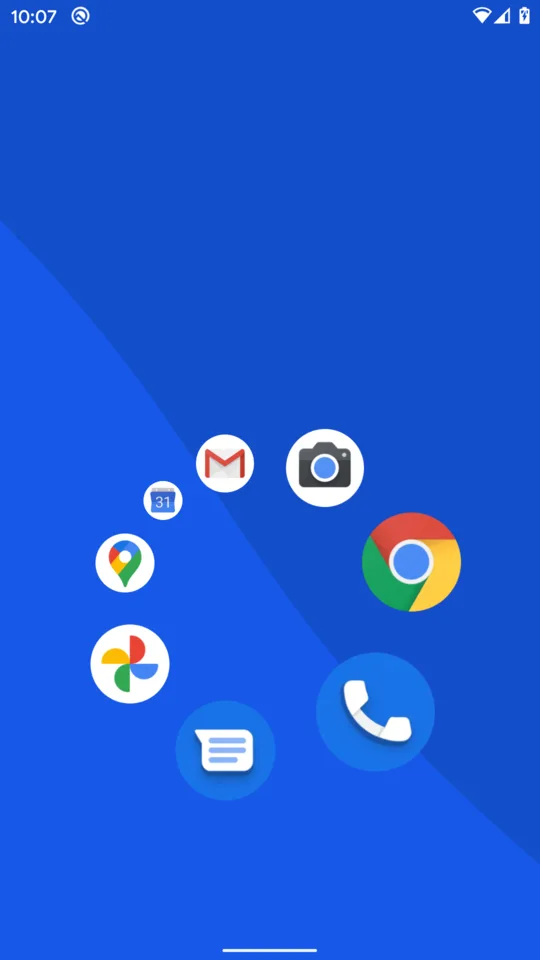
Hold and swipe through a radial menu for your usual apps; tap once and type a letter or two when you need anything else. Edge-ignore settings keep accidental gestures away from screen borders.
Needs:Android 2.3+ · set as the default home app
2113 Apps is independent, not affiliated with or endorsed by Markus Fisch. Official sources: source code on GitHub.
- Version
- 1.28.0
- Size
- 0.3 MB
- Requires
- Android 2.3+
- Updated
- 2026-07-18
Screenshots
Introduction
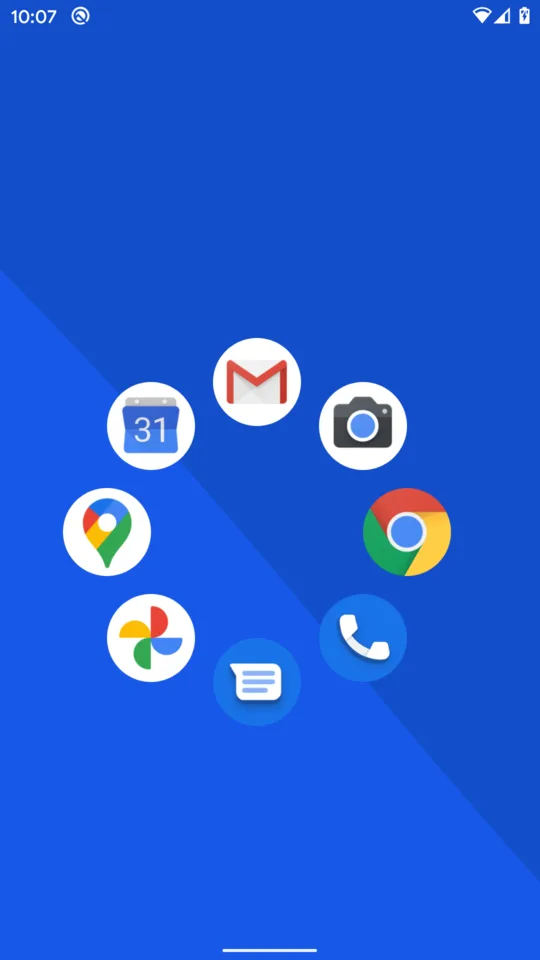
Pie Launcher is an open-source Android home app that replaces rows of icons with a radial menu. Touch and hold in an active part of the home screen, slide toward an app and release to launch it. By default, touches around all screen edges are ignored; Settings can change that area. The design is meant to turn frequent launches into one remembered gesture rather than another visual search through pages.
This page covers F-Droid’s 1.28.0 source build. We matched the 0.3 MB APK to F-Droid’s signed index, inspected its four permissions and read the fixed 1.28.0 source. The screenshots are upstream project material; we did not use the launcher on a phone.
Pie menu and searchable app list
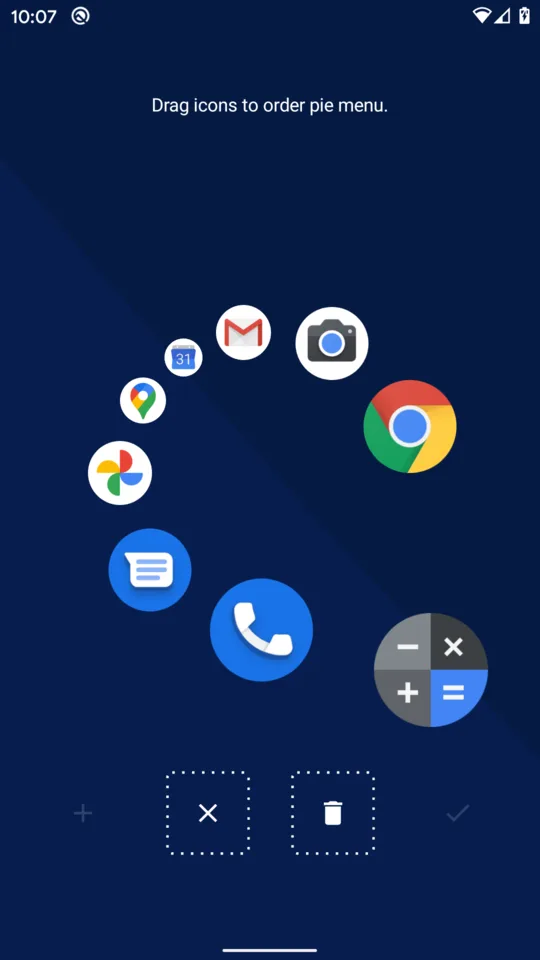
The README recommends four, six or eight icons for a pie, but the fixed source does not impose those as hard limits. Entries are edited by long-pressing an app in the full list. Recent versions add separate menus for different parts of the screen, an option to circle into another menu, saved radius, twist and icon scale for each menu, and sorting based on frequency and recency. Those controls make it more flexible than the sparse first screen suggests, but the core interaction remains hold, swipe and release.
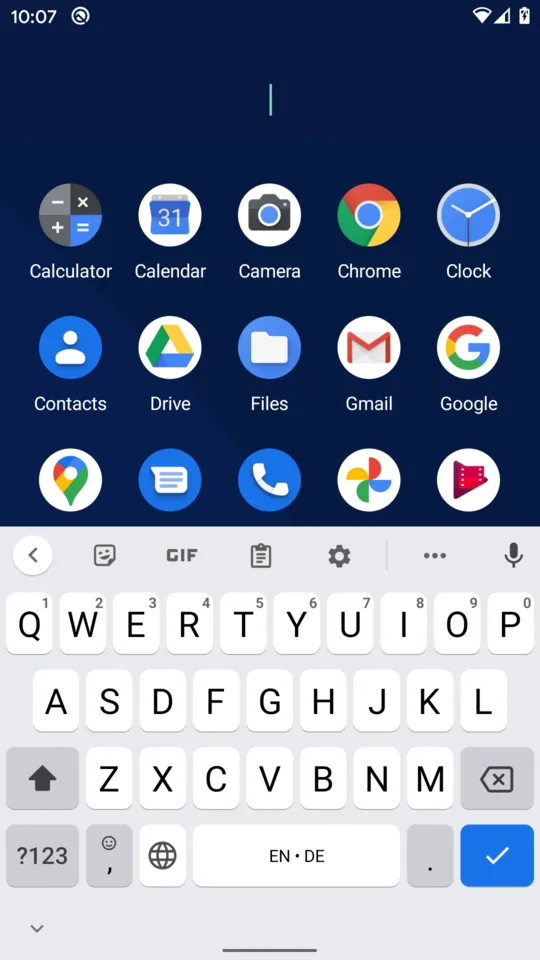
A single tap opens the full app list. Typing one or two letters filters it, with a forgiving name match by default; settings also offer contains, starts-with and package-name search. Swipe down to close the list. Apps can be hidden from the list or pie without uninstalling them.
Version 1.28.0 adds support for Android pinned shortcuts on Android 8.0 and later. That covers app-defined destinations such as a particular conversation when the source app offers one through Android’s shortcut system. It is not a general widget or web-app panel, and a shortcut can stop working if its owning app removes or changes it.
Private Space and launcher limitations
On Android 15, typing a full stop in search can unlock and expose apps from Android’s Private Space. The manifest requests the platform’s hidden-profile access permission for that role. Older systems simply do not provide Private Space.
As with every third-party launcher, gesture navigation and manufacturer home-screen integrations can behave differently from the stock launcher. Upstream says the short delay after the Home gesture affects third-party launchers generally, and documents a system bug that can leave them unresponsive after unlock. Pie Launcher forces a redraw and offers a stronger Do not reuse home screen workaround, but neither guarantees identical behaviour on every ROM.
Set Pie Launcher as the default Home app in Android settings; otherwise the Home gesture can return to the previous launcher. Keep the old launcher installed until you know the pie interaction suits you, so switching back is easy.
Offline and very small
The measured APK declares four permissions: view installed packages, request exemption from battery optimisation, access hidden profiles and expand the notification panel. Package visibility is fundamental to being a launcher. Battery exemption is optional system access intended to keep the home app responsive; granting it can let the launcher run more freely in the background.
There is no internet permission, advertising SDK or tracker found by our static scan. The APK has no native libraries, so it is not tied to ARM or x86. Its unusually small size comes from a native Android implementation with a narrow purpose, not from downloading the rest of the launcher after installation. Android system backup is allowed and may include the app list and launch records stored by the launcher.
About this file
- This is F-Droid’s source build of 1.28.0, signed with F-Droid’s key.
- The APK is 337,194 bytes (about 0.3 MB), needs Android 2.3 or later and contains no architecture-specific native libraries.
- Its measured SHA-256 is
3acf1417b4cfa73b253782f75b77d3753de4c2b5186154dfc1bff3e59b3ec440, matching F-Droid’s signed index. - It has no internet permission and our scan found no known tracker SDKs.
- Pie Launcher is licensed under MIT.
What’s inside the APK
Trackers
No code matching the Exodus Privacy tracker signatures.
Native code
Pure Java/Kotlin, so it runs on any CPU.
Android versions
Built for Android 16 (target API 36).
Permissions
0 of them need your approval first.
Granted at install (4)
Low-risk permissions Android grants automatically, plus any we have not classified.
- ACCESS_HIDDEN_PROFILES
- EXPAND_STATUS_BAR
- QUERY_ALL_PACKAGES
- REQUEST_IGNORE_BATTERY_OPTIMIZATIONS
More Information
- Package name
- de.markusfisch.android.pielauncher
- Version
- 1.28.0 (build 75)
- File size
- 0.3 MB (337,194 bytes)
- Requires
- Android 2.3 or later
- Category
- Customization
- License
- MIT
- Developer
- Markus Fisch
- Source code
- github.com/markusfisch/PieLauncher
- Released
- Jul 18, 2026
- Signed by
- F-Droid, which built this APK from the published source code. Because the key is F-Droid’s, it won’t install over a copy from Google Play or GitHub (or the other way round) without uninstalling first.
- Signer SHA-256
- 2385e49ff072d90dcef9db2890b330533ce472efeb7901994e0d222d5200978b
- File SHA-256
- 3acf1417b4cfa73b253782f75b77d3753de4c2b5186154dfc1bff3e59b3ec440
- Checked
- , against the F-Droid index · how we check · verify it yourself
Common questions
Is this APK the official Pie Launcher release?
It is F-Droid’s build rather than the developer’s own: F-Droid compiled Pie Launcher 1.28.0 from the published source code and signed it with its own key. Its SHA-256 matches F-Droid’s signed index. Because the key is F-Droid’s, it won’t install over a copy from Google Play or GitHub without uninstalling first.
What Android version does Pie Launcher need?
Android 2.3 or later (API level 9). Version 1.28.0 is built for Android 16 (target API 36). Pure Java/Kotlin, so it runs on any CPU.
Can Pie Launcher access the internet?
No. The APK doesn’t request Android’s internet permission, so the app can’t go online by itself. In total it declares 4 permissions, and none of them needs your approval first.
Does Pie Launcher contain trackers?
No known trackers: our scan of version 1.28.0 found no code matching the Exodus Privacy tracker signatures. The scan covers known tracker libraries; it doesn’t show what data the app itself sends.
Is Pie Launcher open source?
Yes. Pie Launcher is released under the MIT licence, and its source code is published at https://github.com/markusfisch/PieLauncher.
How do I open an app that is not in the pie menu?
Tap the home screen once to open the app list, then type part of its name. The default search tolerates small differences; you can switch it to contains or starts-with matching, or search package names instead.
Does Pie Launcher send app-list or usage data anywhere?
The measured APK has no internet permission and our scan found no tracker SDKs. It needs package visibility because a launcher must find installed apps, but it cannot directly transmit that list over the network.
Recent releases
| Version | Released | Size | Requires |
|---|---|---|---|
| v1.28.0 · this download | Jul 18, 2026 | 0.3 MB | Android 2.3+ |
| v1.27.0 | Jul 12, 2026 | 0.3 MB | Android 2.3+ |
| v1.26.5 | Jun 26, 2026 | 0.3 MB | Android 2.3+ |
Versions currently kept in the F-Droid repository. We host and check only the newest one. Full changelog.
Alternatives and related apps
-
 KISS Launcher Another small offline launcher, centred on ranked text search rather than a radial menu.Download
-
 Lawnchair A conventional Pixel-style home screen with grids, widgets and deeper visual controls.Download