

Olauncher
by Tanuj M. · GPL-3.0-only · open source
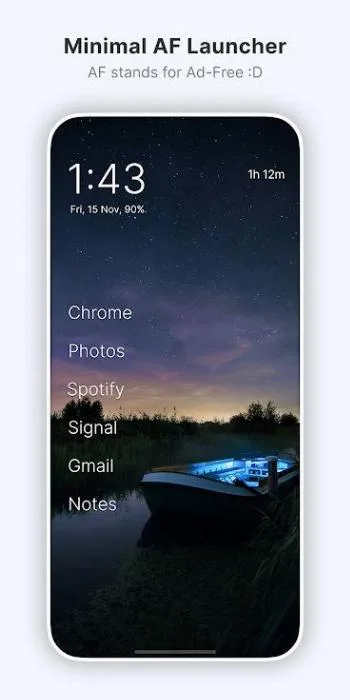
A home screen with the time, the date and up to eight app names in plain text, and no icons. Swipe left or right to open two apps you pick; type to find the rest.
Needs:Android 7.0+
2113 Apps is independent, not affiliated with or endorsed by Tanuj M.. Official sources: source code on GitHub.
- Version
- v6.9.17
- Size
- 2.4 MB
- Requires
- Android 7.0+
- Updated
- 2026-09-17
Screenshots
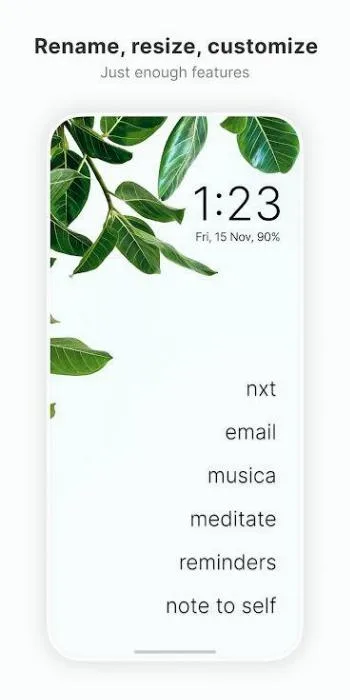
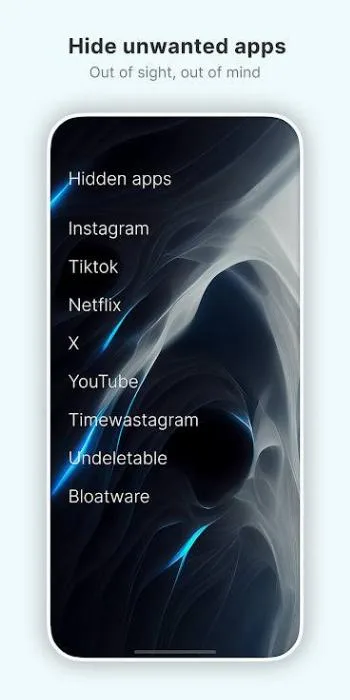
Introduction
Olauncher is a home screen app by Tanuj (tanujnotes on GitHub). Its README calls it “Minimal AF Launcher” and explains: “AF stands for Ad-Free! :D”. On Google Play, under the same package name, it has more than a million downloads. There are no icons and no widgets: the home screen is the time, the date and a short list of app names.
The home screen
- Up to eight apps as plain text, four by default, aligned left, centre or right. You can rename them and change the text size.
- Swipes: left and right each open an app you choose; swipe down opens the notification shade, and up opens the app list. Tapping the clock opens your alarm app.
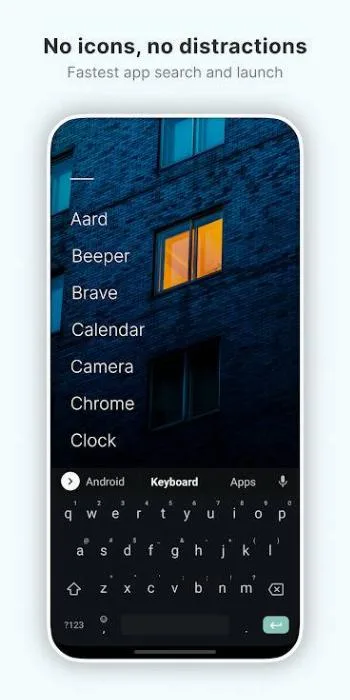
- Search as you type: in the app list, typing filters apps and opens the only match automatically. Starting the text with
!sends it to a DuckDuckGo “bang” search in your browser. - Hidden apps, kept out of the list until you look for them (see the questions below), and the private space of Android 15 and later.
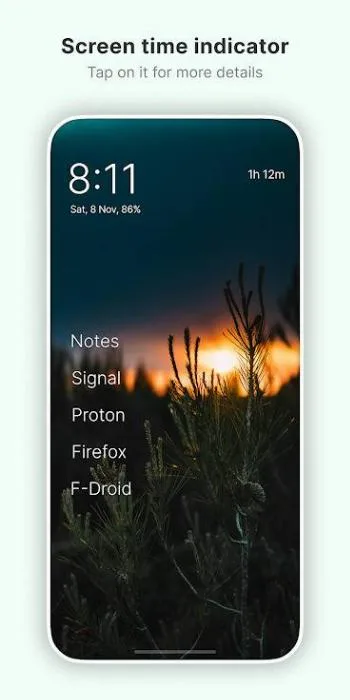
- Screen time: an optional counter on the home screen. It needs the usage access permission, which you grant in Android’s settings; the app’s note says “No app usage data is collected. Everything is processed on your device.”
- Themes: dark by default, or light, or following the system. On e-ink screens the app switches to light and turns animations off.
- Phones stay in portrait; tablets rotate. Pinned shortcuts work, widgets don’t.
Some features are deliberately tucked away; the README: “To maintain the simplicity of the launcher, a few niche features are available but hidden.”
Double tap to lock
Off by default. On Android 9 and later it needs Olauncher’s accessibility service. The service’s configuration listens only to clicks inside Olauncher, and its code reacts only to a tap on Olauncher’s own invisible lock area, then asks Android to lock the screen. The app’s explanation: “this service is only used for this particular feature. Our accessibility service does not collect or share any data.”
On Android 7 and 8 it uses device admin instead, with just one policy, locking the screen. Two known side effects come from that older method: in an early bug report, the fingerprint brought up the PIN or pattern screen after a double-tap lock, with the message “Device locked by admin”, and the FAQ warns that a launcher with admin permission can’t be uninstalled until you turn the feature off.
What goes online
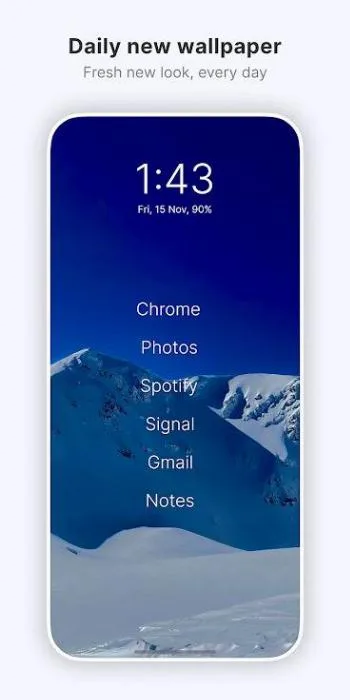
Only the daily wallpaper, and it is off by default. About ten minutes after you first open Olauncher, and only if it is your default launcher, a “Did you know?” dialog offers it once; nothing changes unless you tap Enable. It can also be switched on in the settings.
When it is on, Olauncher checks every four hours while you are connected. It reads a list of image addresses from a file the developer keeps on GitHub (a Gist, which can be changed at any time), downloads the image for the day and sets it as both the home and the lock screen wallpaper. On 10 October 2026 the list pointed mostly at Unsplash, with a few images on Reddit, Pexels and imgbox; those sites see your IP address when the image is fetched. A long press on the On/Off switch sets a plain black wallpaper instead, according to the FAQ.
The developer has declined a request for a version without the internet permission. Everything else that leads online, such as the about page, the privacy policy or the GitHub link, opens in your browser when you tap it.
There are no ad or analytics libraries in the app. It does show a few prompts of its own: a request to rate it on Google Play, one to share it, and a one-time message about Pro Launcher, the developer’s paid launcher on Play, which adds “weather, widgets, fonts, folders” and more.
About this file
- This is the developer’s own build of version v6.9.17, from IzzyOnDroid: the same file, byte for byte, as the APK on the project’s GitHub releases, signed by Tanuj M. F-Droid builds the same source but signs it with its own key, so moving between our file and F-Droid’s means uninstalling first, which resets your home screen. The Play version uses the same package name; we couldn’t check its signature, so don’t count on installing over it either.
- Version v6.9.17, from September 2026, replaced the settings pop-ups with standard menus and dialogs, blurs the screen behind dialogs, adds ten languages (among them Hindi, Korean, Thai and Vietnamese; Brazilian Portuguese was already there) and leaves Google’s encrypted dependency information out of the APK. It also removed the option to change what swiping down does: it always opens the notification shade now.
- The 2.4 MB file has no native code, so it runs on any processor, and needs Android 7.0 or later. Our scan found no trackers.
- The screenshots are the project’s own store images from July 2025, with its captions; they don’t show the new menus.
- Olauncher is licensed under the GPL-3.0.
What’s inside the APK
Trackers
No code matching the Exodus Privacy tracker signatures.
Native code
Pure Java/Kotlin, so it runs on any CPU.
Android versions
Built for Android 16 (target API 36).
Permissions
0 of them need your approval first.
You switch these on in Settings (1)
Special app access. Nothing is granted until you turn it on yourself.
- Usage access · PACKAGE_USAGE_STATS
Granted at install (10)
Low-risk permissions Android grants automatically, plus any we have not classified.
- ACCESS_HIDDEN_PROFILES
- ACCESS_NETWORK_STATE
- EXPAND_STATUS_BAR
- FOREGROUND_SERVICE
- INTERNET
- QUERY_ALL_PACKAGES
- RECEIVE_BOOT_COMPLETED
- REQUEST_DELETE_PACKAGES
- SET_WALLPAPER
- WAKE_LOCK
Defined by other apps (2)
Permissions that belong to another app or to this app itself.
- app.olauncher.DYNAMIC_RECEIVER_NOT_EXPORTED_PERMISSION
- com.android.alarm.permission.SET_ALARM
More Information
- Package name
- app.olauncher
- Version
- v6.9.17 (build 113)
- File size
- 2.4 MB (2,401,356 bytes)
- Requires
- Android 7.0 or later
- Category
- Customization
- License
- GPL-3.0-only
- Developer
- Tanuj M.
- Source code
- github.com/tanujnotes/Olauncher
- Released
- Sep 17, 2026
- Signer SHA-256
- a2bd5f2443fd4b43a039b73ebe254febbc7eb57a2993dff541de52c52e588149
- File SHA-256
- bc72df3b8162f68a7bfed886fa21eb62ee1d53eadb9526498606b8f0aae5aa19
- Checked
- , against the IzzyOnDroid index · how we check · verify it yourself
Common questions
Is this APK the official Olauncher release?
Yes. It is the developer’s own release of Olauncher v6.9.17, byte for byte as IzzyOnDroid distributes it. Its SHA-256 matches IzzyOnDroid’s signed index, and it is signed with the certificate IzzyOnDroid records for the app (SHA-256 a2bd5f2443fd4b43a039b73ebe254febbc7eb57a2993dff541de52c52e588149).
What Android version does Olauncher need?
Android 7.0 or later (API level 24). Version v6.9.17 is built for Android 16 (target API 36). Pure Java/Kotlin, so it runs on any CPU.
Can Olauncher access the internet?
Yes. The APK requests Android’s internet permission. In total it declares 13 permissions, and none of them needs your approval first.
Does Olauncher contain trackers?
No known trackers: our scan of version v6.9.17 found no code matching the Exodus Privacy tracker signatures. The scan covers known tracker libraries; it doesn’t show what data the app itself sends.
Is Olauncher open source?
Yes. Olauncher is released under the GPL-3.0-only licence, and its source code is published at https://github.com/tanujnotes/Olauncher.
Why does a launcher ask for an accessibility service?
Only for Double tap to lock, which is off by default. On Android 9 and later, Olauncher locks the screen through an accessibility service whose configuration limits it to clicks inside Olauncher itself. On Android 7 and 8 it uses device admin instead, with only the lock-screen policy; the FAQ notes you must turn the feature off before you can uninstall the app.
Can I add widgets?
No. Olauncher accepts app shortcuts that other apps pin to the home screen, but answers widget requests with “Widgets are not supported”. The developer points people who want widgets to Pro Launcher, the developer’s paid launcher on Google Play.
Where are my hidden apps?
The FAQ: “Long press anywhere on Olauncher home screen to open settings. Tap on the ‘Olauncher’ text on the top to see your hidden apps.”
The app list sometimes doesn’t show, or the launcher feels slow. What helps?
The developer’s advice: set Olauncher’s battery use to Unrestricted in Android’s app settings and restart the phone. The FAQ calls these problems “Android related” and says they “will happen with any launcher you download”.
Recent releases
| Version | Released | Size | Requires |
|---|---|---|---|
| v6.9.17 · this download | Sep 17, 2026 | 2.4 MB | Android 7.0+ |
| v6.9.1 | Sep 14, 2026 | 2.3 MB | Android 7.0+ |
| v6.7.1 | Jul 5, 2026 | 2.2 MB | Android 7.0+ |
Versions currently kept in the IzzyOnDroid repository. We host and check only the newest one. Full changelog.
Alternatives and related apps
-
 µLauncher Even barer: no apps on the home screen at all, everything opens with gestures, and no internet permission.Download
-
 KISS Launcher Minimal too, but built around a search bar that also finds contacts and settings.Download
-
 Kvaesitso If you want widgets on the home screen, which Olauncher doesn’t support.Download