
TV Launcher
by wiiguy · GPL-3.0-or-later · open source
A deliberately small Android TV home screen with fourteen app positions, a searchable picker and none of the recommendations or account prompts of a streaming-service launcher.
Needs:Android 5.0+ · Android TV or TV box
2113 Apps is independent, not affiliated with or endorsed by wiiguy. Official sources: source code on GitHub.
- Version
- 1.6.2
- Size
- 1.1 MB
- Requires
- Android 5.0+
- Updated
- 2026-10-22
Screenshots
Introduction
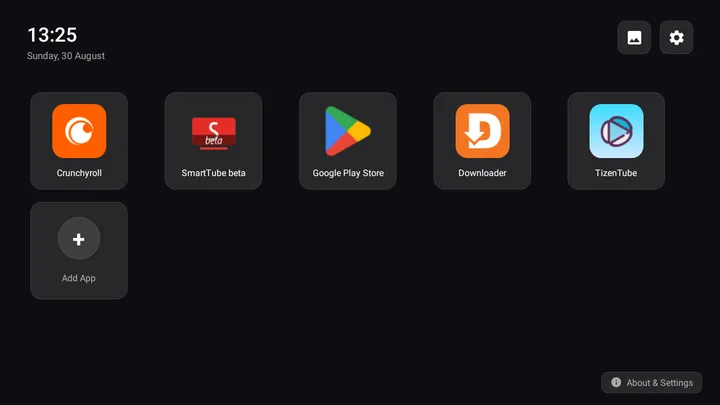
TV Launcher is a compact home-screen replacement made specifically for Android TV. Its main screen is a fixed grid with fourteen app positions and a permanent plus tile. It avoids content recommendations, service accounts and animated feeds: choose the apps you want, put them in order and launch them.
This page covers F-Droid’s 1.6.2 build. We matched its file to F-Droid’s signed index, inspected the manifest and checked the fixed v1.6.2 source tag. We did not test it on a physical television or set-top box, so remote-control behaviour can still vary by firmware.
Choosing and arranging apps
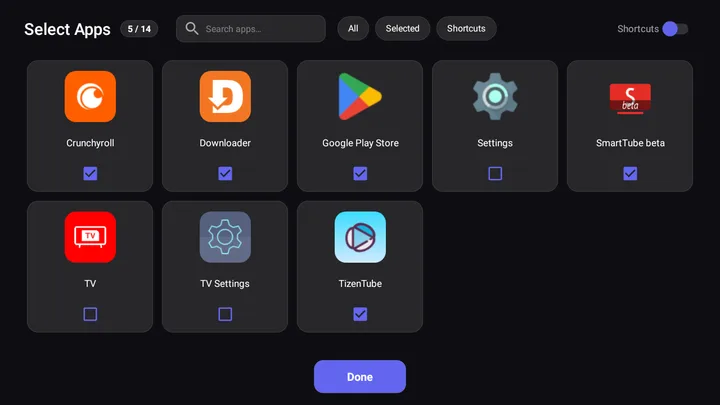
The plus tile opens an app picker with text search and three filters: All, Selected and Shortcuts. Selecting an app adds it to the home grid. Long-pressing a tile opens actions for changing its position, viewing Android’s app-info screen or removing it from the grid. Supported pinned shortcuts can be added as their own tiles, which is useful when an app exposes a direct route to one of its screens.
The fourteen-position limit is intentional, not a count of how many apps may be installed on the device. The picker selects or removes home-screen tiles; it does not launch unpinned apps, and this launcher has no separate app drawer. The launcher queries the installed package list to build the picker, which explains its broad package-visibility permission.
Wallpapers and optional device workarounds
The default Dark Minimal (No Wallpaper) background is stored with the app. The picture button on the home screen opens two other choices: Cycling Online Wallpaper and Custom URL Image. Cycling uses the category and interval you choose, but its providers are a fixed fallback chain: Wallhaven first, then Bing, Picsum and Reddit after failures. Reddit results can point to a third-party image host. The gear button opens Android’s system settings, not this wallpaper panel. Leaving Dark Minimal selected avoids wallpaper traffic.
Two compatibility controls deserve care:
- Override TV Default Launcher uses Android’s Accessibility service to return to this launcher when Home is pressed on devices that do not respect the normal default-launcher choice. It is optional and off by default. Try the ordinary system launcher setting first.
- Kill Stock Launcher Background RAM calls Android’s background-process kill API whenever this launcher resumes, for a built-in list of Google TV, Fire TV, Xiaomi and TCL launchers plus detected system Home apps. It is off by default; Android 14 and later do not let an app use this call to affect another app’s processes.
Both switches are in the Settings & About dialog. Neither is required for the basic grid, and their existence is not evidence that they work on every TV brand; Android TV vendors change launcher and remote behaviour extensively.
Version and file details
Version 1.6.2 changes the build rather than the launcher workflow: the F-Droid flavour removes WorkManager and four related permissions, while the updater is compiled only into the GitHub flavour. The release also moves the official images into Android TV’s screenshot directory. Updates to this build therefore come through F-Droid or a manually installed compatible F-Droid-signed file, not from an in-app installer.
The APK declares internet, installed-app visibility, background-process control and Android’s automatically generated dynamic-receiver permission. Our static scan found no tracker SDKs. “No trackers found” describes the APK scan, not the wallpaper network path: cycling contacts its provider chain, and a custom URL contacts that host whenever those modes fetch an image.
About this file
- This is F-Droid’s source build of 1.6.2, signed with F-Droid’s key. A GitHub build signed by a different key cannot update this signing line in place.
- The 1.1 MB APK needs Android 5.0 or later and contains no native libraries, so it is not restricted to one CPU architecture.
- Its measured SHA-256 is
7afde83f96ccf30d1bc69ca06692d385800d2d9a14dd5f7d85fb4ad4f3c5c210, matching the signed F-Droid index. - TV Launcher is licensed under GPL-3.0 or later. The images returned by optional wallpaper services retain their own licences and terms.
What’s inside the APK
Trackers
No code matching the Exodus Privacy tracker signatures.
Native code
Pure Java/Kotlin, so it runs on any CPU.
Android versions
Built for Android 14 (target API 34).
Permissions
0 of them need your approval first.
Flagged by F-Droid:
- NonFreeNet: Relies on or promotes a proprietary network service.
Granted at install (3)
Low-risk permissions Android grants automatically, plus any we have not classified.
- INTERNET
- KILL_BACKGROUND_PROCESSES
- QUERY_ALL_PACKAGES
Defined by other apps (1)
Permissions that belong to another app or to this app itself.
- com.tvlauncher.DYNAMIC_RECEIVER_NOT_EXPORTED_PERMISSION
More Information
- Package name
- com.tvlauncher
- Version
- 1.6.2 (build 10602)
- File size
- 1.1 MB (1,118,486 bytes)
- Requires
- Android 5.0 or later
- Category
- Customization
- License
- GPL-3.0-or-later
- Developer
- wiiguy
- Source code
- github.com/wiiguy/lightweight_androidtv_launcher
- Released
- Oct 22, 2026
- Signed by
- F-Droid, which built this APK from the published source code. Because the key is F-Droid’s, it won’t install over a copy from Google Play or GitHub (or the other way round) without uninstalling first.
- Signer SHA-256
- 9e9f185a5b3cfb6ff65ac2907d3180c150483705ba129787c60667088647a767
- File SHA-256
- 7afde83f96ccf30d1bc69ca06692d385800d2d9a14dd5f7d85fb4ad4f3c5c210
- Checked
- , against the F-Droid index · how we check · verify it yourself
Common questions
Is this APK the official TV Launcher release?
It is F-Droid’s build rather than the developer’s own: F-Droid compiled TV Launcher 1.6.2 from the published source code and signed it with its own key. Its SHA-256 matches F-Droid’s signed index. Because the key is F-Droid’s, it won’t install over a copy from Google Play or GitHub without uninstalling first.
What Android version does TV Launcher need?
Android 5.0 or later (API level 21). Version 1.6.2 is built for Android 14 (target API 34). Pure Java/Kotlin, so it runs on any CPU.
Can TV Launcher access the internet?
Yes. The APK requests Android’s internet permission. In total it declares 4 permissions, and none of them needs your approval first.
Does TV Launcher contain trackers?
No known trackers: our scan of version 1.6.2 found no code matching the Exodus Privacy tracker signatures. The scan covers known tracker libraries; it doesn’t show what data the app itself sends.
Is TV Launcher open source?
Yes. TV Launcher is released under the GPL-3.0-or-later licence, and its source code is published at https://github.com/wiiguy/lightweight_androidtv_launcher.
Does TV Launcher replace the Home button automatically?
No. Android normally asks which launcher should handle Home, or lets you choose one in system settings. TV Launcher also has an optional Accessibility-based Home-key override for devices that refuse to keep a third-party default; that service is off until you enable it.
Why does an otherwise simple launcher need internet access?
Cycling Online Wallpaper tries Wallhaven, then falls back through Bing, Picsum and Reddit; Custom URL Image downloads the address you enter. The initial Dark Minimal background is local, and app launching does not need a connection. The F-Droid build omits the GitHub edition’s updater and install permission.
Alternatives and related apps
-
 KISS Launcher A search-first launcher for phones, when a ten-foot television grid is not the goal.Download
-
 Fossify Launcher A conventional phone launcher rather than a ten-foot Android TV interface.Download