

SD Maid SE
by Matthias Urhahn · GPL-3.0-only · open source
Finds what uninstalled apps left behind, system junk, app caches and duplicate files, and lists all of it before anything is deleted. Scanning is free; some cleaning needs the upgrade.
Needs:No root · Android 8.0+ · root or Shizuku optional
2113 Apps is independent, not affiliated with or endorsed by Matthias Urhahn. Official sources: source code on GitHub.
- Version
- 2.2.2-rc0
- Size
- 18.2 MB
- Requires
- Android 8.0+
- Updated
- 2026-10-20
Screenshots
Introduction
SD Maid SE is a storage cleaner by Matthias Urhahn, who publishes as darken and also wrote the original SD Maid. Its README: “SD Maid SE (AKA SD Maid 2) is a file management tool for Android that specialises in maintenance. Its core purpose is freeing up space and removing unwanted data.” It is a complete rewrite for newer Android versions, first released in March 2023, and the README still calls it “not feature complete”.
The tools
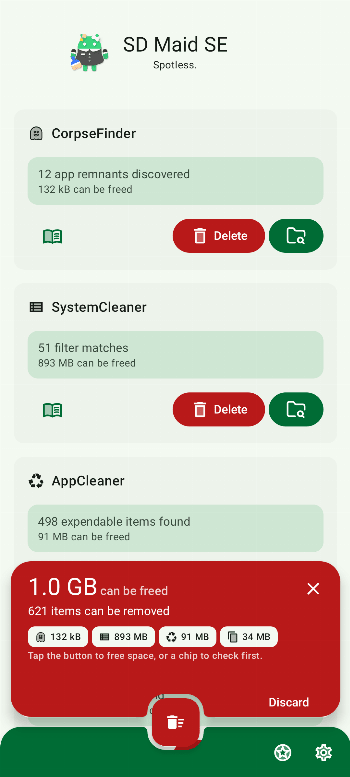
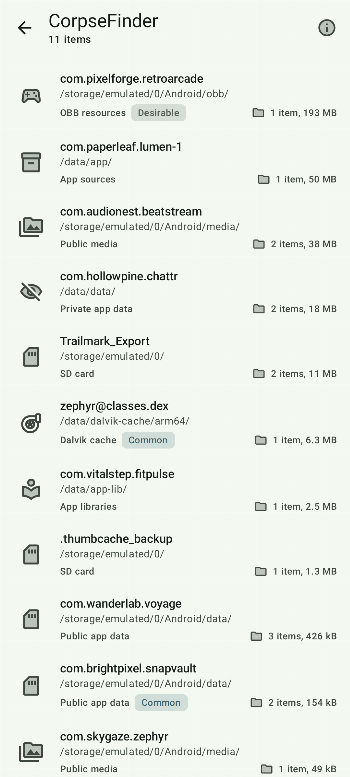
- CorpseFinder: files and folders left behind by apps that are no longer installed.
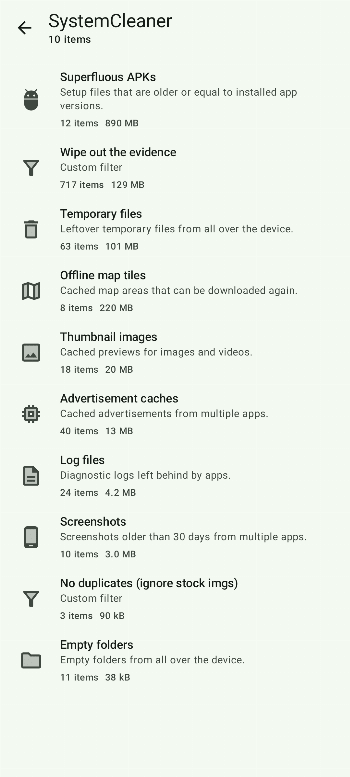
- SystemCleaner: searches all the storage it can reach against filters, such as log files, temporary files, empty folders and advertisement caches, plus filters you write yourself.
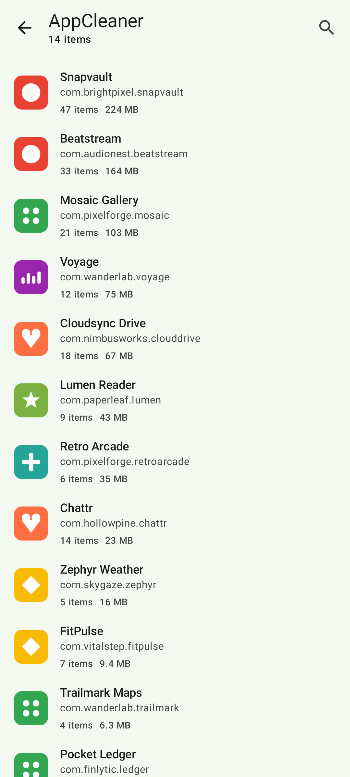
- AppCleaner: caches and other expendable files of installed apps.
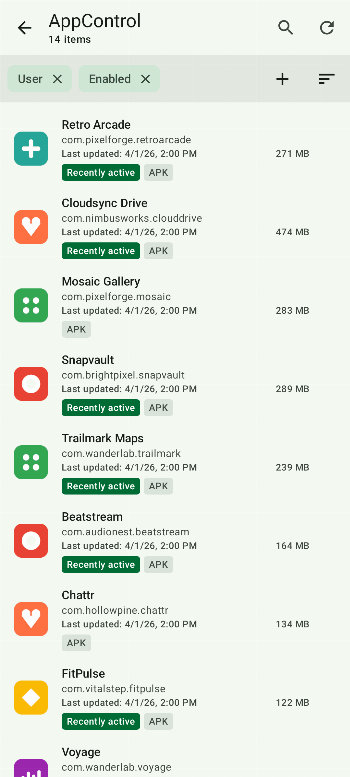
- AppControl: your installed apps, to uninstall, force stop, freeze, archive or export them.
- Analyzer: what takes up space, sorted by size, with a storage trend over time.
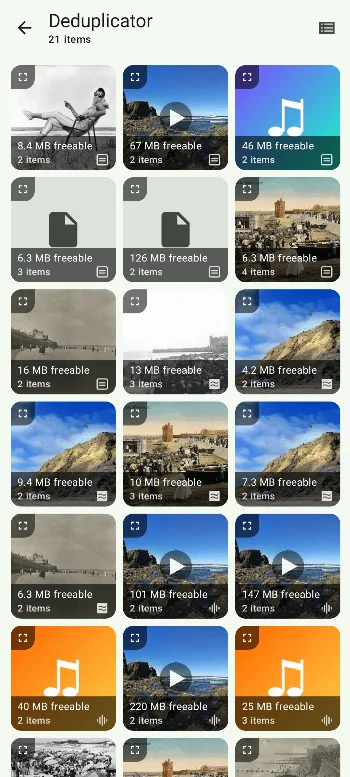
- Deduplicator: exact copies, and optionally photos, videos or audio that look or sound alike.
- Media Squeeze: recompresses photos and videos to take less space.
- Swiper: goes through a folder file by file; you swipe to keep or delete.
- Scheduler: runs CorpseFinder, SystemCleaner and AppCleaner automatically. The schedule it creates is off until you set it up.
There is also a home-screen widget and a launcher shortcut. The app is translated into many languages, Brazilian Portuguese among them.
Root, Shizuku and the accessibility service
SD Maid works without root, on the storage Android lets apps see. From the code of this version and its documentation:
- Android/data needs root or ADB access on Android 13 and later, the folder where many apps keep their files; CorpseFinder, the Analyzer and the Deduplicator can’t look inside it otherwise. App folders under
/dataalways need root. - ADB access comes through Shizuku or Porter, the developer’s own fork of Shizuku. If neither is installed, this build points you to Porter; if both are, SD Maid uses Porter.
- The accessibility service, which the app asks before using, taps Clear cache in the system settings for AppCleaner, and Force stop for AppControl. The developer’s FAQ: “On modern Android, there is no API for apps to clear another app’s cache directly.” With root, or with ADB for a clean of all apps at once, AppCleaner uses a system call instead. On Android 13 and later, apps installed outside Google Play may need restricted settings allowed before the service can be turned on, from the menu on SD Maid’s app info page; the app explains this when it happens.
- On Android 16 and 17, some phones hide the Clear cache button from accessibility services. This version then reaches it blind, the way a keyboard would: on Google, Motorola and Sony phones from Android 16, and on other phones from Android 17. Version 2.2.2-rc0, from 19 October 2026, fixes two problems with this on Android 17: on GrapheneOS it pressed the extra “Manage storage” button that some apps’ storage pages have, and on Pixel phones cache clearing could fail for every app while Android’s “Delete app data?” confirmation kept popping up. If you turn on Google’s Advanced Protection mode on Android 17, it blocks the accessibility service for apps like SD Maid altogether.
Defaults worth knowing
- Deleting is permanent. Nothing goes to a trash folder. Each tool lists what it found and asks before deleting, and you can deselect items.
- One-tap cleaning from the dashboard, a shortcut or the widget scans and deletes without asking. It is off until you turn it on, and needs the upgrade.
- AppCleaner includes the caches only the accessibility service can reach. That setting is on.
- CorpseFinder can watch for uninstalled apps. This is off; once you enable it, it deletes an uninstalled app’s leftovers automatically unless you turn that part off too.
- The Deduplicator compares checksums, so only identical files count as duplicates. Its similar-image and similar-media options are off. A user who lost three similar photos they wanted got this explanation from the developer: with those options, similar files can end up in different duplicate sets, and “There is no way around that when using any other detection method than checksums.”
- Media Squeeze overwrites the original. Its documentation: “The original file is replaced and no copy is kept.”
- Exclusions don’t hold for a full ADB clean. Clearing the caches of all apps at once through ADB clears the apps you excluded too, as the app warns.
What goes online
From the code of this version, two features go online by themselves, both on GitHub. Both are switched on, with switches on the privacy screen during setup and in the settings:
- Messages from the developer. SD Maid asks GitHub’s API at api.github.com for the message files for its edition in the project’s repository, then downloads the one in your language from the address GitHub returns, normally raw.githubusercontent.com. On 14 October 2026 the repository had no messages for release versions, so the first request found nothing and the second wasn’t made.
- The update check. SD Maid asks api.github.com for the project’s latest release, at most every six hours. It is on unless SD Maid was installed by F-Droid or a similar store app, so it is on when you install this file from your browser. A newer version shows a card on the dashboard, and tapping it opens the GitHub download in your browser; the app installs nothing itself.
There is no analytics or crash reporting: the error reporter in this version does nothing. The privacy policy: “I do not collect, share or sell personal information.” It calls both checks optional; they are on until you turn them off. Links you tap, such as the sponsor page, open in your browser.
About this file
- This is the developer’s own build of version 2.2.2-rc0, from 19 October 2026, delivered through IzzyOnDroid and byte for byte the APK on the project’s GitHub release. Its signing key matches the fingerprint the project publishes for its open-source build, and IzzyOnDroid reproduced the file from source. F-Droid’s main repository distributes the same signed file, so updates from GitHub, IzzyOnDroid or F-Droid install over it.
- Every release is numbered “-rc0”; this one is the regular current release, marked Latest on GitHub.
- The 18.2 MB file runs on Android 8.0 and later, on ARM and x86, 32- and 64-bit, and declares 22 permissions: internet and network state, all files access and storage, usage access, the list of installed apps, clearing caches, requesting uninstalls, notifications, background work and starting at boot for schedules, closing system dialogs, access to other users’ storage and to secure settings, which only ADB or root can grant, Shizuku and Porter, detecting Advanced Protection mode, and one AndroidX adds for internal use.
- SD Maid SE’s code is licensed under the GPL-3.0, but the README excludes “SD Maid SE icons, logos, mascots, marketing materials and assets”, its animations and videos, documentation, Google Play screenshots and texts, and translations. The app icon, the mascot images and animations, and the translations are in this file. F-Droid marks the app as containing non-free assets.
- The screenshots are the project’s own, from its repository, with made-up example apps.
What’s inside the APK
Trackers
No code matching the Exodus Privacy tracker signatures.
Native code
Runs on 64-bit and older 32-bit ARM phones.
Android versions
Built for Android 16 (target API 36).
Permissions
3 of them need your approval first.
Flagged by IzzyOnDroid:
- NonFreeAssets: Contains non-free assets.
CPU types in this build: arm64-v8a (64-bit ARM, almost every phone since 2017); armeabi-v7a (32-bit ARM, older and budget phones); x86 (32-bit Intel, emulators); x86_64 (64-bit Intel, emulators and Chromebooks).
Asks you first (3)
Android shows a prompt before the app can use these.
- Show notifications (Android 13+) · POST_NOTIFICATIONS
- Read shared storage (Android 12 and older) · READ_EXTERNAL_STORAGE
- Write shared storage (Android 10 and older) · WRITE_EXTERNAL_STORAGE
You switch these on in Settings (2)
Special app access. Nothing is granted until you turn it on yourself.
- All files access · MANAGE_EXTERNAL_STORAGE
- Usage access · PACKAGE_USAGE_STATS
System-level (2)
Reserved for system apps. A normal install does not get these; they only take effect through root, ADB or Shizuku, if at all.
- INTERACT_ACROSS_USERS
- WRITE_SECURE_SETTINGS
Granted at install (11)
Low-risk permissions Android grants automatically, plus any we have not classified.
- ACCESS_NETWORK_STATE
- BROADCAST_CLOSE_SYSTEM_DIALOGS
- CLEAR_APP_CACHE
- FOREGROUND_SERVICE
- FOREGROUND_SERVICE_DATA_SYNC
- INTERNET
- QUERY_ADVANCED_PROTECTION_MODE
- QUERY_ALL_PACKAGES
- RECEIVE_BOOT_COMPLETED
- REQUEST_DELETE_PACKAGES
- WAKE_LOCK
Defined by other apps (4)
Permissions that belong to another app or to this app itself.
- com.android.permission.GET_INSTALLED_APPS
- eu.darken.porter.permission.API
- eu.darken.sdmse.DYNAMIC_RECEIVER_NOT_EXPORTED_PERMISSION
- moe.shizuku.manager.permission.API_V23
More Information
- Package name
- eu.darken.sdmse
- Version
- 2.2.2-rc0 (build 20202000)
- File size
- 18.2 MB (18,173,899 bytes)
- Requires
- Android 8.0 or later
- Category
- System Tools
- License
- GPL-3.0-only
- Developer
- Matthias Urhahn
- Source code
- github.com/d4rken-org/sdmaid-se
- Released
- Oct 20, 2026
- Signer SHA-256
- f490032be5383f55900495fa7fc207ece2e786a5c2c6cc52027b99548a9ce938
- File SHA-256
- 11b5b9084c27ab3b30db47c92f403129244c178e81e07c0bb0ffbb64a9bb1bb6
- Checked
- , against the IzzyOnDroid index · how we check · verify it yourself
Common questions
Is this APK the official SD Maid SE release?
Yes. It is the developer’s own release of SD Maid SE 2.2.2-rc0, byte for byte as IzzyOnDroid distributes it. Its SHA-256 matches IzzyOnDroid’s signed index, and it is signed with the certificate IzzyOnDroid records for the app (SHA-256 f490032be5383f55900495fa7fc207ece2e786a5c2c6cc52027b99548a9ce938).
What Android version does SD Maid SE need?
Android 8.0 or later (API level 26). Version 2.2.2-rc0 is built for Android 16 (target API 36). Runs on 64-bit and older 32-bit ARM phones.
Can SD Maid SE access the internet?
Yes. The APK requests Android’s internet permission. In total it declares 22 permissions, and 3 of them need your approval first.
Does SD Maid SE contain trackers?
No known trackers: our scan of version 2.2.2-rc0 found no code matching the Exodus Privacy tracker signatures. The scan covers known tracker libraries; it doesn’t show what data the app itself sends.
Is SD Maid SE open source?
Its code is. The source code of SD Maid SE is released under the GPL-3.0-only licence and published at https://github.com/d4rken-org/sdmaid-se. IzzyOnDroid marks the app as containing non-free assets: some files bundled in the APK aren’t covered by that licence.
Is SD Maid SE the same app as SD Maid?
No. It is the successor, rewritten from scratch, and a separate app. The original SD Maid is still on Google Play and, in the developer’s words, gets “security patches and some bug fixes, but no new features”. A Pro upgrade from SD Maid 1 doesn’t carry over; exclusions and custom filters can be imported. On Android 7 or older, the developer says to keep using SD Maid 1.
What is free, and what needs the upgrade?
Every tool scans for free. Deleting is free in CorpseFinder, with SystemCleaner’s built-in filters and in the storage Analyzer, and AppControl works on one app at a time. The upgrade adds deleting caches in AppCleaner and duplicates in the Deduplicator, compressing photos and videos, scheduled and one-tap cleaning, custom filters, and Swiper beyond two sessions of 50 files.
How does the upgrade work in this version?
This build has no Google Play billing. Its upgrade screen says: “Tap the button below to activate all extra features and open my GitHub Sponsors profile.” The developer’s FAQ calls it a voluntary donation that is “currently not an enforced check and trusts you as you trust SD Maid with you data.” The Google Play version sells a yearly subscription with a 14-day trial, or a one-time purchase.
Can I switch to the Google Play version?
Not by installing over this one. Both use the same package name, but this build is signed with the developer’s key for the open-source version and the Play version with another, so Android refuses the update. Uninstalling deletes SD Maid’s settings, and exporting a settings backup first needs the upgrade.
Recent releases
| Version | Released | Size | Requires |
|---|---|---|---|
| v2.2.2-rc0 · this download | Oct 20, 2026 | 18.2 MB | Android 8.0+ |
| v2.2.1-rc0 | Oct 7, 2026 | 18.1 MB | Android 8.0+ |
Versions currently kept in the IzzyOnDroid repository. We host and check only the newest one. Full changelog.
Alternatives and related apps
-
 App Manager Manages installed apps in depth, from backups to freezing, with root or ADB, but doesn’t search for junk files.Download
-
 Material Files A file manager for finding and deleting files by hand, with root or Shizuku for folders other apps can’t open.Download