FireWall Blocks
by Shayan · MIT · open source
Blocks Wi-Fi or mobile data per app without root, through Shizuku or a local VPN.
Needs:Shizuku, or nothing in VPN mode
2113 Apps is independent, not affiliated with or endorsed by Shayan. Official sources: source code on GitHub.
- Version
- 1.5.shynoid
- Size
- 12.7 MB
- Requires
- Android 11+
- Updated
- 2026-05-28
Screenshots
Introduction
FireWall Blocks lets you cut an app off from the internet, on Wi-Fi, mobile data or both, without root. It has two ways of doing it, and you can use either or both at once.
Two modes
- Shizuku mode (recommended by the developer): the firewall rules are applied through Shizuku, and the app doesn’t have to keep running in the background. After a reboot, start Shizuku first, then open FireWall Blocks once to re-apply your rules.
- VPN mode: works immediately with no setup, by routing traffic through a local VPN on the phone. Nothing leaves the device through someone else’s server. The catch is that Android allows only one VPN at a time, so this mode can’t run alongside a real VPN app.
Features
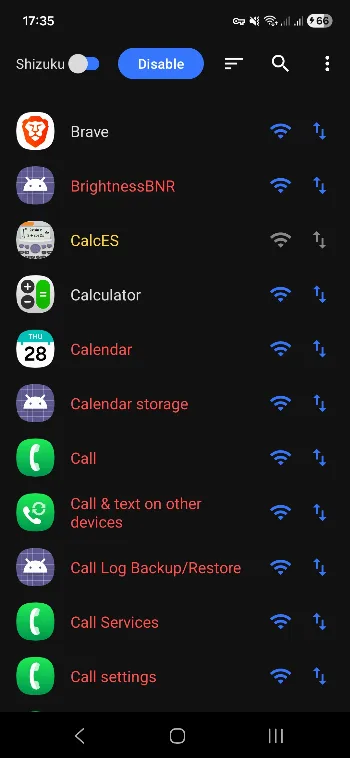
- Per-app rules for Wi-Fi and mobile data separately.
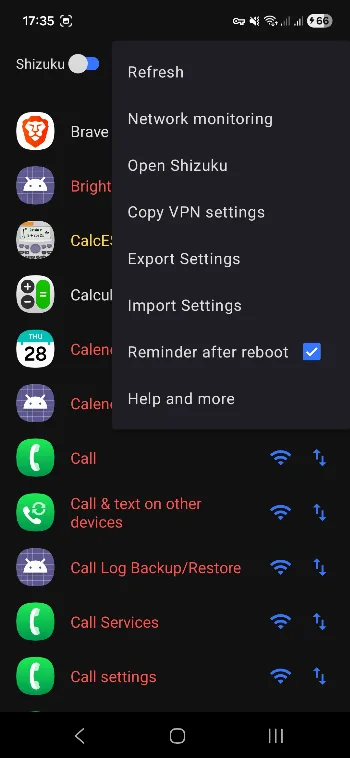
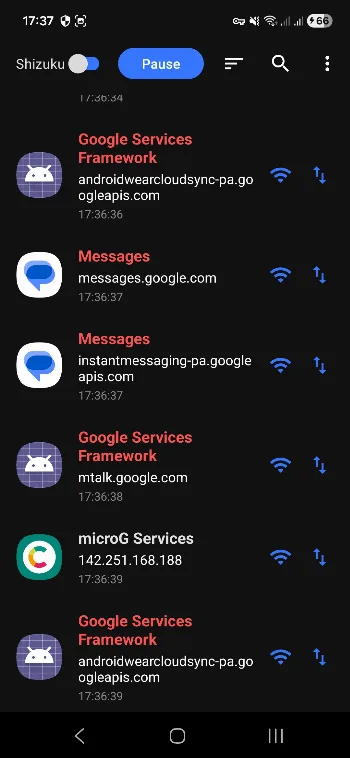
- A network monitoring screen (VPN mode) that shows which apps are trying to connect, with block and allow buttons right in the live log.
- Import and export of your rules as a JSON file.
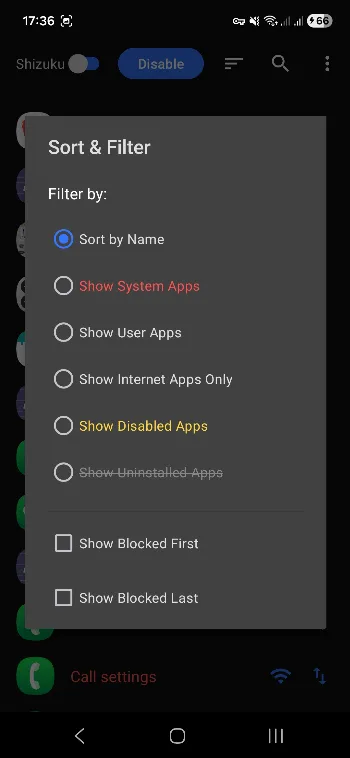
- Sorting and filters: user apps, system apps, apps with network permission, disabled apps, rules left over from uninstalled apps.
- App search.
What stands out in the APK
- Shizuku API confirmed in the code. No trackers.
- Acts as a VPN (
BIND_VPN_SERVICE) is the special capability that VPN mode uses. Android asks for your approval the first time you turn it on. - Notifications is the only permission that asks first. The rest are ordinary install-time permissions: network access, a foreground service, starting at boot and seeing installed apps so it can list them.
Installing it
- Install the APK.
- For Shizuku mode, install and start Shizuku first. For VPN mode, nothing else is needed.
- Tap Enable, pick a mode, then tap the Wi-Fi or data icon next to any app to block it.
More apps that use Shizuku: Shizuku apps list.
What’s inside the APK
Trackers
No code matching the Exodus Privacy tracker signatures.
Native code
Pure Java/Kotlin, so it runs on any CPU.
Android versions
Built for Android 14 (target API 34).
Permissions
1 of them need your approval first.
Shizuku API. Uses the Shizuku API, so it can do ADB-level work without root once Shizuku is running. (rikka.shizuku.Shizuku$$ExternalSyntheticLambda0)
Asks you first (1)
Android shows a prompt before the app can use these.
- Show notifications (Android 13+) · POST_NOTIFICATIONS
You switch these on in Settings (1)
Special app access. Nothing is granted until you turn it on yourself.
- Acts as a VPN · BIND_VPN_SERVICE
Granted at install (6)
Low-risk permissions Android grants automatically, plus any we have not classified.
- ACCESS_NETWORK_STATE
- FOREGROUND_SERVICE
- FOREGROUND_SERVICE_DATA_SYNC
- INTERNET
- QUERY_ALL_PACKAGES
- RECEIVE_BOOT_COMPLETED
Defined by other apps (2)
Permissions that belong to another app or to this app itself.
- com.shayan.firewall.DYNAMIC_RECEIVER_NOT_EXPORTED_PERMISSION
- moe.shizuku.manager.permission.API_V23
More Information
- Package name
- com.shayan.firewall
- Version
- 1.5.shynoid (build 8)
- File size
- 12.7 MB (12,681,333 bytes)
- Requires
- Android 11 or later
- Category
- Network & Privacy
- License
- MIT
- Developer
- Shayan
- Source code
- github.com/shynoiddev/FireWall-Blocks
- Released
- May 28, 2026
- Signer SHA-256
- e2511eca05e29878980e8fd8adc6bfe346019fced7a5109b4f521babbaa25ce3
- File SHA-256
- 39b1fea1663241083d2bf2d8358dbe31388c4e2a7379d7abb685655eb586ab85
- Checked
- , against the IzzyOnDroid index · how we check · verify it yourself
Common questions
Is this APK the official FireWall Blocks release?
Yes. It is the developer’s own release of FireWall Blocks 1.5.shynoid, byte for byte as IzzyOnDroid distributes it. Its SHA-256 matches IzzyOnDroid’s signed index, and it is signed with the certificate IzzyOnDroid records for the app (SHA-256 e2511eca05e29878980e8fd8adc6bfe346019fced7a5109b4f521babbaa25ce3).
What Android version does FireWall Blocks need?
Android 11 or later (API level 30). Version 1.5.shynoid is built for Android 14 (target API 34). Pure Java/Kotlin, so it runs on any CPU.
Can FireWall Blocks access the internet?
Yes. The APK requests Android’s internet permission. In total it declares 10 permissions, and 1 of them needs your approval first.
Does FireWall Blocks contain trackers?
No known trackers: our scan of version 1.5.shynoid found no code matching the Exodus Privacy tracker signatures. The scan covers known tracker libraries; it doesn’t show what data the app itself sends.
Is FireWall Blocks open source?
Yes. FireWall Blocks is released under the MIT licence, and its source code is published at https://github.com/shynoiddev/FireWall-Blocks.
Recent releases
| Version | Released | Size | Requires |
|---|---|---|---|
| v1.5.shynoid · this download | May 28, 2026 | 12.7 MB | Android 11+ |
| v1.4.2.shynoid | Dec 16, 2025 | 12.6 MB | Android 11+ |
Versions currently kept in the IzzyOnDroid repository. We host and check only the newest one. Full changelog.
Alternatives and related apps
-
 Private DNS Quick Toggle Switches to an ad-blocking DNS from a Quick Settings tile.Download
 -
 PCAPdroid mitm Decrypts the traffic PCAPdroid captures, to see what apps actually send.Download