
Gadgetbridge
by Freeyourgadget · AGPL-3.0-only · open source
Use a smartwatch, fitness band, earbuds or scale without the maker’s app and account: notifications on your wrist, activity and sleep data, music controls and more, all kept on your phone.
Needs:No root · Android 6.0+ · a supported gadget
2113 Apps is independent, not affiliated with or endorsed by Freeyourgadget. Official sources: gadgetbridge.org · source code on Codeberg.
- Version
- 0.95.1
- Size
- 22.0 MB
- Requires
- Android 6.0+
- Updated
- 2026-10-09
Screenshots
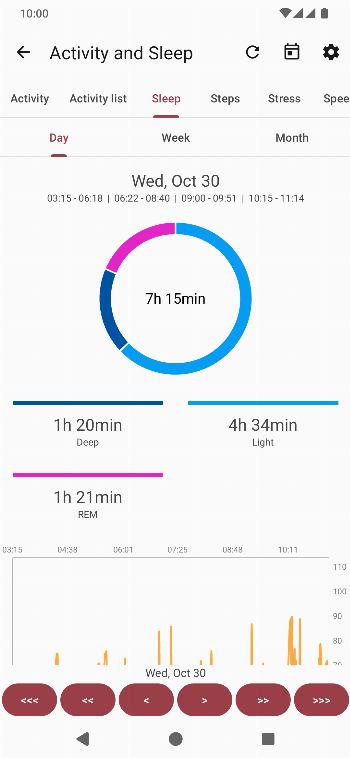
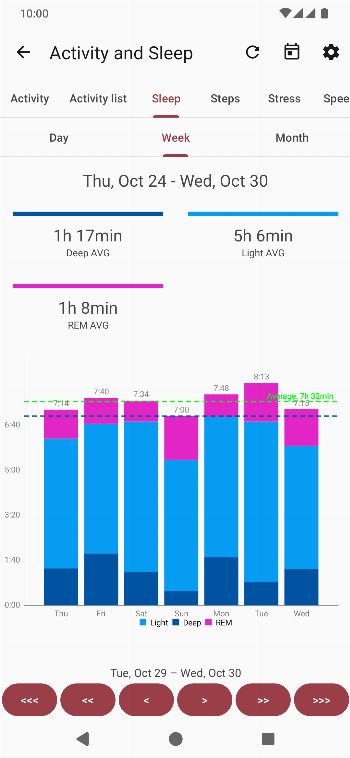
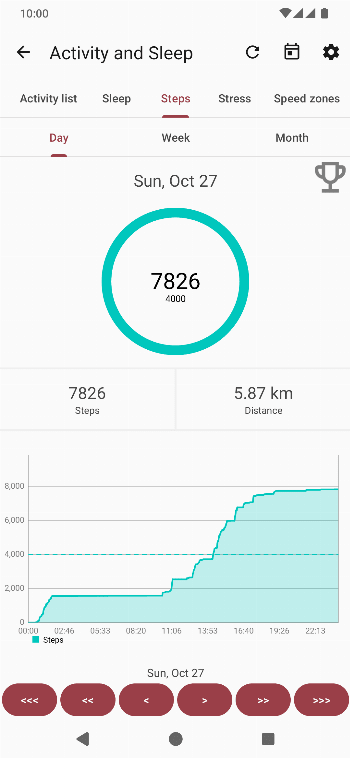
Introduction
Gadgetbridge is an open-source app that, in its README’s words, lets you “use your Bluetooth gadgets (mostly wearables like smart watches, but many more) without the vendor’s closed source application and without the need to create an account and transmit any of your data to the vendor’s servers.” It is developed by the Freeyourgadget community on Codeberg. It isn’t on Google Play: a maintainer explained that there is “no manpower to publish on Play store and to fight with their policies”. The version there, Bangle.js Gadgetbridge, is a separate edition with internet access.
What it works with
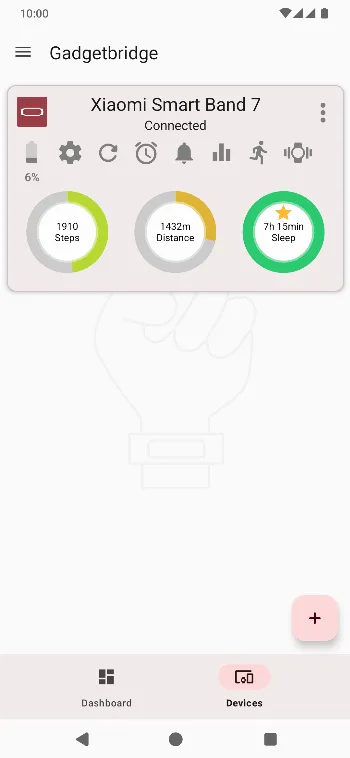
The project’s website listed 630 gadget models from 86 makers on 10 October 2026, among them 444 watches and bands from brands like Amazfit, Xiaomi, Huawei and Honor, Garmin, Fossil, Pebble, Casio, Polar and Withings, plus headphones, bike computers, smart rings, scales and more. Support varies by model: the site marks gadgets as working well, working partially or only pairing, so check yours on gadgetbridge.org before you rely on it.
Depending on the gadget, Gadgetbridge can:
- show your phone’s notifications, incoming calls and messages on your wrist, and reply from the gadget;
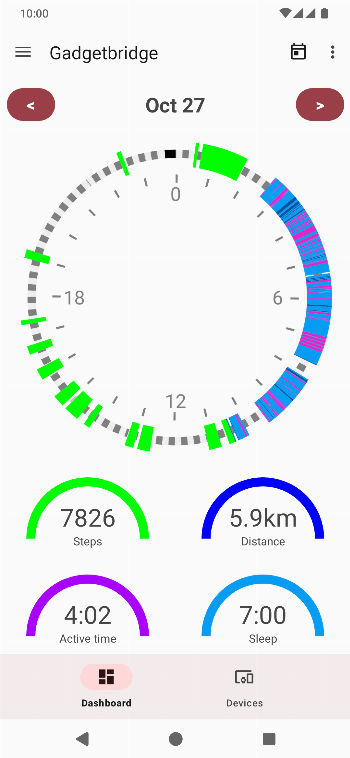
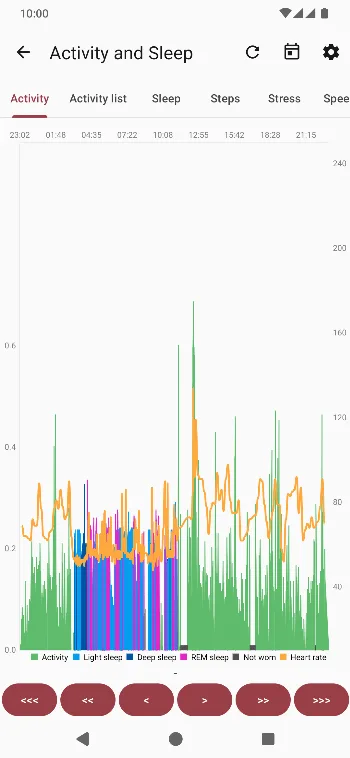
- collect steps, sleep, heart rate, stress, workouts and other sensor data, with charts and a dashboard;
- control music on the phone, show weather and navigation directions, take photos remotely and find your phone;
- install watch faces and firmware files that you provide.
Pairing, and when you still need the maker’s app
Many gadgets pair directly in Gadgetbridge. Some don’t: their makers encrypt the connection with a key negotiated through the maker’s servers. The pairing guide says it is “in most of these cases simply impossible to add your device to Gadgetbridge unless you provide a valid authentication key”, which you usually get by pairing once with the official app.
- Newer Xiaomi and Amazfit gadgets need that one-time pairing with the official app (see the questions below). A factory reset changes the gadget’s Bluetooth address, and you need a new key.
- Fossil Hybrid HR and Nothing CMF watches also need the official app once.
- Huawei and Honor watches “can be paired without the need for the official app”.
- Garmin watches pair directly, but weather and GPS-assistance updates on the watch expect credentials from Garmin; Gadgetbridge can send fake ones, with the warning not to enable this if you plan to use Garmin’s app, which may then need a factory reset.
Your data stays on the phone
Activity and health data go into a local database. You can export everything as a zip and import it again, export automatically on a schedule (the database, GPX tracks or FIT files), and sync to Health Connect, Android’s on-device health store; the documentation stresses that “no data is sent to external servers (even to Google) through this integration”. Home Assistant can read your steps from there. Other apps and scripts can control Gadgetbridge through an intent interface you switch on in the developer options.
What goes online
Nothing. Gadgetbridge declares no internet permission, and its build removes it even if one of its libraries asks for it. The documentation: “If it isn’t installed or allowed, nothing changes, Gadgetbridge remains absolutely offline”, referring to the one way to add internet access: the separate Internet Helper add-on app. With the add-on, you can allow things like the Pebble and Bangle.js app stores and internet access for watch apps; all of these are off by default.
Even then, the code blocks every request to Garmin’s servers, and answers a Garmin watch’s request for satellite data with a file you downloaded yourself. Weather comes from weather apps on the phone, and the map download option only opens a web page in your browser.
Permissions
There are 74, because Gadgetbridge takes over jobs the maker’s app would do:
- Bluetooth, and location, which Android requires for finding Bluetooth devices; in the background, because, as the documentation explains, the scan runs in a background task. Location also gives watches GPS data for workouts and sunrise and sunset times.
- Phone, SMS, contacts and calendar, to show who is calling or writing, reply and answer calls from the gadget, and copy calendar events to it.
- Camera for taking photos from the gadget, and do-not-disturb control.
- 24 Health Connect permissions, all for writing data to it, none for reading.
- Permissions defined by other apps, which do nothing unless those apps are installed: weather providers, CoMaps navigation, the Catima and FossWallet card wallets, Termux, and the Internet Helper.
About this file
- This is the developer’s own build of Gadgetbridge 0.95.1, from 9 October 2026, through IzzyOnDroid: the same file, byte for byte, as the APK on the project’s Codeberg releases, signed with the project’s key (certificate SHA-256
01cce931…bc7be). IzzyOnDroid’s checker confirms it can be rebuilt from source to the same file. - F-Droid publishes each version twice, once signed by the developer and once by F-Droid. This file updates installs signed by the developer; over F-Droid’s own signature, you have to uninstall first, so export your data before you do. F-Droid hadn’t published 0.95.1 yet when we checked.
- 0.95.1 only fixed build reproducibility. 0.95.0, a day earlier, added 15 new and 8 experimental devices, redesigned the charts, workout details and device list, and added blood pressure and hydration to Health Connect, among other changes.
- The 22.0 MB file runs on ARM and x86 phones and needs Android 6.0 or later. Our scan found no trackers.
- The screenshots are the project’s own, from October 2024, before the redesign in 0.95.0.
- Gadgetbridge is licensed under the AGPL-3.0; the project’s icons are mostly CC BY-SA 4.0. The source code for this version is at https://codeberg.org/Freeyourgadget/Gadgetbridge/src/tag/0.95.1.
What’s inside the APK
Trackers
No code matching the Exodus Privacy tracker signatures.
Native code
Runs on 64-bit and older 32-bit ARM phones.
Android versions
Built for Android 15 (target API 35).
Permissions
16 of them need your approval first.
CPU types in this build: arm64-v8a (64-bit ARM, almost every phone since 2017); armeabi-v7a (32-bit ARM, older and budget phones); x86 (32-bit Intel, emulators); x86_64 (64-bit Intel, emulators and Chromebooks).
Asks you first (16)
Android shows a prompt before the app can use these.
- Location while running in the background · ACCESS_BACKGROUND_LOCATION
- Approximate location · ACCESS_COARSE_LOCATION
- Precise location · ACCESS_FINE_LOCATION
- Answer incoming calls · ANSWER_PHONE_CALLS
- Connect to paired Bluetooth devices · BLUETOOTH_CONNECT
- Scan for Bluetooth devices · BLUETOOTH_SCAN
- Place phone calls directly · CALL_PHONE
- Use the camera · CAMERA
- Show notifications (Android 13+) · POST_NOTIFICATIONS
- Read calendar events · READ_CALENDAR
- Read the call log · READ_CALL_LOG
- Read your contacts · READ_CONTACTS
- Read shared storage (Android 12 and older) · READ_EXTERNAL_STORAGE
- Read phone status and identity · READ_PHONE_STATE
- Receive text messages · RECEIVE_SMS
- Send text messages · SEND_SMS
You switch these on in Settings (2)
Special app access. Nothing is granted until you turn it on yourself.
- Alarms and reminders · SCHEDULE_EXACT_ALARM
- Display over other apps · SYSTEM_ALERT_WINDOW
Granted at install (41)
Low-risk permissions Android grants automatically, plus any we have not classified.
- ACCESS_NETWORK_STATE
- ACCESS_NOTIFICATION_POLICY
- BLUETOOTH
- BLUETOOTH_ADMIN
- FOREGROUND_SERVICE
- FOREGROUND_SERVICE_CONNECTED_DEVICE
- FOREGROUND_SERVICE_DATA_SYNC
- FOREGROUND_SERVICE_SPECIAL_USE
- MEDIA_CONTENT_CONTROL
- PROCESS_OUTGOING_CALLS
- QUERY_ALL_PACKAGES
- RECEIVE_BOOT_COMPLETED
- REQUEST_COMPANION_RUN_IN_BACKGROUND
- REQUEST_IGNORE_BATTERY_OPTIMIZATIONS
- REQUEST_OBSERVE_COMPANION_DEVICE_PRESENCE
- VIBRATE
- WAKE_LOCK
- health.WRITE_ACTIVE_CALORIES_BURNED
- health.WRITE_BLOOD_GLUCOSE
- health.WRITE_BLOOD_PRESSURE
- health.WRITE_BODY_TEMPERATURE
- health.WRITE_CYCLING_PEDALING_CADENCE
- health.WRITE_DISTANCE
- health.WRITE_ELEVATION_GAINED
- health.WRITE_EXERCISE
- health.WRITE_EXERCISE_ROUTE
- health.WRITE_HEART_RATE
- health.WRITE_HEART_RATE_VARIABILITY
- health.WRITE_HYDRATION
- health.WRITE_OXYGEN_SATURATION
- health.WRITE_POWER
- health.WRITE_RESPIRATORY_RATE
- health.WRITE_RESTING_HEART_RATE
- health.WRITE_SKIN_TEMPERATURE
- health.WRITE_SLEEP
- health.WRITE_SPEED
- health.WRITE_STEPS
- health.WRITE_STEPS_CADENCE
- health.WRITE_TOTAL_CALORIES_BURNED
- health.WRITE_VO2_MAX
- health.WRITE_WEIGHT
Defined by other apps (15)
Permissions that belong to another app or to this app itself.
- app.comaps.fdroid.permission.READ_NAVIGATION_DATA
- app.comaps.google.permission.READ_NAVIGATION_DATA
- app.comaps.permission.READ_NAVIGATION_DATA
- com.termux.permission.RUN_COMMAND
- cyanogenmod.permission.ACCESS_WEATHER_MANAGER
- cyanogenmod.permission.READ_WEATHER
- lineageos.permission.ACCESS_WEATHER_MANAGER
- lineageos.permission.READ_WEATHER
- me.hackerchick.catima.READ_CARDS
- me.hackerchick.catima.debug.READ_CARDS
- nodomain.freeyourgadget.gadgetbridge.DYNAMIC_RECEIVER_NOT_EXPORTED_PERMISSION
- nodomain.freeyourgadget.internethelper.INTERNET
- nz.eloque.foss_wallet.READ_CARDS
- nz.eloque.foss_wallet.dev.READ_CARDS
- org.omnirom.omnijaws.READ_WEATHER
More Information
- Package name
- nodomain.freeyourgadget.gadgetbridge
- Version
- 0.95.1 (build 255)
- File size
- 22.0 MB (22,030,483 bytes)
- Requires
- Android 6.0 or later
- Category
- Network & Privacy
- License
- AGPL-3.0-only
- Developer
- Freeyourgadget
- Source code
- codeberg.org/Freeyourgadget/Gadgetbridge
- Released
- Oct 9, 2026
- Signer SHA-256
- 01cce9316fcb77ea02c6dea81fde9f3176469202c0cea0514c0e03cb969bc7be
- File SHA-256
- 187ce6606ad5fc8372e3f6da14686f6b3500dbab81a503f7be5afbda876e4050
- Checked
- , against the IzzyOnDroid index · how we check · verify it yourself
Common questions
Is this APK the official Gadgetbridge release?
Yes. It is the developer’s own release of Gadgetbridge 0.95.1, byte for byte as IzzyOnDroid distributes it. Its SHA-256 matches IzzyOnDroid’s signed index, and it is signed with the certificate IzzyOnDroid records for the app (SHA-256 01cce9316fcb77ea02c6dea81fde9f3176469202c0cea0514c0e03cb969bc7be).
What Android version does Gadgetbridge need?
Android 6.0 or later (API level 23). Version 0.95.1 is built for Android 15 (target API 35). Runs on 64-bit and older 32-bit ARM phones.
Can Gadgetbridge access the internet?
No. The APK doesn’t request Android’s internet permission, so the app can’t go online by itself. In total it declares 74 permissions, and 16 of them need your approval first.
Does Gadgetbridge contain trackers?
No known trackers: our scan of version 0.95.1 found no code matching the Exodus Privacy tracker signatures. The scan covers known tracker libraries; it doesn’t show what data the app itself sends.
Is Gadgetbridge open source?
Yes. Gadgetbridge is released under the AGPL-3.0-only licence, and its source code is published at https://codeberg.org/Freeyourgadget/Gadgetbridge.
Does Gadgetbridge send my health data anywhere?
Not by itself. The FAQ: Gadgetbridge “does not have (and will not have) Android network permission, which means that Gadgetbridge has no means of sending any data anywhere.” Data leaves the app only if you turn on Health Connect syncing, which stays on the phone, use an export, or install the separate Internet Helper add-on.
It asks for an authentication key for my Mi Band or Amazfit. What now?
Newer Xiaomi and Amazfit gadgets need a key that only the maker’s servers can issue: pair once with the official app (Zepp, Zepp Life or Mi Fitness), get the key, and enter it in Gadgetbridge with a 0x prefix. The project warns not to unpair the gadget in the official app afterwards, because that invalidates the key.
How do I get weather on my watch?
From a separate weather app. The documentation: “To display weather information on your gadget, you will need to install or/and configure a weather provider application”, such as Breezy Weather, QuickWeather or Tiny Weather Forecast Germany.
How do I move my data to a new phone?
Use Data management › Export zip, which makes a full backup, and Import zip in Gadgetbridge on the new phone; the import overwrites what is there. The project recommends importing with the same version that exported. Without an export, uninstalling loses your data.
Alternatives and related apps
-
 Breezy Weather A weather app that can send forecasts to Gadgetbridge, which gets weather for your watch only from apps like it.Download
-
 OsmAnd~ Offline navigation whose turn-by-turn directions Gadgetbridge can show on watches that support it.Download