KnoxPatch
by Salvo Giangreco · GPL-3.0-or-later · open source
Gets Samsung apps and features working again on a rooted Galaxy phone by hooking the checks that fail after rooting.
Needs:Samsung Galaxy · root + LSPosed
2113 Apps is independent, not affiliated with or endorsed by Salvo Giangreco. Official sources: source code on GitHub.
- Version
- 0.8.3
- Size
- 3.4 MB
- Requires
- Android 9+
- Updated
- 2026-06-25
Screenshots
Introduction
Rooting a Samsung Galaxy phone trips Knox, and a number of Samsung’s own apps and features stop working, because they check for a device state they consider untrusted. KnoxPatch is an LSPosed module that makes those checks pass again, so the affected Samsung apps work on a rooted device.
What it fixes
The README’s list for version 0.8.3:
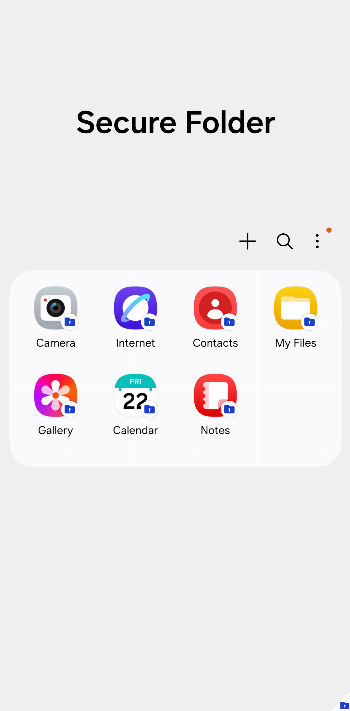
- Working: Auto Blocker, Samsung Cloud (Find My Mobile and Enhanced data protection), Samsung Flow, Samsung Health, Samsung Health Monitor, Secure Wi-Fi, SmartThings, Private Share, and Secure Folder, for which the Enhancer “might be required”.
- With an extra tool: the Galaxy Wearable apps and Smart View need the Enhancer; Samsung TV Plus needs TrickyStore.
- Not working: Samsung Pass and Samsung Wallet (Pay).
The README adds that on One UI 5.1 and older some features might also need Play Integrity Fix or a similar module. It lists Android 9 (One UI 1) to Android 16 (One UI 8) as supported; the code handles versions up to One UI 8.5 and does nothing on newer versions or on phones without One UI, writing “not yet supported” or “only supports One UI” in the LSPosed log.
How it works
KnoxPatch changes what the selected apps see, not the phone itself. From the code:
- To Samsung apps such as Secure Folder, Auto Blocker and SmartThings, it reports a locked bootloader, a “green” verified boot state and a warranty bit of 0.
- For apps that check integrity through Samsung’s keystore, such as Samsung Account, Samsung Cloud, SmartThings and Quick Share, it makes those checks pass.
- For a few apps, including Samsung Flow and Samsung Health Monitor, it hides root: it blocks the usual su paths and pretends that root apps such as Magisk aren’t installed.
- On the system side, it patches Secure Folder’s integrity checks, and it stops Samsung’s Knox Guard service from starting. Knox Guard is Samsung’s cloud service for locking devices remotely, used for example on phones bought on a payment plan.
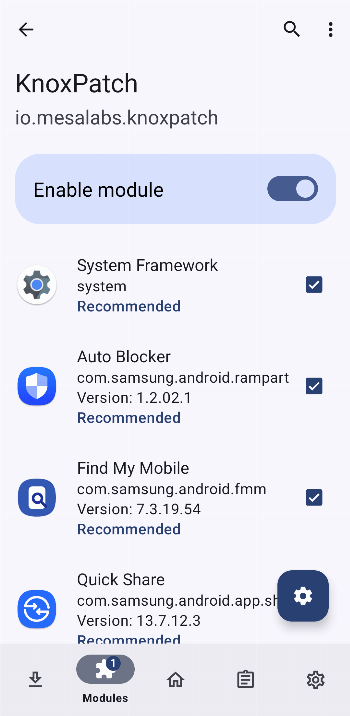
Which apps you select in LSPosed matters. The module recommends a list that depends on your Android version: from 7 apps on Android 9 to 16 on Android 13 and later, starting with the System Framework. As usual with LSPosed, a change to the System Framework scope takes effect after a reboot.
Two parts
- This module, for everything that can be fixed through the Xposed API.
- KnoxPatch Enhancer, a separate module, currently version 0.4, for what the Xposed side can’t reach. You install it as a zip from the project’s GitHub releases, or from IzzyOnDroid’s Magisk module repository, through the Magisk or KernelSU app (for the Galaxy Wearable apps and Smart View), or through a custom recovery (to fix Secure Folder on older phones with One UI 2 or 3 and file-based encryption).
What you need
- A rooted Samsung Galaxy device running Samsung’s One UI.
- LSPosed, since this is an LSPosed module with a classic Xposed entry point.
- Android 9 or newer, the minimum for this build.
- For some features, the KnoxPatch Enhancer module as well.
Before you root for this
Samsung’s documentation describes the Knox Warranty Bit as “a one-time programmable bit e-fuse” and says that once it is tripped, “Knox services won’t work on the device” and that fixing a Knox cloud service needs “a hardware replacement of the device’s Printed Board Assembly”. KnoxPatch works around the checks in individual apps; it can’t undo that, and it can’t make a rooted phone genuinely meet Samsung’s security requirements. Keep that in mind for anything involving payments or secured data.
About this file
- This is the developer’s own build of version 0.8.3, from June 2026, whose release notes say it fixes Secure Folder issues; the two releases before it added One UI 8.5 support.
- It has no internet permission, and no Android permissions at all apart from a private one most modern apps carry. Our scan found no trackers.
- The project is under the GPL-3.0. The Brazilian Portuguese translation covers about half of the app’s few strings.
What’s inside the APK
Trackers
No code matching the tracker signatures we check, including Exodus Privacy’s list and our published supplements.
Native code
Runs on 64-bit and older 32-bit ARM phones.
Android versions
Built for Android 16 (target API 36).
Permissions
0 of them need your approval first.
Xposed API. Built against the Xposed API. It needs an Xposed framework such as LSPosed, which in turn needs root. (de.robv.android.xposed.IXposedHookLoadPackage)
CPU types in this build: arm64-v8a (64-bit ARM, almost every phone since 2017); armeabi-v7a (32-bit ARM, older and budget phones); x86 (32-bit Intel, emulators); x86_64 (64-bit Intel, emulators and Chromebooks).
Defined by other apps (1)
Permissions that belong to another app or to this app itself.
- io.mesalabs.knoxpatch.DYNAMIC_RECEIVER_NOT_EXPORTED_PERMISSION
More Information
- Package name
- io.mesalabs.knoxpatch
- Version
- 0.8.3 (build 8003)
- File size
- 3.4 MB (3,364,844 bytes)
- Requires
- Android 9 or later
- Category
- Root & Mods
- License
- GPL-3.0-or-later
- Developer
- Salvo Giangreco
- Source code
- github.com/salvogiangri/KnoxPatch
- Released
- Jun 25, 2026
- Signer SHA-256
- 339fb64d24a6a8c1c7ab85b6059ff810eae3bd1481a3af51a08f08d658e9172d
- File SHA-256
- fff78f1c0a7aa3ed2a0db98cfba3d1a9f2f9f907ae045476da5d578cd9f87365
- Checked
- , against the IzzyOnDroid index · how we check · verify it yourself
Common questions
Is this APK the official KnoxPatch release?
Yes. It is the developer’s own release of KnoxPatch 0.8.3, byte for byte as IzzyOnDroid distributes it. Its SHA-256 matches IzzyOnDroid’s signed index, and it is signed with the certificate IzzyOnDroid records for the app (SHA-256 339fb64d24a6a8c1c7ab85b6059ff810eae3bd1481a3af51a08f08d658e9172d).
What Android version does KnoxPatch need?
Android 9 or later (API level 28). Version 0.8.3 is built for Android 16 (target API 36). Runs on 64-bit and older 32-bit ARM phones.
Can KnoxPatch access the internet?
No. The APK doesn’t request Android’s internet permission, so the app can’t go online by itself. In total it declares 1 permission, and none of them needs your approval first.
Does KnoxPatch contain trackers?
No known trackers: our scan of version 0.8.3 found no code matching the tracker signatures it checks. Those include Exodus Privacy’s list and the published local supplements described on How We Check; the scan doesn’t show what data the app itself sends.
Is KnoxPatch open source?
Yes. KnoxPatch is released under the GPL-3.0-or-later licence, and its source code is published at https://github.com/salvogiangri/KnoxPatch.
Can it get Samsung Wallet (Pay) or Samsung Pass working?
No. The README marks both as not supported. Samsung TV Plus also needs another tool, TrickyStore, and the Galaxy Wearable apps and Smart View need the KnoxPatch Enhancer module.
Can it restore the Knox warranty bit or my warranty?
No. Samsung’s own documentation says “a tripped Knox Warranty Bit can’t be reverted, and Knox services won’t work on the device”. KnoxPatch only makes the apps you select read the warranty bit as 0; the fuse in the hardware stays tripped.
The APK won’t install. What can I do?
This file is the standard build, which declares that it needs Samsung’s com.samsung.device system library, so Android won’t install it on a phone without that library. If it fails on a Galaxy phone, the release notes suggest trying the project’s “sep-lite” APK from its GitHub releases instead.
I installed it, but there’s no icon. Where is it?
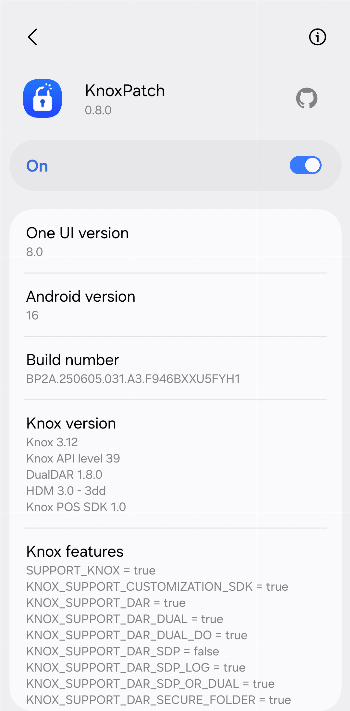
It has no launcher icon. Open it from LSPosed, in the module’s settings, to see its information screen with your One UI, Android and Knox versions.
Recent releases
| Version | Released | Size | Requires |
|---|---|---|---|
| v0.8.3 · this download | Jun 25, 2026 | 3.4 MB | Android 9+ |
| v0.8.2 | Mar 23, 2026 | 3.4 MB | Android 9+ |
| v0.8.1 | Nov 16, 2025 | 4.3 MB | Android 9+ |
Versions currently kept in the IzzyOnDroid repository. We host and check only the newest one. Full changelog.