Universal Installer
by Pass With High Score · GPL-3.0-only · open source
An open-source installer for APK files and split-APK bundles, with optional silent installs through Shizuku or root, OBB game data placement, and an update tracker for apps from GitHub and F-Droid.
Needs:Android 7.0+ · Shizuku or root optional
2113 Apps is independent, not affiliated with or endorsed by Pass With High Score. Official sources: universal-installer.pwhs.app · source code on GitHub.
- Version
- 1.21.0
- Size
- 7.3 MB
- Requires
- Android 7.0+
- Updated
- 2026-11-01
Screenshots
Introduction
Universal Installer is an installer and package manager by Nguyen Quang Minh, who publishes as PWHS. Its first public release came out in April 2026, and versions followed every few days until September; 1.19.0 came a month after 1.18.0, in October, and 1.20.0 six days later. It installs ordinary APK files and the split-APK bundles that download sites use, and it can do so silently through Shizuku or root. It also has an uninstaller, a tracker for app updates and a way to send files to an Android TV on your network. We read the source code of version 1.18.0 for this page and checked the changes through 1.21.0. Version 1.20.0 added package details and installation troubleshooting; version 1.21.0 adds local installation statistics and milestones, a guided VirusTotal setup, persistent install-progress notifications, and more specific installation-error guidance, including for HyperOS. Its Android 16 AppFunctions let an AI agent that the system authorizes read the installed-app list and installation or download history, and open an app’s uninstall screen.
What it installs
- Single APKs, and bundles:
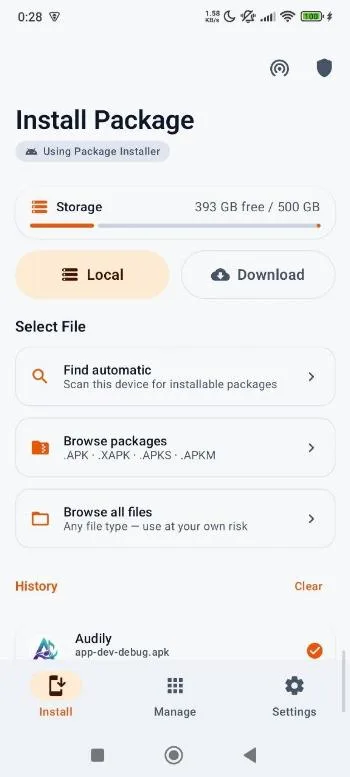
.apks,.xapk,.apkmand.apk+, plus ordinary.zipfiles holding split APKs. Several loose split APKs can also be combined into one install. - Only the parts your phone needs. For a bundle it pre-selects the splits for your phone’s processor, its screen density, and the languages in your settings plus English. You can change the selection before installing.
- OBB game data. It finds
.obbfiles in a bundle and copies them toAndroid/obb/<package name>/once the app has installed. Android 11 and later block that folder for most apps, so when a direct copy fails it tries Shizuku, then asks you to grant the folder in Android’s file picker. - APKM files are read as ordinary ZIP archives. We found no code for the encrypted
.apkmfiles APKMirror used to publish; according to App Manager’s changelog, APKMirror has since stopped encrypting them.
For what these formats are and why “App not installed” appears, see our guide to XAPK, APKS and APKM files.
Ways to install
- Standard: Android’s normal installer, which shows its confirmation for each app. The first time, Android asks you to allow Universal Installer to install unknown apps.
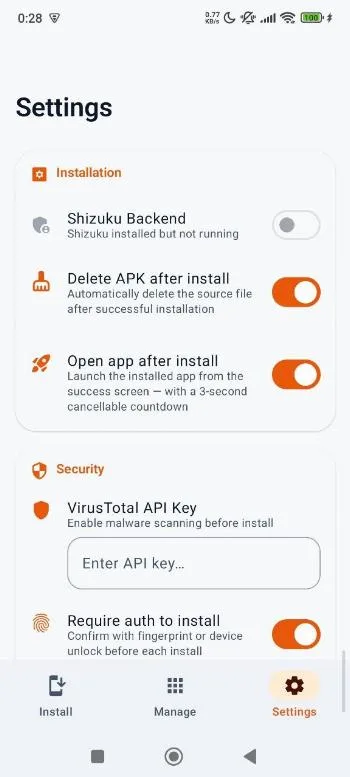
- Shizuku: installs without a prompt (since 1.19.0 also through Porter, an app that offers the same interface, and in a combined mode that falls back to Dhizuku), with options that are all off by default except replacing an existing app: allow downgrade, grant all requested permissions, install for all users, allow test-only apps, and bypass Android 14’s block on apps with a very old target SDK.
- Root: the same kind of options through
pm install. Shizuku and root can also install into a work profile or another user. - Dhizuku: uses device owner rights instead of a shell, so it needs a phone where Dhizuku has been made device owner; it offers only the downgrade option.
- Custom and microG: a shell command template of your own, or handing the file to microG’s companion app.
An option to make apps appear as installed by another store, Google Play by default, is available in the Shizuku and root modes and off unless you turn it on.
Checks before installing
- Signature. It compares the new file’s signing certificate with the installed app’s and warns about a mismatch, which, as the code notes, Android itself reports only as a generic conflict. Certificates rotated by the developer count as a match.
- Downgrade. It warns when the file is older than the installed version.
- Trackers. It scans the app’s code against a list of tracker signatures from Exodus Privacy that ships inside the app, so this works offline. Since 1.19.0 an option, off by default, stops prompt-free installs of apps in which it finds trackers.
- VirusTotal, only if you enter your own free API key. Then it looks up each package’s SHA-256 hash automatically when you open it, and uploads the file itself only when you tap scan (for files up to 650 megabytes).
What it connects to
From our reading of the code, the copy here makes no network requests by itself when it starts. It goes online for:
- VirusTotal, as above, and only with your key.
- Updates. The Updates tab tracks apps you add from GitHub, GitLab, Codeberg or F-Droid, by asking those sites for their latest releases. The first time you open it, it adds Universal Installer itself to the list and checks GitHub.
- Downloads from a link you paste, saved to
Download/UniversalInstaller. - Sync & Share, a web server on your local network that you switch on, for fetching files from another device such as a TV.
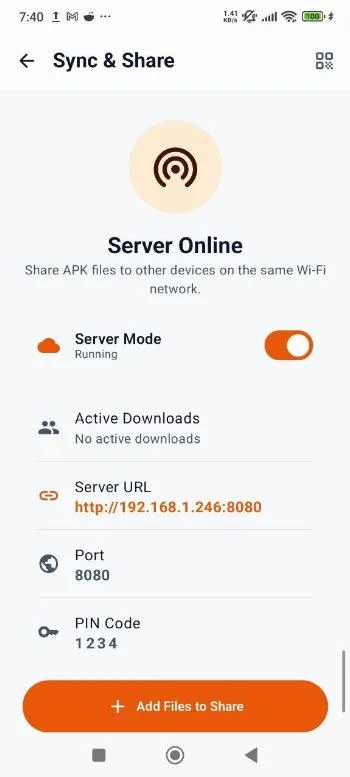
About Sync & Share: it serves the packages in Download/UniversalInstaller over plain HTTP on port 8080 and asks for a PIN, 1234 if you don’t set one. In our reading of the source through 1.21.0, the PIN check can be bypassed by another device on the same network, so treat anything in that folder as visible to everyone on the network while the server is on, and switch it off when you’re done. It serves only that folder.
The developer’s privacy policy says the GitHub build sends “nothing. It creates no account, transmits no usage statistics, and reports no crashes”, which matches the open-source flavour we host. Version 1.21.0 adds analytics event calls for its new statistics screen and other actions, but that flavour binds them to a no-op sink and includes neither Firebase Analytics nor Crashlytics. The policy lists VirusTotal and local sharing as features that use the network, used “only when you explicitly trigger them”. Two differences in the code remain: the update tracker and link downloads go online too after you open or use them, and once a VirusTotal key is set, the hash lookup runs whenever you open a package, not only when you ask for a scan.
The permissions it asks for
Universal Installer declares 23 permissions; the one added in 1.19.0 is for talking to Porter. The less obvious ones, as the manifest and code explain them:
- Query all packages: to list every installed app, including ones without a launcher icon, and to tell an update from a new install.
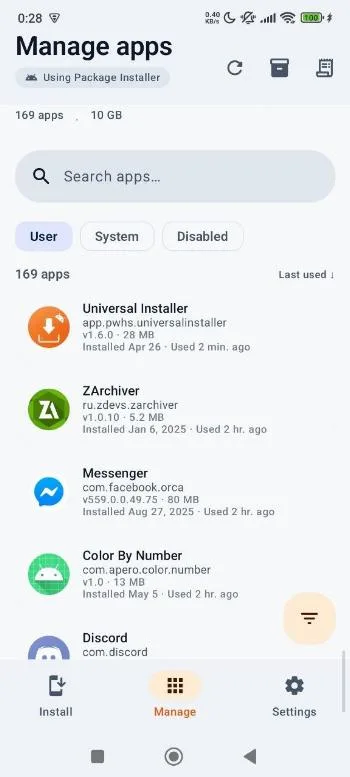
- Usage access: only for sorting the uninstall list by last use; you grant it in Android’s settings.
- All-files access: for its automatic scan of your storage for packages.
- Camera: the QR scanner for pairing with a TV.
- Fingerprint and biometrics: an optional lock before installing or uninstalling. The code calls it “best-effort UX, not a security boundary”.
About this file
- This is the developer’s own build of version 1.21.0, the phone version (
app-release.apk), signed by the developer (CN=Minh, O=PWHS). It is the same file as on the project’s GitHub releases and on IzzyOnDroid. The GitHub release also has separate Android TV and Wear OS builds; this is the phone build. - The project builds a separate Google Play version, published by NQM Innovation Lab, which according to the build files includes Firebase Analytics and Crashlytics; the build here has neither. We haven’t verified which key signs the Play version, so don’t count on one updating the other.
- The 7.3 MB file runs on ARM and x86, 32- and 64-bit, from Android 7.0. Our scan found no trackers. It contains the Shizuku and libsu (root) libraries for the privileged modes.
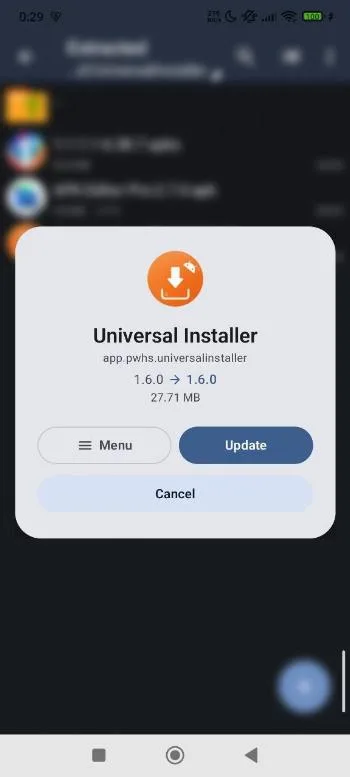
- The screenshots come from the project’s store listing and show version 1.6.0, before the Updates tab was added.
- It is licensed under the GPL-3.0.
What’s inside the APK
Trackers
No code matching the Exodus Privacy tracker signatures.
Native code
Runs on 64-bit and older 32-bit ARM phones.
Android versions
Built for Android 16 (target API 36).
Permissions
4 of them need your approval first.
Shizuku API. Uses the Shizuku API, so it can do ADB-level work without root once Shizuku is running. (rikka.shizuku.ShizukuProvider)
libsu (root shell). Bundles libsu, a library for running commands in a root shell. (com.topjohnwu.superuser.CallbackList)
CPU types in this build: arm64-v8a (64-bit ARM, almost every phone since 2017); armeabi-v7a (32-bit ARM, older and budget phones); x86 (32-bit Intel, emulators); x86_64 (64-bit Intel, emulators and Chromebooks).
Asks you first (4)
Android shows a prompt before the app can use these.
- Use the camera · CAMERA
- Show notifications (Android 13+) · POST_NOTIFICATIONS
- Read shared storage (Android 12 and older) · READ_EXTERNAL_STORAGE
- Write shared storage (Android 10 and older) · WRITE_EXTERNAL_STORAGE
You switch these on in Settings (3)
Special app access. Nothing is granted until you turn it on yourself.
- All files access · MANAGE_EXTERNAL_STORAGE
- Usage access · PACKAGE_USAGE_STATS
- Install unknown apps · REQUEST_INSTALL_PACKAGES
Granted at install (12)
Low-risk permissions Android grants automatically, plus any we have not classified.
- ACCESS_NETWORK_STATE
- ACCESS_WIFI_STATE
- FOREGROUND_SERVICE
- FOREGROUND_SERVICE_DATA_SYNC
- INTERNET
- QUERY_ALL_PACKAGES
- RECEIVE_BOOT_COMPLETED
- REQUEST_DELETE_PACKAGES
- USE_BIOMETRIC
- USE_FINGERPRINT
- VIBRATE
- WAKE_LOCK
Defined by other apps (4)
Permissions that belong to another app or to this app itself.
- app.pwhs.universalinstaller.DYNAMIC_RECEIVER_NOT_EXPORTED_PERMISSION
- com.rosan.dhizuku.permission.API
- eu.darken.porter.permission.API
- moe.shizuku.manager.permission.API_V23
More Information
- Package name
- app.pwhs.universalinstaller
- Version
- 1.21.0 (build 45)
- File size
- 7.3 MB (7,279,841 bytes)
- Requires
- Android 7.0 or later
- Category
- System Tools
- License
- GPL-3.0-only
- Developer
- Pass With High Score
- Released
- Nov 1, 2026
- Signer SHA-256
- 40e1d86c6228809e07857a62edcf72952fea664e715317920150b937ef75f5de
- File SHA-256
- 172ae8d1d84fee46cb0993257a950657c5ddadb2e9a8a2e0410aabf349c42a07
- Checked
- , against the IzzyOnDroid index · how we check · verify it yourself
Common questions
Is this APK the official Universal Installer release?
Yes. It is the developer’s own release of Universal Installer 1.21.0, byte for byte as IzzyOnDroid distributes it. Its SHA-256 matches IzzyOnDroid’s signed index, and it is signed with the certificate IzzyOnDroid records for the app (SHA-256 40e1d86c6228809e07857a62edcf72952fea664e715317920150b937ef75f5de).
What Android version does Universal Installer need?
Android 7.0 or later (API level 24). Version 1.21.0 is built for Android 16 (target API 36). Runs on 64-bit and older 32-bit ARM phones.
Can Universal Installer access the internet?
Yes. The APK requests Android’s internet permission. In total it declares 23 permissions, and 4 of them need your approval first.
Does Universal Installer contain trackers?
No known trackers: our scan of version 1.21.0 found no code matching the Exodus Privacy tracker signatures. The scan covers known tracker libraries; it doesn’t show what data the app itself sends.
Is Universal Installer open source?
Yes. Universal Installer is released under the GPL-3.0-only licence, and its source code is published at https://github.com/pass-with-high-score/universal-installer.
Why does Android still ask me to confirm every install?
In the default mode Universal Installer hands the files to Android’s own installer, which asks you each time. Installing without a prompt needs one of the privileged modes: Shizuku, root, or Dhizuku. Through Dhizuku, installs are silent only when Dhizuku holds device owner rights; the developer explains that in profile owner mode “Android restricts silent installs”.
Does Shizuku mode still ask for “Install unknown apps” when I share a file to it?
Not since 1.19.0, from October 2026, once Shizuku is running. Version 1.18.0 checked that permission even in Shizuku mode; a user reported it (issue #156), and the fix skips the check in the root and custom modes, and in the Shizuku, Dhizuku and microG modes once that service is ready. The standard mode still needs the permission, because it hands the file to Android’s own installer.
Can it downgrade an app?
Only in the Shizuku, root and Dhizuku modes, where there is a downgrade option that is off by default. The signature check still applies: Android won’t replace an app with one signed by a different key, and Universal Installer warns before trying. Whether Android accepts a downgrade can also depend on the Android version and the app.
Recent releases
| Version | Released | Size | Requires |
|---|---|---|---|
| v1.21.0 · this download | Nov 1, 2026 | 7.3 MB | Android 7.0+ |
| v1.20.0 | Oct 25, 2026 | 7.0 MB | Android 7.0+ |
| v1.19.0 | Oct 19, 2026 | 6.9 MB | Android 7.0+ |
Versions currently kept in the IzzyOnDroid repository. We host and check only the newest one. Full changelog.
Alternatives and related apps
-
 App Manager Also installs APKS, APKM and XAPK files with OBB data, without root, and manages installed apps in far more depth.Download
-
 Install with Options A smaller Shizuku-based installer built around install options such as test-only apps and Android 14’s target SDK block.Download