FPS Meter
by rdevz-ph · MIT · open source
Overlay frame pace, temperatures, memory and battery data on a game, and use Shizuku when you need SurfaceFlinger compositor timing instead of display-vsync pace.
Needs:Android 8.0+ · overlay access · Shizuku for real game FPS
2113 Apps is independent, not affiliated with or endorsed by rdevz-ph. Official sources: rdevz-ph.github.io · source code on GitHub.
- Version
- 3.0
- Size
- 1.8 MB
- Requires
- Android 8.0+
- Updated
- 2026-10-22
Screenshots
Introduction
FPS Meter is an open-source overlay for watching Android performance while another app or game is on screen. It can show frame rate and frame time alongside battery level, RAM and available temperature readings, save summary statistics for a session and place controls in a floating bubble or Quick Settings tile.
This page covers F-Droid’s 3.0 source build. We matched its 1.8 MB APK to F-Droid’s signed index, confirmed its Shizuku provider and read the fixed v3.0 source and known-limitations document. We did not compare its numbers with external hardware on a physical phone, so this is not a calibration test.
Display pace versus real game frames
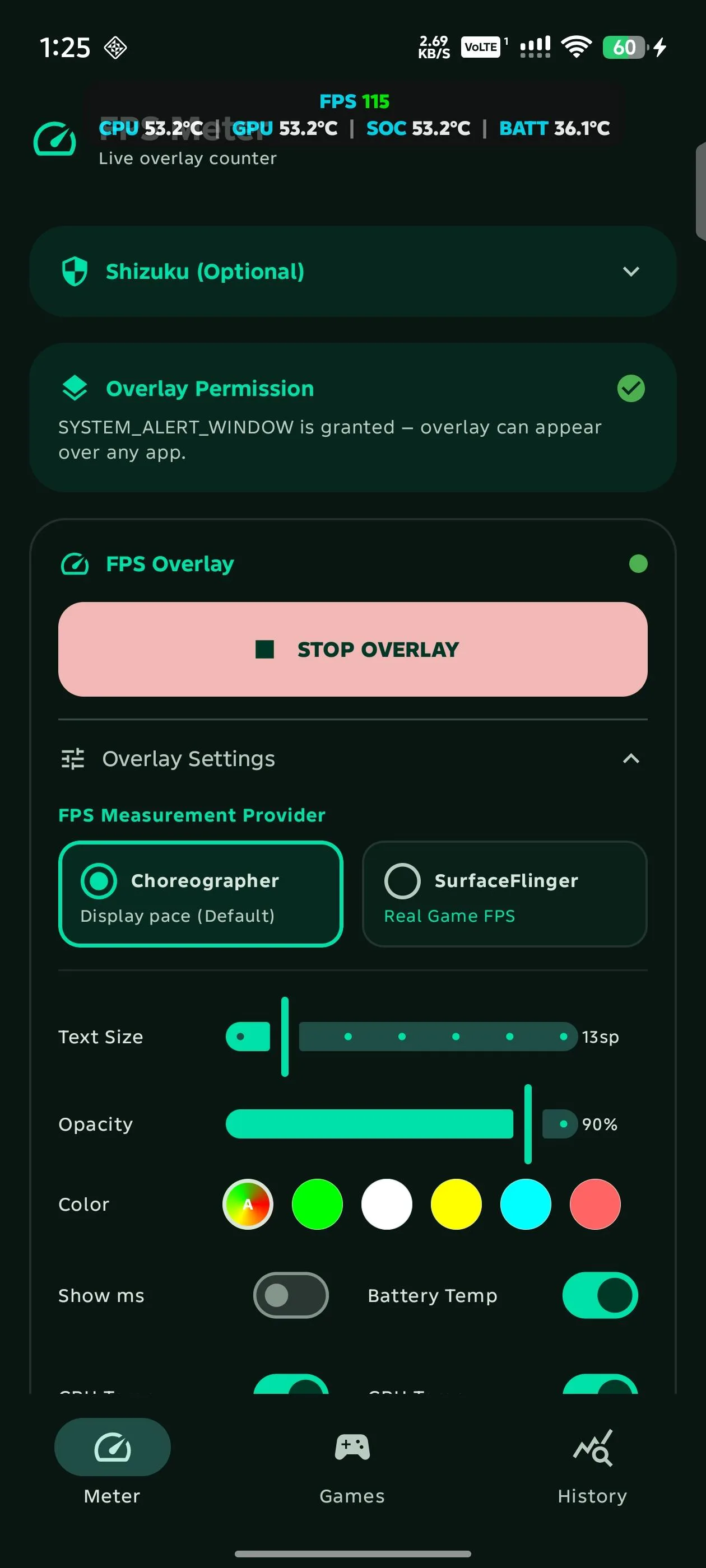
FPS Meter has two measurement providers, and their difference is essential:
- Choreographer, the default, samples Android’s display-vsync callbacks with very little overhead. The interface calls this “Display pace”. It can indicate the screen cadence but does not inspect the target game’s own frame buffers.
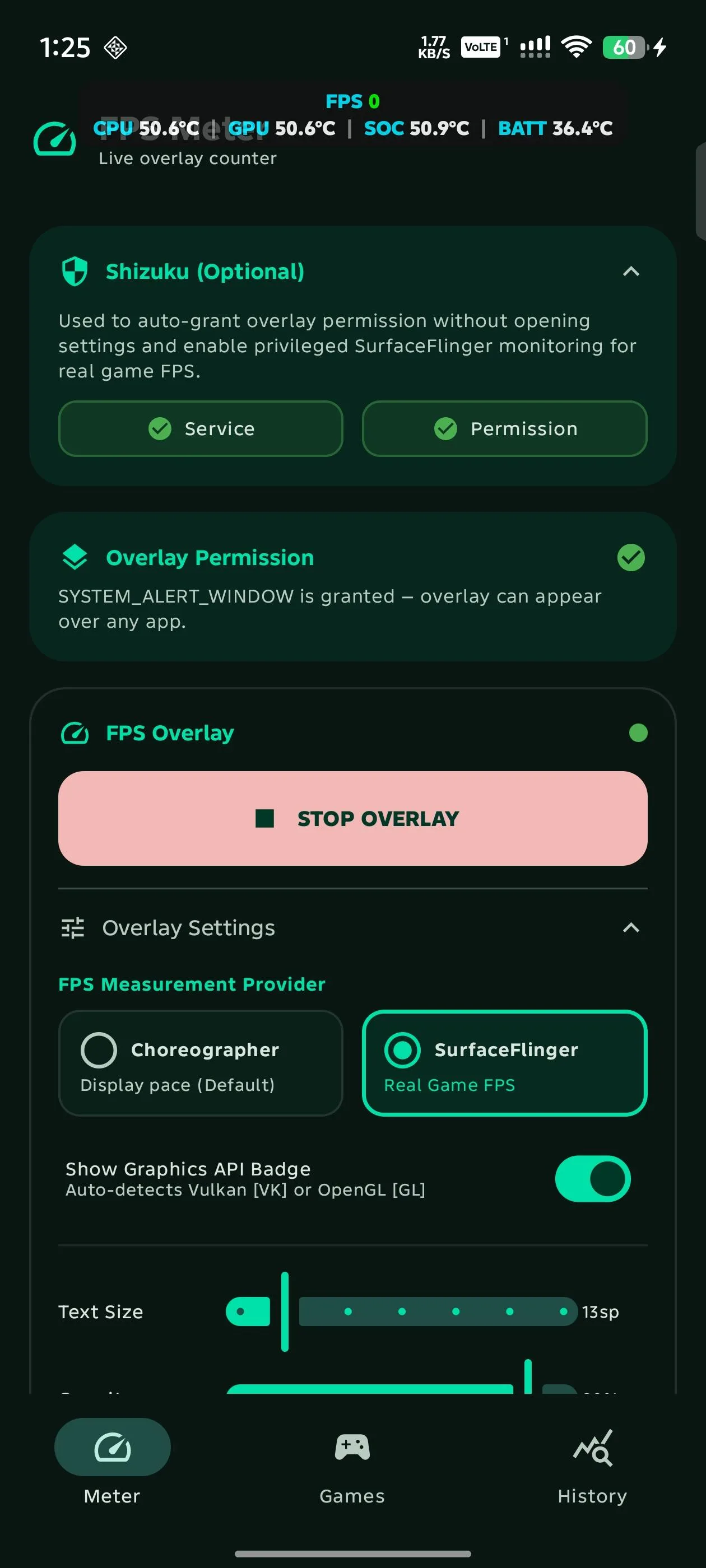
- SurfaceFlinger runs privileged shell commands through Shizuku, finds the active rendering layer and primarily reads presentation timing from Android’s compositor. When that column is unavailable it can use frame-ready timing or the layer’s frame counter instead. The app labels this “Real Game FPS” and also attempts to identify Vulkan or OpenGL ES; an undetected API is displayed as GL rather than “unknown”.
If Shizuku is not running when the overlay starts, disconnects later, or the collector reaches three uncaught errors in a row, the overlay silently falls back to Choreographer. The main settings card does turn grey and show “Requires Shizuku” while the service is unavailable, but an overlay already on screen and its saved or shared sessions do not label the fallback; only a log message records it. Most parsing failures instead produce 0 FPS. Shizuku reconnecting does not switch an existing overlay back, so stop and reopen it after the service returns.
Overlay, sessions and automatic start
The overlay can be dragged or snapped to six screen positions. Metrics can use a compact pill or version 3.0’s new multi-row, RTSS-style layout. Its rows are controlled by individual settings; an enabled metric that cannot be read shows --. The displayed frame time is calculated as 1000 divided by FPS, while “minimum FPS” is the lowest one-second average rather than the slowest single frame.
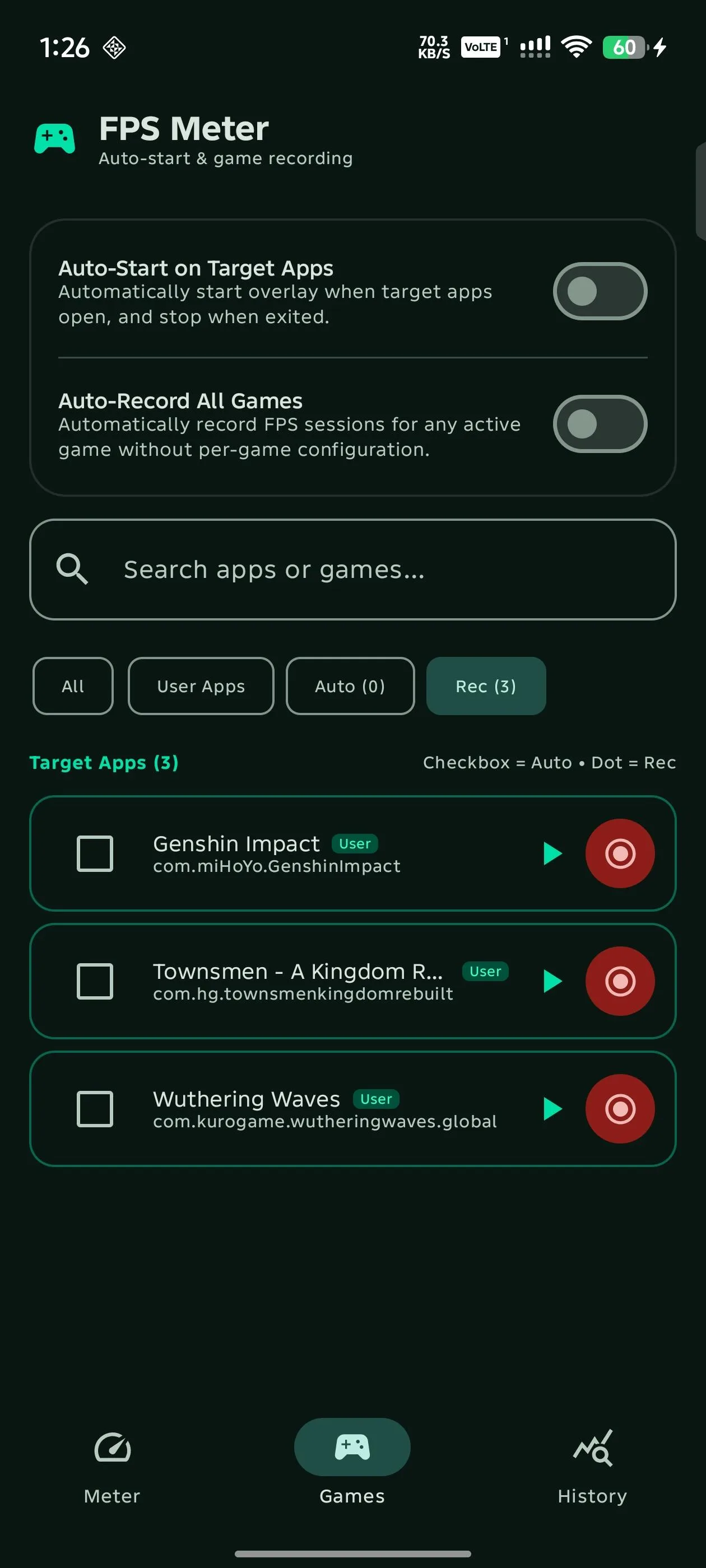
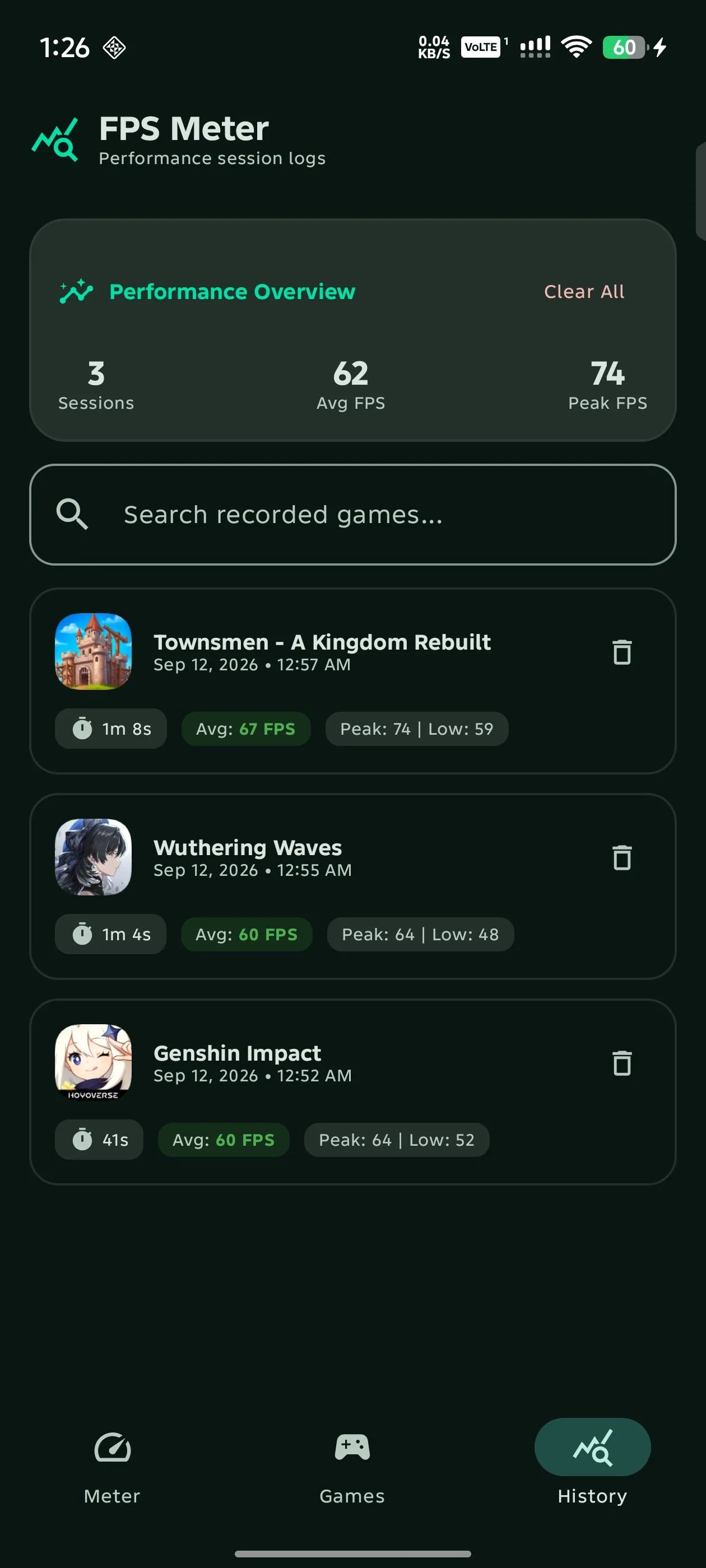
The Games screen can launch selected apps and record average, minimum and maximum FPS plus duration. History and summary cards are stored locally rather than saving every raw sample. A floating control bubble can start or stop recording and hide the HUD without leaving the game.
Automatic start is optional and uses an Accessibility Service to notice foreground app changes. The project sets that service not to retrieve window content, but it still has powerful accessibility access. Its “Via Shizuku” setup writes Android’s enabled-accessibility-services setting directly: it preserves other listed services, but turns the global accessibility switch off for roughly one second while applying the change, bypassing Android’s normal restricted-setting approval screen. Manufacturer game sidebars and aggressive background management can still confuse or kill the service; upstream documents filters and a force-stop/re-enable recovery flow rather than claiming universal reliability.
Hardware readings and privacy
Battery temperature and charge come from Android’s battery broadcast. With Shizuku, the app also queries the thermal service and device-specific Linux thermal zones for CPU, GPU and SoC temperatures. Names and availability differ widely across Snapdragon, MediaTek, Exynos and other devices. Version 3.0 has no code for GPU or RAM clock frequencies, and root-only files remain unavailable because FPS Meter is designed for non-root use.
The APK declares seven permissions for a foreground overlay service, notifications, special overlay access and Shizuku; one is Android’s automatically generated receiver permission rather than a user-facing capability. It has no internet permission, and our static scan found no known tracker SDKs. Session history, configured games and diagnostic readings remain local unless you deliberately share a generated scorecard or diagnostic report through another app. The manifest allows Android backup and ships empty backup-rule templates, so those local settings and records may also enter a system backup.
About this file
- This is F-Droid’s source build of 3.0, signed with F-Droid’s key.
- The 1.8 MB APK needs Android 8.0 or later and includes native libraries for 32- and 64-bit ARM and x86.
- Its measured SHA-256 is
54f4be6d08dce30249686e51f60a74c1f8c2920a0c1965cef67780805d34337d, matching F-Droid’s signed index. - It has no internet permission; our scan found the Shizuku API and no known tracker SDKs.
- FPS Meter is licensed under MIT. Shizuku is optional for the basic display-pacing overlay but required for its SurfaceFlinger game-FPS mode and privileged hardware readings.
What’s inside the APK
Trackers
No code matching the Exodus Privacy tracker signatures.
Native code
Runs on 64-bit and older 32-bit ARM phones.
Android versions
Built for Android 16 (target API 36).
Permissions
1 of them need your approval first.
Shizuku API. Uses the Shizuku API, so it can do ADB-level work without root once Shizuku is running. (rikka.shizuku.Shizuku$1)
CPU types in this build: arm64-v8a (64-bit ARM, almost every phone since 2017); armeabi-v7a (32-bit ARM, older and budget phones); x86 (32-bit Intel, emulators); x86_64 (64-bit Intel, emulators and Chromebooks).
Asks you first (1)
Android shows a prompt before the app can use these.
- Show notifications (Android 13+) · POST_NOTIFICATIONS
You switch these on in Settings (1)
Special app access. Nothing is granted until you turn it on yourself.
- Display over other apps · SYSTEM_ALERT_WINDOW
Granted at install (2)
Low-risk permissions Android grants automatically, plus any we have not classified.
- FOREGROUND_SERVICE
- FOREGROUND_SERVICE_SPECIAL_USE
Defined by other apps (3)
Permissions that belong to another app or to this app itself.
- com.rdevzph.fpsmeter.DYNAMIC_RECEIVER_NOT_EXPORTED_PERMISSION
- moe.shizuku.api.permission.SHIZUKU
- moe.shizuku.manager.permission.API_V23
More Information
- Package name
- com.rdevzph.fpsmeter
- Version
- 3.0 (build 22)
- File size
- 1.8 MB (1,836,060 bytes)
- Requires
- Android 8.0 or later
- Category
- Game Tools
- License
- MIT
- Developer
- rdevz-ph
- Source code
- github.com/rdevz-ph/FPS-Meter-Android
- Released
- Oct 22, 2026
- Signed by
- F-Droid, which built this APK from the published source code. Because the key is F-Droid’s, it won’t install over a copy from Google Play or GitHub (or the other way round) without uninstalling first.
- Signer SHA-256
- a7eb48222821c4074908d289c46e9737b0942148a686076b1549da0f6ed48006
- File SHA-256
- 54f4be6d08dce30249686e51f60a74c1f8c2920a0c1965cef67780805d34337d
- Checked
- , against the F-Droid index · how we check · verify it yourself
Common questions
Is this APK the official FPS Meter release?
It is F-Droid’s build rather than the developer’s own: F-Droid compiled FPS Meter 3.0 from the published source code and signed it with its own key. Its SHA-256 matches F-Droid’s signed index. Because the key is F-Droid’s, it won’t install over a copy from Google Play or GitHub without uninstalling first.
What Android version does FPS Meter need?
Android 8.0 or later (API level 26). Version 3.0 is built for Android 16 (target API 36). Runs on 64-bit and older 32-bit ARM phones.
Can FPS Meter access the internet?
No. The APK doesn’t request Android’s internet permission, so the app can’t go online by itself. In total it declares 7 permissions, and 1 of them needs your approval first.
Does FPS Meter contain trackers?
No known trackers: our scan of version 3.0 found no code matching the Exodus Privacy tracker signatures. The scan covers known tracker libraries; it doesn’t show what data the app itself sends.
Is FPS Meter open source?
Yes. FPS Meter is released under the MIT licence, and its source code is published at https://github.com/rdevz-ph/FPS-Meter-Android.
Does FPS Meter show a game’s real FPS without Shizuku?
Not through its default Choreographer provider. That mode samples Android’s display-vsync pace. The Shizuku-backed SurfaceFlinger provider primarily uses presentation timing from the active layer, with other compositor counters as fallbacks, so it is closer to game output but still depends on finding the right layer.
Why are some temperatures blank, and where are GPU or RAM clock speeds?
Sensor names and permissions vary by chipset and phone maker, so thermal rows may show no value. Version 3.0 does not implement GPU or RAM frequency readings at all; its hardware rows cover the metrics the source actually collects, not every label commonly shown by rooted performance tools.
Recent releases
| Version | Released | Size | Requires |
|---|---|---|---|
| v3.0 · this download | Oct 22, 2026 | 1.8 MB | Android 8.0+ |
| v2.9-hotfix | Oct 16, 2026 | 1.8 MB | Android 8.0+ |
| v2.8-beta | Oct 14, 2026 | 1.8 MB | Android 8.0+ |
Versions currently kept in the F-Droid repository. We host and check only the newest one. Full changelog.